
Visual semantics is the meaning a search engine reads from a page’s layout, blocks, and components, alongside its text.
Google extracts a primary content block, called the centerpiece annotation, from HTML structure before it evaluates the rest of the page.
Google holds a patent on an encoder that reads pages block by block and scores block order and image fit.
A page that fails the cheap layout pass never reaches the expensive ranking systems, whatever its text says.
The rules below turn those facts into a build checklist for any page type.
Most SEO work stops at words. Google stopped there years ago. A page is letters, pixels, and bytes, and Google reads all three. Here is what that means for the pages you build, with the evidence behind each rule.
What is visual semantics in SEO?
Visual semantics is a meaning model that segments, classifies, and understands a page by its layout, working alongside textual semantics. Koray Tuğberk Gübür introduced the term in a July 2026 article for Search Engine Land. The model has three parts. Blocks are the visually separable units on a page. The centerpiece is the block that carries the page’s purpose. Function is the task the page lets a user complete.
Textual semantics answers one question: what is this page about?
Visual semantics answers a second: where on the page does each meaning live, and what does the page do?
Google needs both answers to rank a page cheaply.
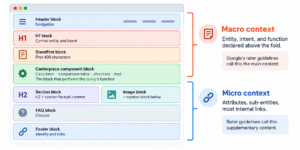
A page as Google segments it: typed blocks in vertical order, with the macro context above the fold and the micro context below it. Each block carries one meaning.
Why does Google read layout and not only text?
Google reads layout because layout is cheaper to evaluate than text at scale. Search engines weigh quality against cost on every page. A page that costs more to understand than its quality justifies loses to a cheaper alternative. Layout classification answers the first questions fast: what type of page is this, where is the main content, and what does the page do.
What is the cost of retrieval?
Cost of retrieval is the compute a search engine spends to crawl, render, segment, extract, and evaluate a page. Every wrapper element adds a node to resolve. Every share button inside the main content adds contextless tokens. Every page without a distinct purpose adds a document to rank.
Koray Gübür states the principle in one line: the cost of ranking a site cannot exceed the cost of not ranking it.
What did the DOJ trial reveal about cheap signals?
Pandu Nayak testified that Google runs its expensive ranking systems only on a shortlist. Core topicality, PageRank, and localization signals cut tens of thousands of candidates to a few hundred. RankBrain then runs on the top 20 or 30 because it costs more than other components. Nayak also said many documents have no click data at all. New pages live or die on the cheap pass, and the cheap pass reads structure.
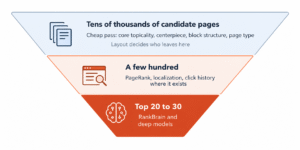
The ranking funnel as described in Nayak’s DOJ testimony. Expensive systems see only the shortlist. A page with a broken centerpiece is filtered before any deep model reads its text.
What is the centerpiece annotation?
The centerpiece annotation is Google’s label for the primary content block of a page. Martin Splitt of Google described it publicly in 2021. Google reads the HTML structure, runs language processing, identifies the primary topic, and weights supplementary blocks and boilerplate lower. DOJ exhibits later showed the extracted centerpiece text for news articles. The extracted window ran to about 400 characters.
How does boilerplate break the centerpiece?
Boilerplate inside the primary block enters the centerpiece as contextless words. The DOJ exhibits include news pages whose extracted centerpiece opens with share-button labels, because the share bar sat under the headline in the code. Other exhibits show a clean extraction: standfirst, then first paragraph, with the share icons excluded. Same page type, different DOM order, different result. The same failure appears on service pages every week, and Figure 3 shows it on a semantic SEO audit page.
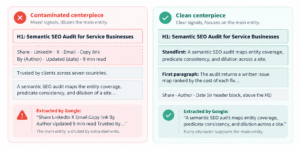
The two extraction outcomes shown in the DOJ exhibits, redrawn. The contaminated version wastes its first 60 characters on share-button labels. The clean version spends all 400 on the entity and the claim.
How do you test your own centerpiece?
The test takes two minutes and needs no tool.
Step 1. Copy the visible text
Select the page from the H1 downward and paste it into a plain text file.
Step 2. Read the first 400 characters
Count them. Read them as a stranger. The passage must name the entity, state the main claim, and say what the page does.
Step 3. Look for furniture
Any share label, date stamp, author widget, badge, or button label inside those 400 characters contaminates the centerpiece. Move the element above the H1 in a separate header block, or below the first content block.
How does Google segment a page into blocks?
Google holds a patent on layout-aware multimodal document understanding that reads a page block by block. The patent, with Michael Bendersky and Marc Najork among the inventors, describes a two-level encoder. A block-level model encodes each block from its text, position, type, attributes, and images. A document-level model then encodes the relationships between blocks. The research behind it is Google’s LAMPreT paper.
Which layout signals does the patent name?
The patent names position, block type, text attributes, and image content as inputs. Position is the block’s bounding box, normalized to the page. Block type comes from a set of fourteen, including header, paragraph, list, table, image, caption, and padding. Text attributes are font size, bold, italic, underline, and color. Images are encoded from their pixels, not their alt text. The tokenizer builds blocks from HTML tags and spatial layout, not from screenshots.
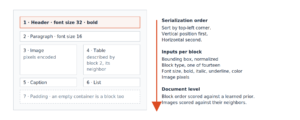
How the layout-aware patent reads a page. Blocks are typed, sorted vertically then horizontally, and encoded with their typography and images. A page whose DOM order differs from its rendered order produces two different sequences.
What does block order mean for a page?
The document-level model is trained to detect blocks that are out of order. One pretraining task swaps two blocks and asks the model to tell. Another masks an image and asks the model to pick the right one from candidates. The ablation in the paper shows what matters most: removing the block-ordering task drops image-suggestion recall from near 100 percent to 70 percent. Block order is a learned expectation, and a page that departs from the conventional sequence reads as disordered.
Three practical consequences follow. The centerpiece sits first in both DOM order and rendered position, top left of the primary column. FAQ, testimonial, and CTA blocks never sit ahead of it. A caption sits directly below its image, because the model reads adjacency as a relationship.
What are macro context and micro context?
Macro context is the above-the-fold area that declares the central entity and the central intent. Micro context is the below-the-fold area that expands attributes and sub-entities. Google’s Quality Rater Guidelines draw the same line between main content and supplementary content. The macro context carries the H1, the standfirst, the centerpiece component, and the primary action. The micro context carries secondary attributes, related entities, FAQs, and most of the internal links.
The split has a writing consequence. Internal link density stays low above the fold and rises below it. A wall of links near the top reads as navigation or aggregation, not as main content.
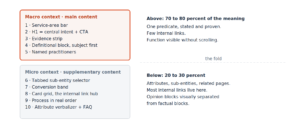
The macro and micro split on a service homepage. The numbering is the block order. Identity, proof, and definition sit above the fold; expansion and links sit below.
How does page function decide rankings?
A helpful page is a functional page. Google’s rater guidelines define effort to include designing page functionality and building the systems that power a page. Google’s spam policy names misleading functionality as a violation: a page that implies a tool, a comparison, or a service it does not deliver. Read together, the two documents say the same thing. Relevance gets a page considered. Responsiveness gets it ranked. Responsiveness means the page lets the user complete the task behind the query.
The same words inside a functional environment read as more useful than the same words inside a passive one. A page that lets the reader compare, book, calculate, or request is responsive. A page that only describes is relevant at best.
What page type does each query need?
Each query type has a page type, a centerpiece component, and a content mix that matches its task. The table below lists the mapping for the most common query patterns, with the component that belongs at the top of each page.
|
Query pattern |
Page type |
Centerpiece component |
Content mix |
|
How do I fix my [entity] |
Forum or Q&A page |
Question with best answer thread |
Opinionated, unstructured |
|
[Service] in [city] |
Directory page |
Provider list with filters and contact |
Factual, structured |
|
[Service] prices |
Hybrid page |
Price range block, then providers |
Factual answer, then commercial |
|
How to install [entity] |
Informational guide |
Numbered step list |
Unstructured with a structured step block |
|
Best [entity] |
Ranked entity list |
Comparison table plus item cards |
Factual criteria, opinionated verdicts |
|
[X] to [Y] |
Tool page |
The tool itself |
Minimal text, one worked example |
|
What is [entity] |
Definitional article |
Extractive definition block |
Unstructured, factual |
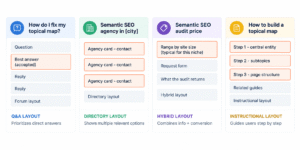
One topic, four query types, four layouts. The centerpiece changes with the task: an answer thread, an agency list, a price range, a step list. The topical map decides which of the four a site needs.
How do you apply visual semantics to a page?
Six decisions turn the theory into a build order. Each one has a test you run on staging.
Decide the centerpiece before the mockup
Write one sentence: this page lets a user [verb] [entity] by [component]. The component in that sentence is the centerpiece. A page without that sentence has no centerpiece to protect.
Put the centerpiece first, in code and on screen
The H1, standfirst, and centerpiece component come first in the HTML source. They also come first in rendered position. No hero carousel, no autoplay video, no decorative block ahead of them. The same rule extends to every block: DOM order equals rendered order, site-wide.
Let typography carry importance
The H1 is the largest text on the page. Heading sizes descend by level with no inversion. Bold marks the declarative opener under each heading and the label terms on cards, nothing else. Underline marks links only. The patent reads these attributes as inputs, so decorative bolding is noise.
Verbalize every component
A table gets a caption sentence directly above it. An image gets a caption block directly below it. A card grid gets a heading that names the entity set and the sort logic. An icon gets visible text beside it. Verbalization is the text a crawler or a language model reads when it cannot read the pixels. A fuller treatment sits in semantic content and its entity structure.
Give the page one function and make it work
One page, one source type, one task. A compare button opens a comparison. A calculate button returns a computed value. A quote form sends a request. A label that promises a function the page does not perform falls under Google’s misleading functionality policy, and that fix comes before any new content.
Test one variable per release
A layout change on a templated site multiplies across every URL and triggers a full recrawl. Ship one structural change per cycle and watch the crawl stats for the spike. Measure clicks and impressions by page group, because a change that widens query coverage lowers average CTR while raising clicks.
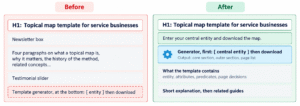
A tool page built two ways. On the left the generator sits under four paragraphs, a newsletter box, and a slider. On the right it is the centerpiece, with one line of instruction above it and the explanation below. The second layout is the one to build.
How does visual semantics connect to topical authority?
Visual annotations are a multiplier on topical authority, not an addition to it. Koray Gübür states the current form of the topical authority formula in the article linked above: historical data times topical coverage, divided by cost of retrieval, times the right visual annotations. A wrong centerpiece multiplies everything else by a number near zero. Coverage decides which pages exist. Layout decides if each one gets read.
The two halves meet in the topical map. A map that lists entities, attributes, and predicates without a page type and a centerpiece per node is half a map. The page decision itself follows the query deserves a page content structure: page, section, or sentence. The pages then connect through the semantic content network strategy, with outer pages linking inward to the core. Service businesses apply the same logic to the homepage, the service pages, and the location pages, as laid out in the semantic SEO strategy for service businesses.
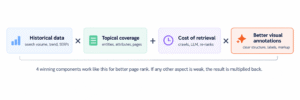
The topical authority formula as Koray Gübür states it, with visual annotations as the last multiplier. The last factor is the one most sites never set.
What are the common visual semantics mistakes?
Seven layout patterns break extraction on otherwise strong pages.
- A share bar, author box, or date stamp between the H1 and the first content block.
- A hero carousel or autoplay video above the centerpiece.
- Tables built from styled divs instead of table elements.
- A compare or calculate label with no working function behind it.
- A wall of internal links above the fold.
- Primary content injected by JavaScript after load, or delivered inside an iframe.
- Card grids where each card has a different internal structure.
Each of these raises the cost of retrieval or corrupts the centerpiece. None of them is fixed by writing more text. The copy side of the same problem, sentence order and predicate choice, is covered in semantic copywriting for conversions.
Want the centerpiece test run on your site? The Semantic Content Audit at Digital Vikingz checks extraction, block order, function, and entity coverage on your live pages and returns a written issue map. Fixed scope, no obligation. Request the audit.
Frequently asked questions about visual semantics
Is visual semantics a Google ranking factor?
Visual semantics is a reading model, not a named ranking factor. Google documents the systems that read layout: centerpiece extraction, passage ranking, and the layout-aware patent. The rules here lower the cost of understanding a page. They do not promise a rank.
Does the centerpiece annotation apply to non-news pages?
The DOJ exhibits show news articles. Martin Splitt described the concept for pages in general. The 400-character window is documented for news; the exact window for commercial pages is not published. Treat the first 400 characters as the safe target on every page type.
Does a page need images to score well on layout?
No. The layout-aware patent pads image-free pages with empty image tensors and skips their image losses. An image-free page loses one alignment signal and gains no penalty. A decorative stock image that does not match its neighbors is worse than no image.
How do CSS grid and flexbox affect block order?
CSS reordering changes rendered position without changing DOM order. The DOJ extraction reads DOM order. The patent serializes by rendered position. A page must produce the same sequence in both, so reordering with CSS is off the table for content blocks.
What is a block, exactly?
A block is a portion of the page with a clear spatial boundary to its neighbors. The patent’s tokenizer builds blocks from HTML tags and layout, then assigns one of fourteen types. A heading with its opener, a card, a table, and an image with its caption are each blocks.
Do empty containers count as blocks?
Yes. Padding is one of the named block types. Spacer divs, empty grid cells, and hidden wrappers that render with a bounding box become blocks with no content. Remove them.
How does alt text fit in?
Alt text serves the systems that read text. The layout-aware model reads pixels. A page needs both: an image that depicts the adjacent entity, and alt text that names the entity and attribute. Alt text cannot rescue an off-topic image.
Do FAQs belong at the top for featured snippets?
No. FAQ blocks belong in the closure section after the primary content. A FAQ ahead of the centerpiece pushes the page’s function down in block order and reads as disordered.
How does visual semantics affect AI citations?
Generative search selects passages, verifies each summary sentence against a passage, and can anchor-link to the exact portion. Clean blocks with one fact per sentence and a stable id on each heading are what that process matches. Layout hygiene and citation readiness are the same work.
Can a whole topic live on one page?
Yes, when the variations share one function. A tool page covers every input variation through the tool itself. The page decision comes first: variations that fail the page test become sections or sentences on the parent page.
How long does a layout change take to show in Search Console?
A site-wide template change triggers a recrawl within days and a visible crawl spike in the crawl stats report. Ranking movement follows over the following weeks. Judge it after one full crawl cycle, by page group, on clicks and impressions.
Share: