
A law firm's topical map is the plan of its website pages, with one page owning each search clients type.
Semantic SEO plans that map so search engines understand which page answers each legal search. A law firm website needs practice area pages, sub-practice pages, attorney profiles, legal question pages, a fees page and office pages.
The site is built as practice folders, office pages and attorney profiles, in a set publication order. The map is measured in consultation requests per page, with impressions and clicks as the cause.
What is a topical map for a law firm website?
A topical map for a law firm website is the list of pages the firm needs, each matched to one search.
Clients search for the matter they face, not for the firm's name. A client types "car accident lawyer", "divorce lawyer" or the name of an attorney a friend recommended. The topical map gives each of those searches one page on the firm's website.
Law firm owners ask "what pages should a law firm website have" and rarely say "topical map". Semantic SEO keeps each row as one page, with its owning search, its intent and its URL.
No row of the map gives legal advice. Each row names what a page should explain, and the firm's attorneys write the substance.
What pages does a law firm website need?
A law firm website needs practice area pages, sub-practice pages, attorney profiles, legal question pages, a fees page and office pages.
Trust pages complete the site: the home page, the about page, the reviews or results page and the contact page. Trust pages own no search beyond the firm's name, so the table lists only pages that own a search.
The table below is a sample topical map for a three-lawyer firm with three practice areas and two offices.
| Page | Section | Owning search | Intent | URL |
|---|---|---|---|---|
| Personal injury | Core | personal injury lawyer | Commercial | /personal-injury/ |
| Car accident claims | Core | car accident lawyer | Transactional | /personal-injury/car-accidents/ |
| Family law | Core | family law attorney | Commercial | /family-law/ |
| Divorce | Core | divorce lawyer | Commercial | /family-law/divorce/ |
| Child custody | Core | child custody lawyer | Commercial | /family-law/child-custody/ |
| Estate planning | Core | estate planning attorney | Commercial | /estate-planning/ |
| Fees and consultations | Core | lawyer consultation fee | Commercial | /fees-and-consultations/ |
| Millbrook office | Core | law firm millbrook | Transactional | /offices/millbrook/ |
| Ashford office | Core | law firm ashford | Transactional | /offices/ashford/ |
| Attorney profile, one per attorney | Core | the attorney's name | Navigational | /attorneys/[name]/ |
| Car accident claim length | Outer | how long does a car accident claim take | Informational | /personal-injury/car-accidents/how-long/ |
| Contested or uncontested divorce | Outer | uncontested vs contested divorce | Informational | /family-law/divorce/uncontested-vs-contested/ |
| Will or living trust | Outer | will vs living trust | Informational | /estate-planning/will-vs-trust/ |
| Child support | Outer | how is child support calculated | Informational | /family-law/child-support-calculation/ |
No two rows share an owning search. The rows are a worked sample, not a client result. Each owning search is checked in Google Search Console or Google's search suggestions before a page is built.
An informational intent is to learn, a commercial intent is to compare, and a transactional intent is to hire now. A navigational intent is to reach one named attorney.
Semantic SEO treats each row as one page decision, so the table is also the build list. The core rows start with the practice area pages.
Which practice areas earn their own practice area page?
A practice area earns its own page when the firm takes cases in that practice and clients search the practice by name.
The practice area pages in the sample map are listed below:
- Personal injury: the page for injury claims as a whole, and the hub for car accident claims.
- Family law: the page for family matters, and the hub for divorce and child custody.
- Estate planning: the page for wills, trusts and powers of attorney, with no sub-practice page yet.
Each practice area page explains who the firm helps and which matters the firm handles. The page also sets out how a matter proceeds and what the first step is.
Some guides suggest pages for practice areas the firm hopes to take later. The map keeps a practice area only when the firm takes those cases today.
Semantic SEO names each practice page by the words clients type, such as "personal injury", not "litigation services". Some practice areas then split into sub-practices.
When does a sub-practice earn its own page?
A sub-practice earns its own page when its name is searched and its facts or process differ from the parent practice.
Car accident claims split from personal injury in the sample, because clients type "car accident lawyer" as a search of its own. The evidence, the insurers involved and the client questions differ from other injury claims.
Legal separation stays a section of the divorce page while its searches stay few.
The figure below tests six sub-practices of the sample firm. Car accident claims, divorce and child custody earn pages. Dog bite claims, legal separation and powers of attorney stay sections of their parent pages.
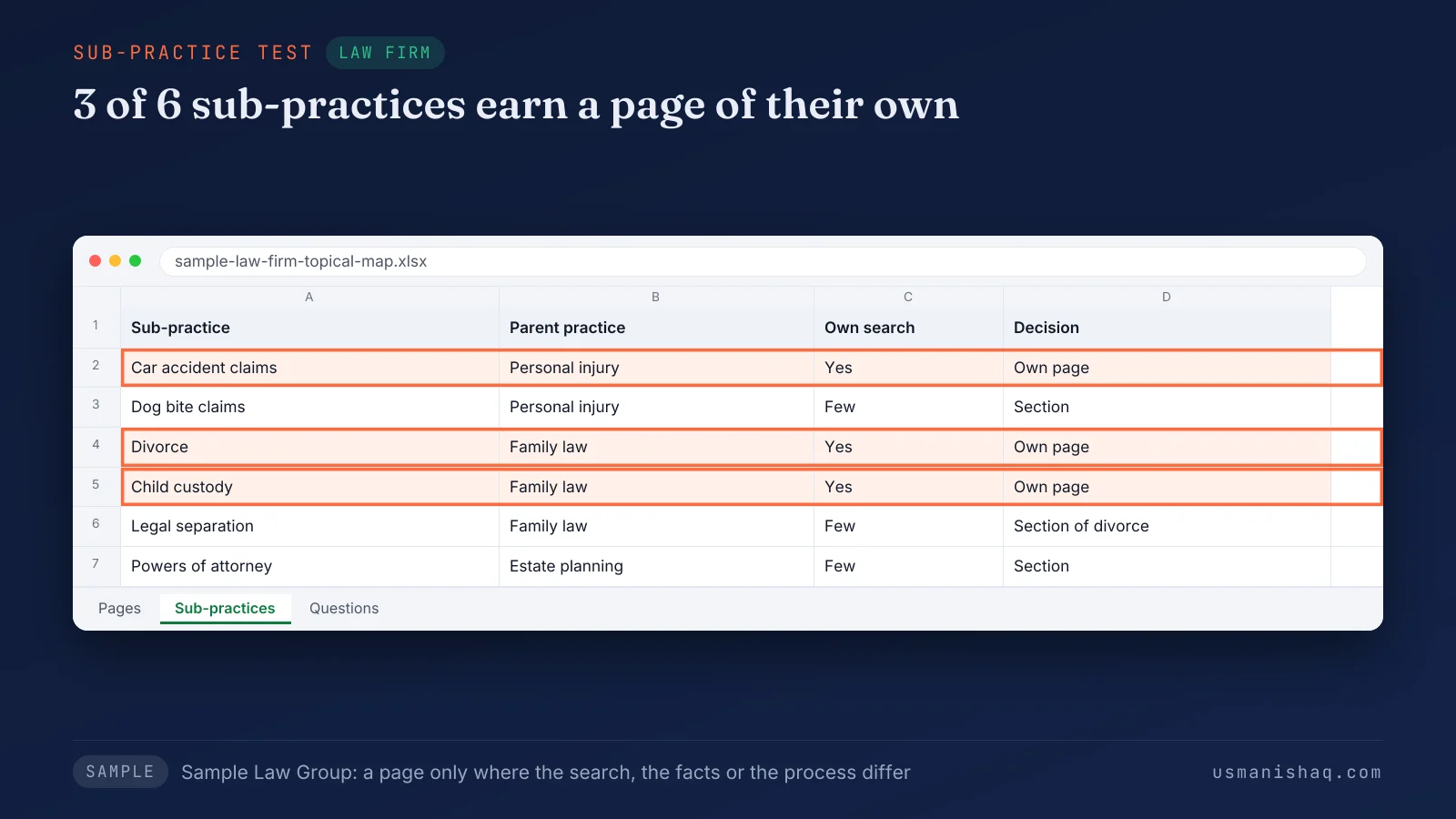
One merged page for every injury claim answers each search and owns none of them. Semantic SEO splits a practice where the searches split, and keeps one page where the searches agree. Attorney pages follow a different test.
What should an attorney profile page explain?
An attorney profile page should explain the attorney's practice areas, bar admissions, education, office and published work.
Each attorney profile owns one search: the attorney's own name. Clients referred by another lawyer or a friend type that name before they call.
The parts of an attorney profile page are listed below:
- Practice areas: a link to each practice page the attorney handles.
- Bar admissions: each jurisdiction where the attorney is admitted to practice.
- Education and published work: law school, articles and talks.
- Office: the office where the attorney meets clients, linked to its office page.
- Matters handled: described within the advertising rules of the attorney's jurisdiction.
Every practice page links back to the profiles of the attorneys who handle that practice. Legal questions earn pages by a separate test.
Which legal questions earn a question page?
A legal question earns a question page when its search differs from the search its practice or sub-practice page owns.
A search earns a page when clients type the search and the search names a different matter, stage or comparison. The search also shows different results in Google from the searches other pages own.
The four question searches in the sample map each earn a question page.
Each question page explains how the matter works in the firm's jurisdiction and gives no advice on a reader's own case. The question "what should I bring to a first consultation" stays a section of the fees page.
Every question page links to its practice or sub-practice page. Semantic SEO keeps question pages in the outer section, each one feeding a core page.
Does a law firm need a fees and consultations page?
Yes, a law firm needs a fees and consultations page, because clients search lawyer costs before asking for a consultation.
The fees page explains how the firm charges in each practice area: hourly, flat or contingency, where the firm uses them. Semantic SEO gives every cost search that one owner page. The page also states whether the first consultation has a fee, how long the consultation lasts and what to bring.
How is a law firm website structured?
A law firm website is structured as practice folders, office pages and attorney profiles, built in a set publication order.
The six parts of a law firm website structure are listed below:
- Practice folder: one folder for each practice area, such as /family-law/.
- Pages inside the practice folder: sub-practice pages such as /family-law/divorce/, with question pages beneath them.
- Office pages: one page for each staffed office, such as /offices/millbrook/, with its address, hours and attorneys.
- Attorney profiles: one page per attorney, such as /attorneys/[name]/.
- Links: each question page links to its practice page, and each practice page links to its sub-practice pages and attorneys. The home page links to every practice page and to the fees page.
- Schema: LegalService on office pages and Person on attorney profiles, stating only what each page shows.
Some guides place every practice under a city page. The sample map keeps the practice page as the hub, so one page owns the practice for both offices.
The figure below groups the sample firm's 16 pages into four folders. Six pages sit in practice folders, three are office and fees pages, three are attorney profiles and four are question pages.
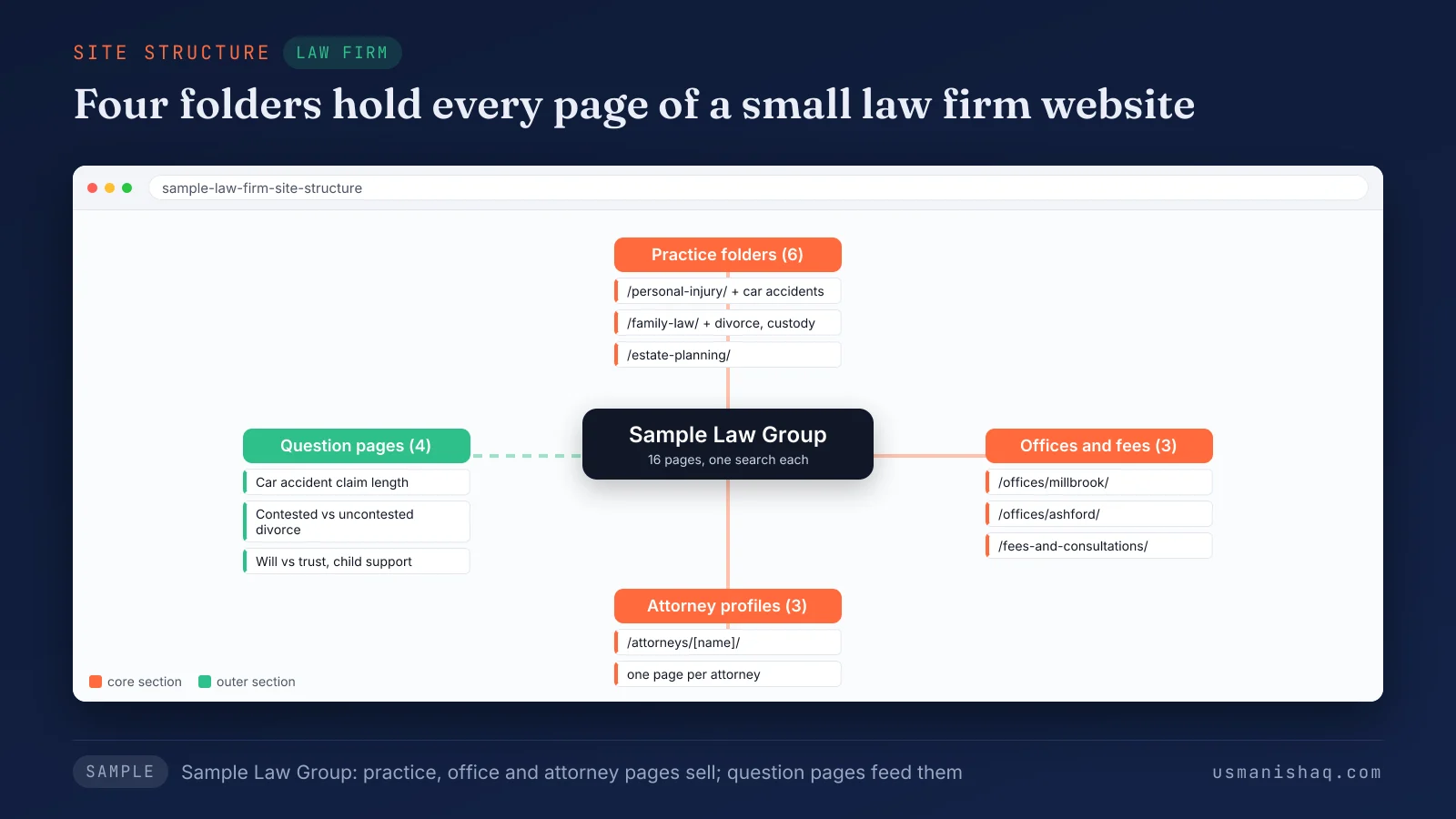
Semantic SEO sets the folders before the pages, so every URL follows its row. The pages then go live in a set order.
In what order should a law firm publish its pages?
A law firm should publish practice pages first, then sub-practice pages, attorney profiles, the fees page, office pages and question pages.
The steps to publish the pages of a law firm website are listed below:
- Publish the practice page for the matters the firm wants more of.
- Add the sub-practice pages where client searches split.
- Publish an attorney profile for every lawyer named on a practice page.
- Add the fees and consultations page.
- Add an office page for each staffed office, then the question pages, each linked to its practice page.
Semantic SEO architecture writes the publication order into the topical map before the first page goes live. A fixed-scope project, Semantic SEO Architecture for a law firm, produces the topical map and a 12-month roadmap for one firm. Each published page is then judged by the consultation requests it brings.
How is a law firm's topical map measured?
A law firm's topical map is measured in consultation requests per page, and that count shows if the map is worth it.
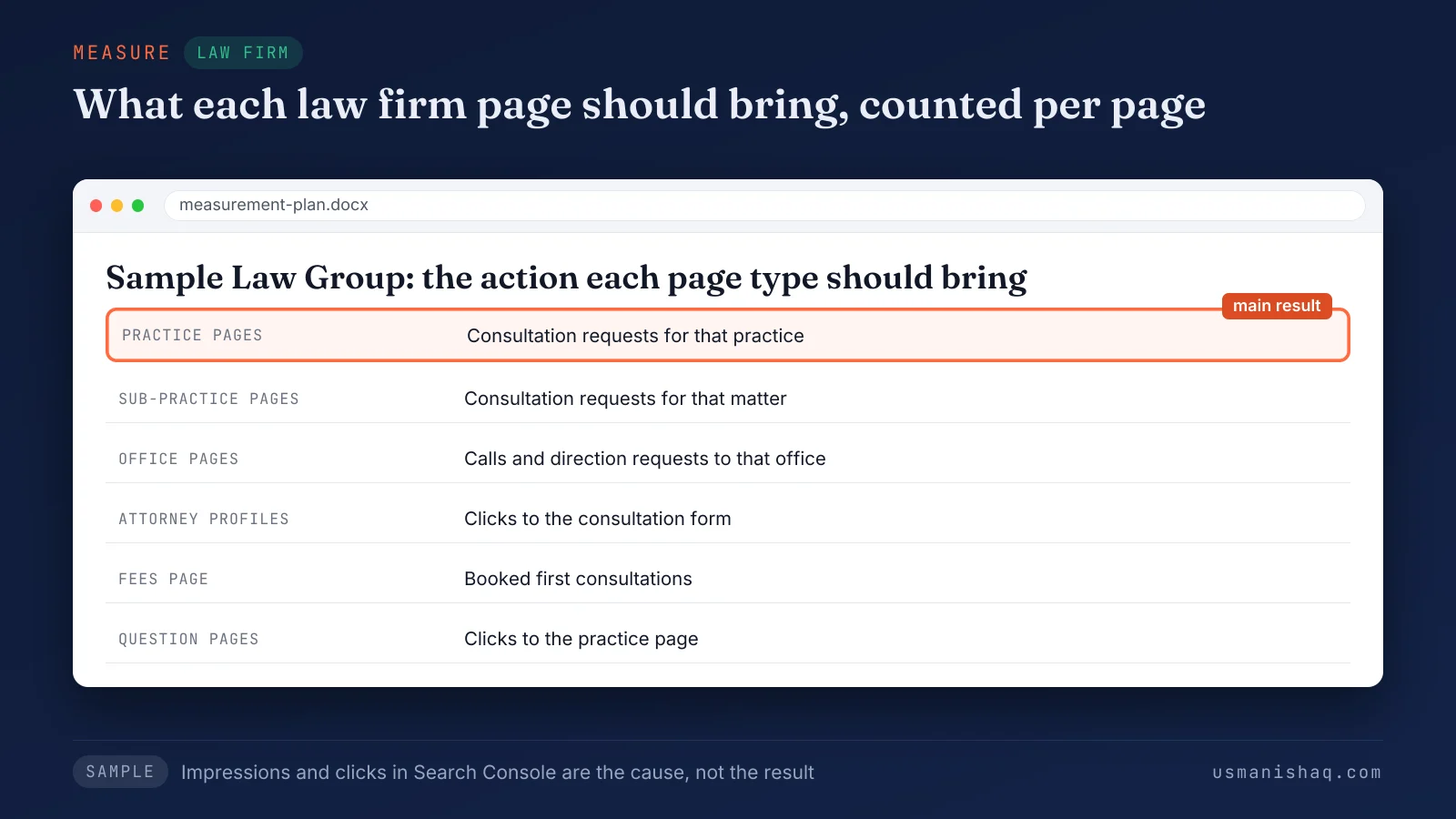
Practice and sub-practice pages should bring consultation requests. Office pages should bring calls and direction requests. Attorney profiles should bring clicks to the consultation form.
The fees page should bring booked first consultations. Question pages should bring clicks to the practice page, not consultations directly.
The figure below lists the action each of the six page types should bring. Consultation requests from practice pages are marked as the main result.
Search Console shows the impressions and clicks of each page. The firm's intake records note which page each consultation request came from.
A practice page with impressions and no consultation requests needs a better answer on the page, not more pages. Semantic SEO reads each row of the map against the requests the page brings.
Is a topical map worth it for a small law firm?
Yes, a topical map is worth it for a law firm with more than one practice area or more than one office.
The Google Business Profile and legal directories list the firm, its categories and its reviews. The website holds one page for each practice, matter, attorney and question, which no profile has room for.
A solo attorney with one practice in one office needs a few rows only. The worth holds only while the website avoids five faults.
Which faults break the topical map of a law firm website?
A law firm website's topical map breaks under five faults: one list page, competing posts, unwanted matters, city pages and unchecked claims.
The five faults that break the topical map of a law firm website are listed below:
- One list page: a single "Practice Areas" page lists every matter, so no practice owns a search. The fix is a page for each practice area.
- Competing posts: a blog post answers a search a practice page owns, such as "divorce lawyer". The fix is one owner, with the post turned into a section or a link.
- Unwanted matters: pages for work the firm declines bring consultation requests the firm refers away. The fix is a border: no page for a matter the firm does not take.
- City pages without an office: pages for nearby cities repeat one text with the city name swapped. Google's spam policies list "pages targeted at specific regions or cities that funnel users to one page" as doorway abuse. The fix is an office page for each staffed office and a list of areas served.
- Unchecked claims: phrases such as "guaranteed results" or "certified specialist" go live without a check. The State Bar of Arizona's guidance on its ER 7.1 says statements about a lawyer's services must not be false or misleading. Advertising rules differ by jurisdiction, so each page is checked against the firm's own bar rules before the page goes live.
Semantic SEO checks the map for all five faults before a page is written. The same checks apply when the firm adds a practice area or an office.
How does a law firm's topical map change for a new practice area or office?
A law firm's topical map keeps its columns for a new practice or office, and those columns fit other service businesses.
Every firm needs its own topical map, since the practices, offices and client questions differ. Any topical map is built in five steps: describe the business, gather searches, assign owners, set page types and order pages.
The guide on the five steps that plan a topical map for a business website sets them out in order. The topical map as a planning method comes from the framework of Koray Tuğberk Gübür.
Semantic SEO keeps the columns fixed, so maps of different firms compare row by row. A trade business calls its practice pages service pages and its office pages town pages.
The sample topical map built for a plumbing company website uses the same five columns with plumbing rows. Attorney profiles and the fees page are the parts a law firm adds to that pattern.
A new practice area enters a law firm's topical map as a folder, starting with one practice page. A new office changes the map in a different way.
How does the map change when a law firm opens a second office?
A second office enters a law firm's topical map as an office page once the office has an address, hours and attorneys.
Nearby cities without an office stay on a list of areas served, not on pages of their own.
The same pattern explains the reasons a website ranks in one town and not in the towns nearby. Semantic SEO applies one office test to every location the firm adds.
Questions law firm owners ask about website pages
Law firm owners ask four questions about website pages: the size of a solo site, the page count, disclaimers and larger competitors.
Does a solo attorney need a large website?
No, a solo attorney needs a page for each search the practice owns, not a large website. A 2026 article on FingerLakes1.com states: "a solo lawyer who handles three primary services does not need 100 practice-area pages."
How many pages does a law firm website need?
A law firm website needs one page for every search that passes the page test, so no fixed number applies. The semantic SEO sample map holds 16 pages: six practice pages, three profiles, two offices, one fees page and four question pages.
Does a law firm website need a disclaimer?
Yes, a law firm website needs the disclaimers its own jurisdiction's rules require, and the required wording differs by jurisdiction. The State Bar of Arizona names no mandatory website disclaimer beyond the firm's name and contact details. The same page recommends a notice that reading the site creates no attorney-client relationship.
Can a small law firm compete with larger firms' websites?
Yes, a small law firm can compete for searches that no larger firm's website answers with a page of its own. A sub-practice page, such as child custody, competes where a larger site covers that matter in one line of a list.
The topical map for a law firm website and the next step
A law firm website starts with a topical map that gives each practice, attorney, office and question one owning page.
Search engines understand a law firm through pages that each name one practice, one matter, one attorney or one question. A semantic SEO topical map lists the pages a law firm website needs before the first page is written.