
Businesses in ChatGPT is OpenAI's beta, opened on 10 November 2026, that lets an owner claim the profile ChatGPT shows for a business, verify the claim and edit the profile in Business Hub. The claim runs in a fixed order: search, select, verify, wait for review, then a Persona identity check. Business Hub insights cover the past 28 days of mentions, website clicks and discovery topics, and a click is not a website visit.
What is Businesses in ChatGPT?
Businesses in ChatGPT is OpenAI's beta, opened on 10 November 2026, that lets an owner claim the profile ChatGPT shows for a business, verify the claim and edit the profile in Business Hub. Business Hub is the dashboard at chatgpt.com/business-hub where the owner claims the business, changes its details and reads its insights. OpenAI puts the ChatGPT audience at 1.2 billion people each week.
The profile does not wait for the owner. I opened Business Hub on 11 November 2026 in a signed-in ChatGPT account and searched for a second business I manage, outside the US. ChatGPT already held a listing with the name, a category line, the full street address and a photo. Nobody at that business had submitted the listing. ChatGPT built the profile from public data.
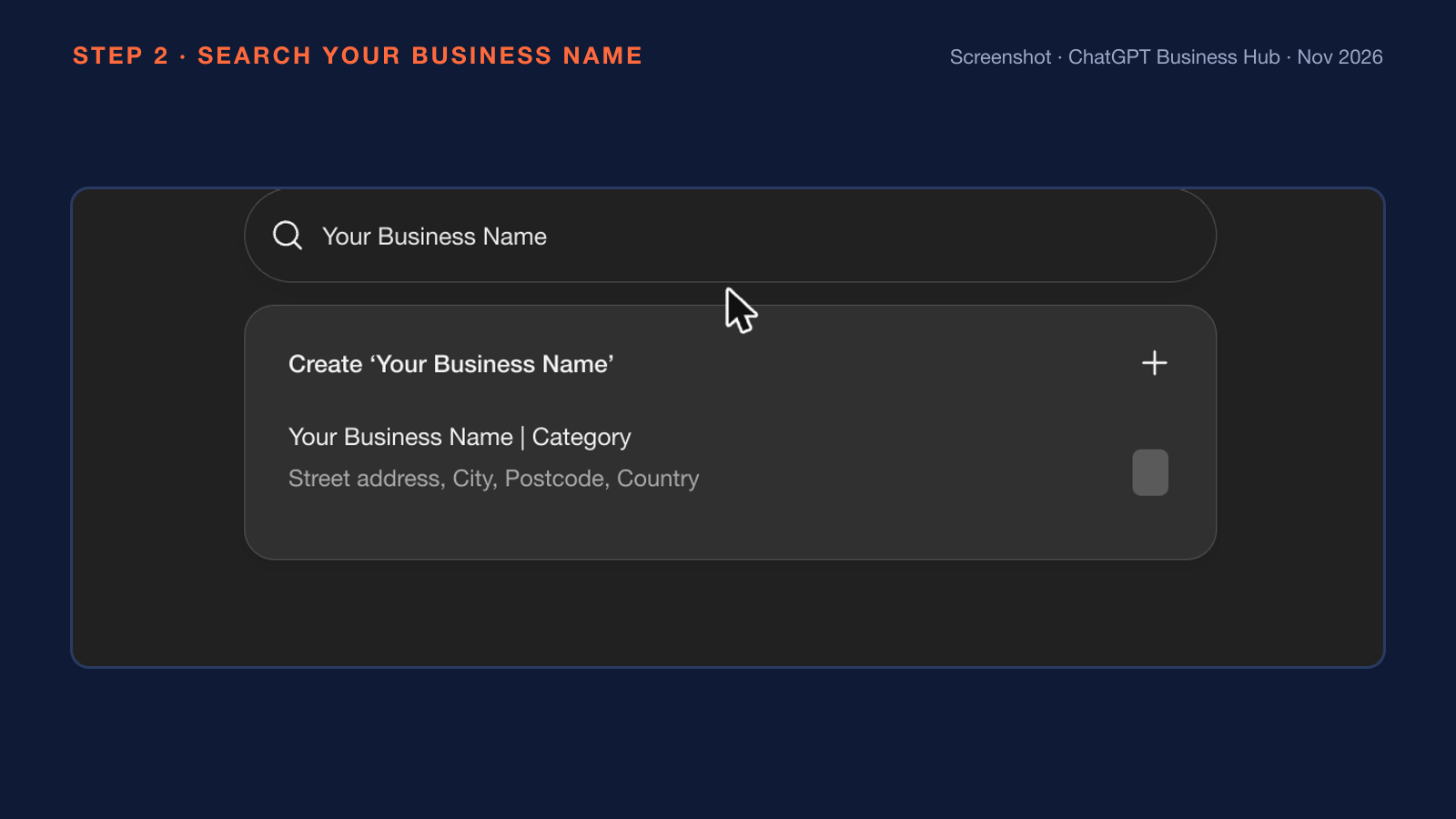
The search results above show the existing listing at the top and a Create option under the listing. A plumber, an electrician or a dental clinic with public details online can have the same live profile that nobody checks. The ChatGPT profile works much like a Google Business Profile.
How does a ChatGPT business profile compare with a Google Business Profile?
A ChatGPT business profile and a Google Business Profile are both claimed and verified by the owner, and the two differ in what the owner edits, what the insights count and the extra feature each one offers. The main differences are given below:
| Point | ChatGPT business profile | Google Business Profile |
|---|---|---|
| Claim and verify | Business Hub claim, one ownership check, then Persona | Claim and verify ownership with Google |
| What the owner edits | Website, description, category, logo, cover photo, delivery and return policy, product feed | Hours, phone, address and other details |
| What the insights count | Mentions, website clicks and discovery topics over 28 days | Performance insights |
| Extra feature | Business Agent for eligible US ecommerce and online service businesses | Customer reviews |
Business hours do not appear in OpenAI's list of editable profile fields, so the website stays the place to publish them. OpenAI sets its own eligibility rules for a ChatGPT business profile.
Who can claim a business in ChatGPT?
An owner or an authorised representative of an eligible business located where ChatGPT is available can claim a business in ChatGPT. The eligibility rules in OpenAI's help article and landing page are listed below:
- No Ads account and no Enterprise agreement are needed to claim.
- Claiming is initially available to eligible businesses with a website.
- Local stores and restaurants can claim only an existing US listing.
- Eligibility depends on industry, location and OpenAI's verification and integrity checks.
- Enterprise customers and advertisers claim through their OpenAI representative.
I pressed Get started in Business Hub for that second business, and a waitlist screen appeared. The screen said OpenAI is "gradually opening access to more businesses" and offered a Join waitlist button.
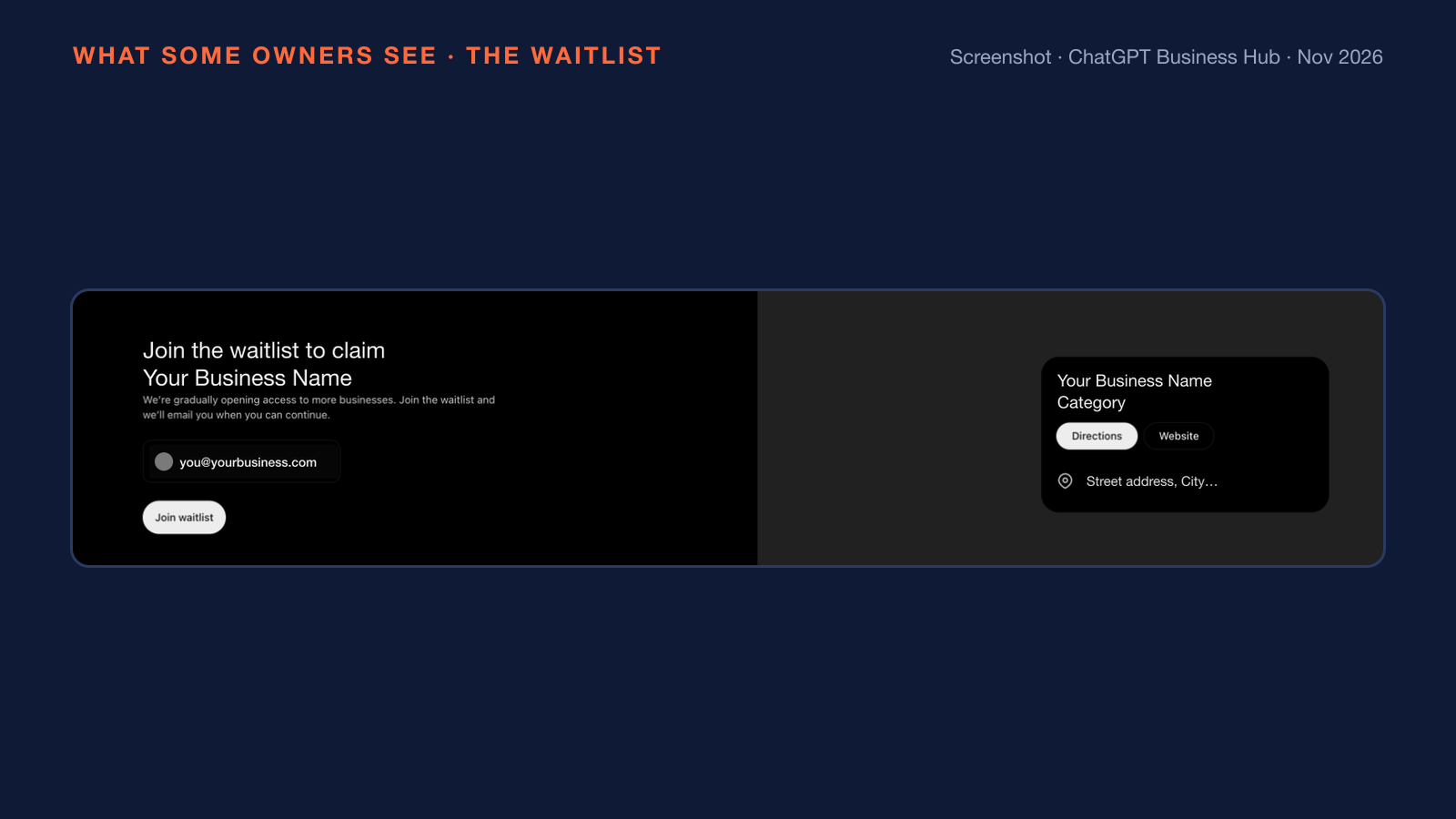
The waitlist screen above promised an email once the claim can continue. Owners in the UK, Canada and Australia ask if a business can claim from outside the US, and the answer depends on the business type. A plumber or an electrician who serves customers at a location or at the customer's home has no claim route outside the US today. Launch-week tests published from the UK, Italy and India found the service option in the add flow marked "coming soon". The existing ChatGPT profile stays live during the wait, so the Check and Match moves of the four-move plan below are the useful work now. Owners with access follow six steps to claim.
How do you claim your business in ChatGPT?
An owner claims a business in ChatGPT through six steps in Business Hub: search, select, confirm the account, choose a verification method, wait for review and complete Persona. The six steps, in the order of OpenAI's help article, are given below:
- Sign in to ChatGPT and open Business Hub from the sidebar or at chatgpt.com/business-hub.
- Search for the business by name.
- Select the matching listing and confirm the ChatGPT account that will run the profile.
- Choose a verification method.
- Wait for OpenAI to review the claim and email a decision. A Cancel claim option stays available during review.
- Complete the Persona identity check, the identity verification of the person behind the claim.
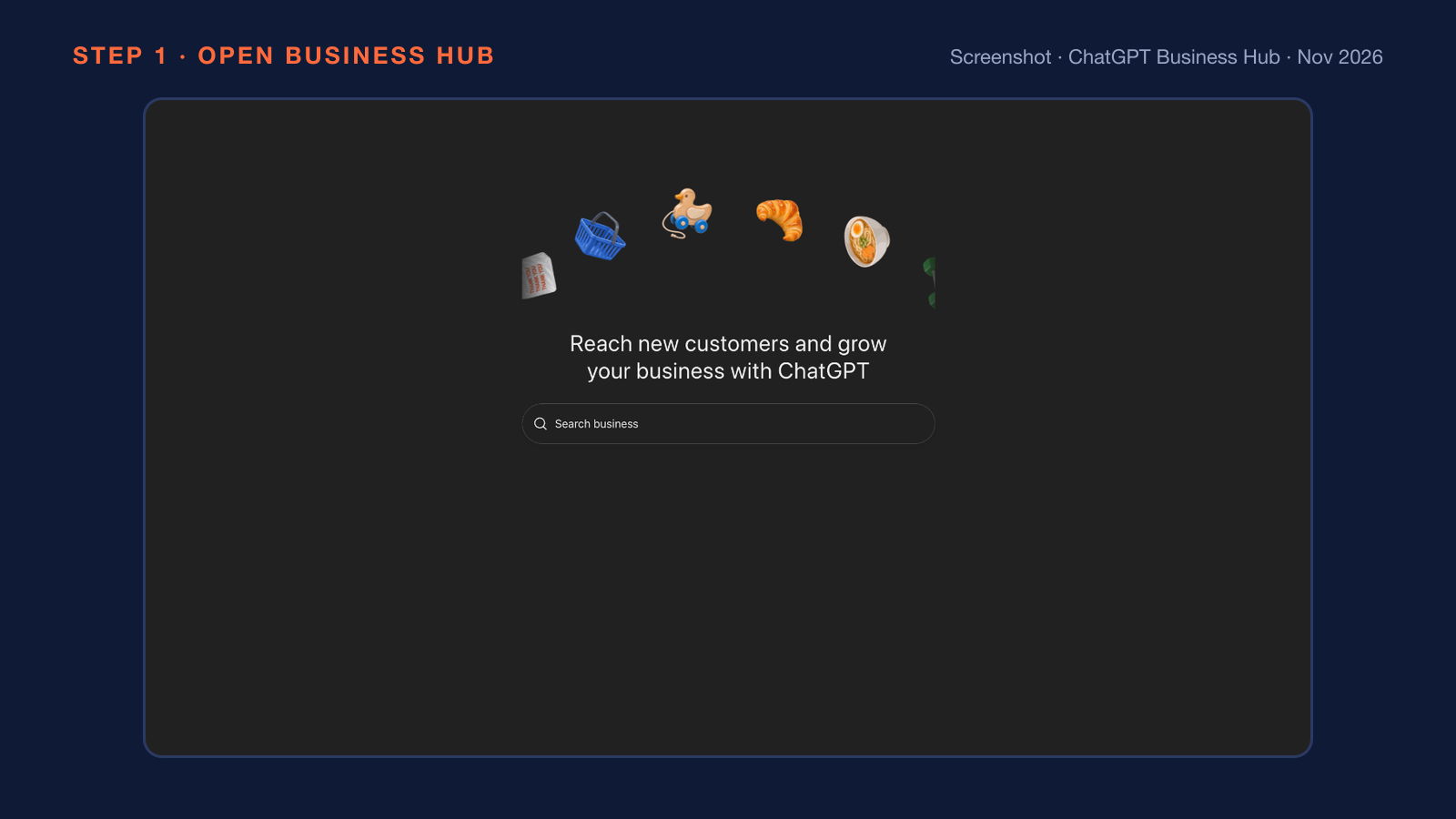
Step 1 ends on the start screen above. The claim dialog at step 3 named three benefits in my test: mention tracking, current products and details, and a business agent. The dialog then stated that the owner must verify authority to represent the business. A listing locked to new claims shows Contact support instead. A business with no listing takes the add path.
What if ChatGPT has no listing for your business?
An eligible online business with no listing in ChatGPT can add a new profile through the Create option in Business Hub. Local stores and restaurants have no add path, because such businesses can claim only an existing US listing. I added my own business, usmanishaq.com, through Business Hub on 11 November 2026. The search for usmanishaq.com led to the Create option, and Create opened the add dialog.
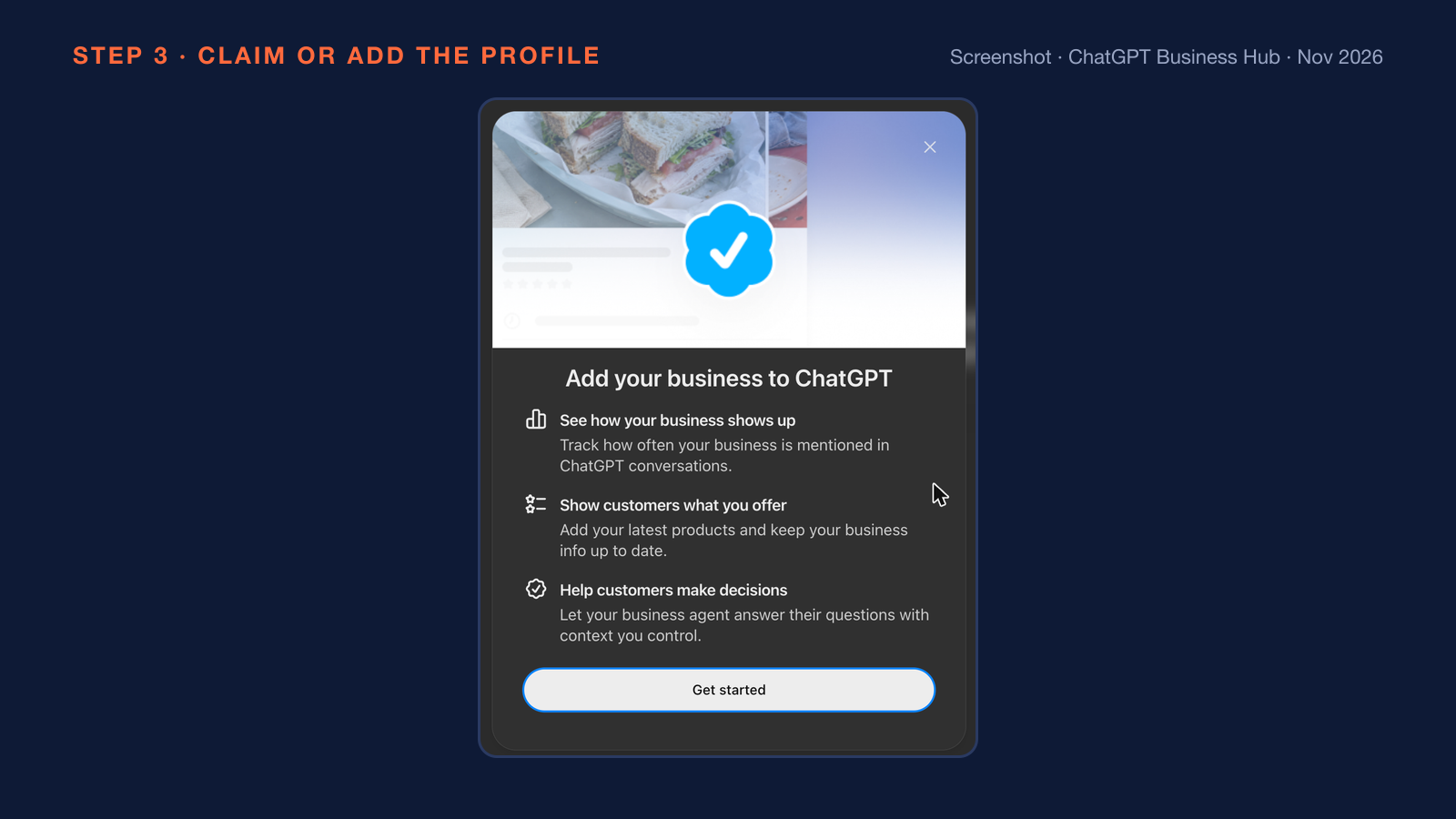
The add dialog above lists the same three benefits as the claim dialog. The next screen asked how customers usually interact with the business. The option At a physical location covers customers who visit a store, restaurant or office. The option Through a website covers customers who buy from a website or marketplace.
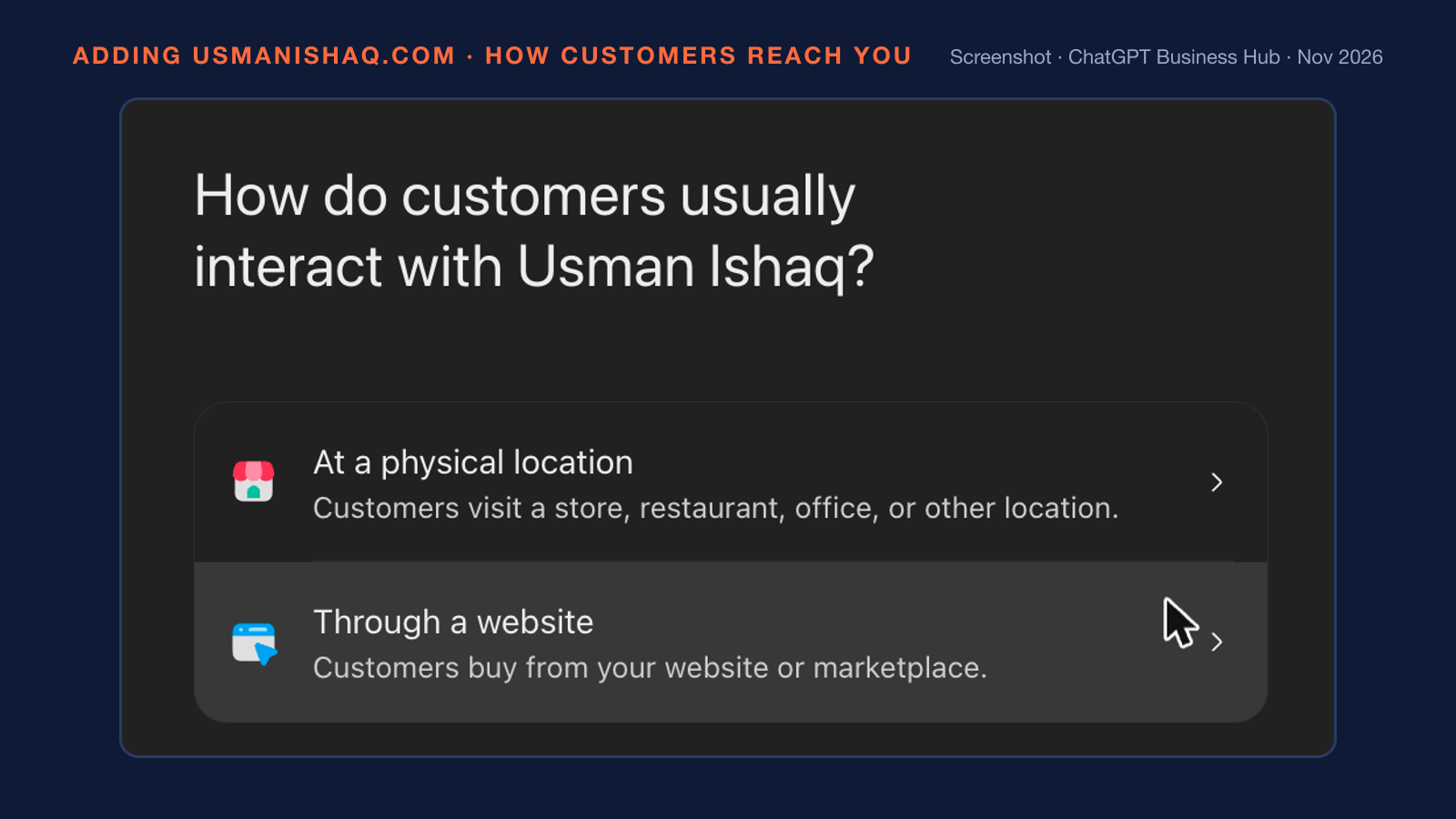
The question screen above sets the profile type. Neither option describes a trade that works at the customer's premises, such as a roofer or a cleaner. I chose Through a website, and the step "Add your business website" opened with a Website field and a live profile preview. I entered usmanishaq.com in the Website field.
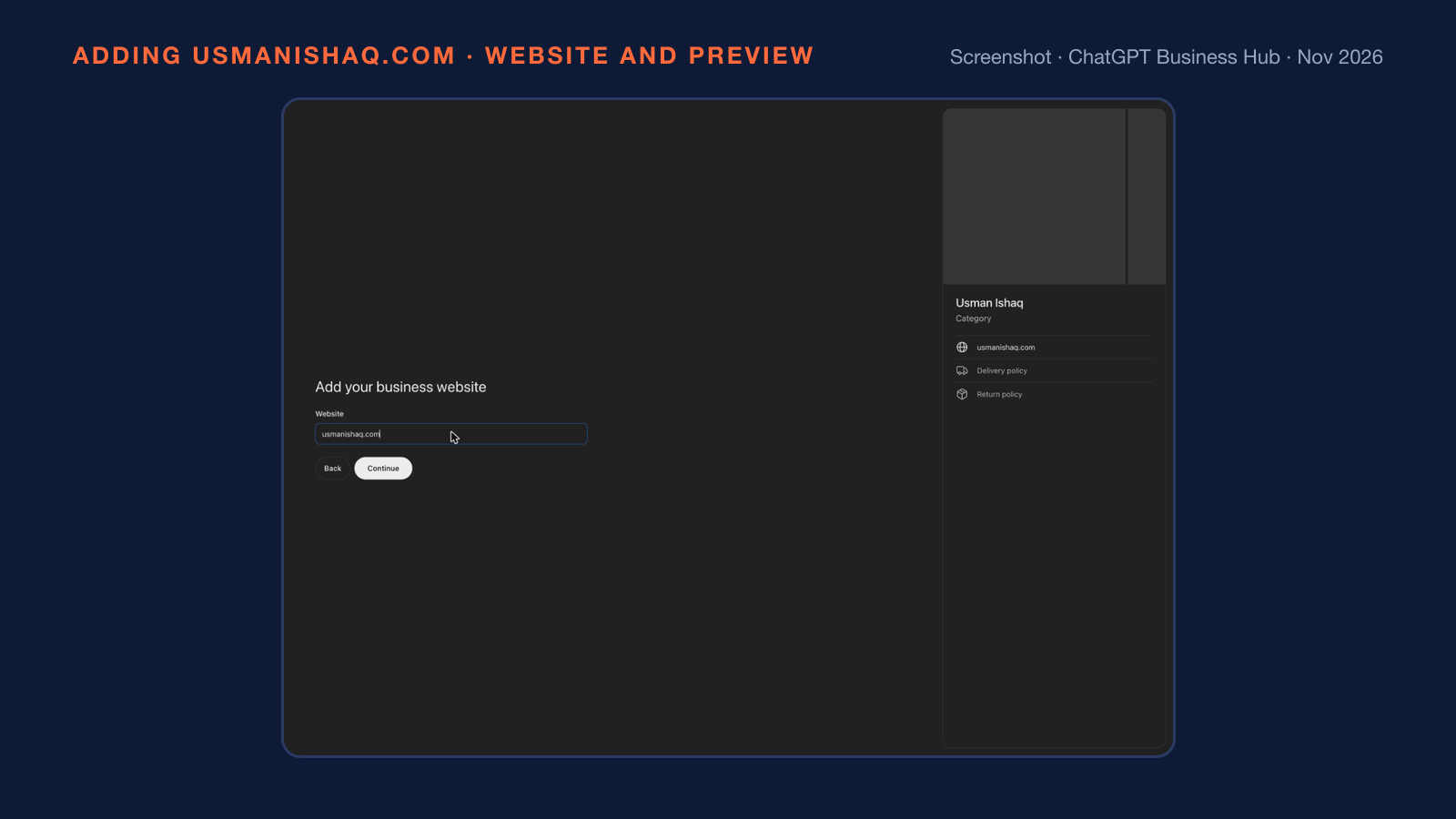
The preview above shows the fields of the new profile: name, category, website, delivery policy and return policy. Continue then opened the website domain check, which the verification section covers. A listing that another account already claimed needs a different route.
What if someone else already claimed your business?
An owner whose business someone else already claimed opens the profile, selects more options (•••), chooses Dispute ownership and verifies with Persona. OpenAI's help article states that claiming or disputing a profile does not change the business's visibility in ChatGPT. A well-known search news journalist wrote on launch day that he was "nervous about people hijacking businesses" in Business Hub.
Claiming early is the plainest defence against a hijack. The business phone, the business email and the website domain are the verification channels, so the phone line, the inbox and the domain records should stay current and under the owner's control. The owner should claim from the owner's own ChatGPT login and add the agency later as a teammate. An agency should never claim the business under the agency's own account. Verification of a claim runs in two parts.
How do you verify a business in ChatGPT?
A business in ChatGPT is verified in two parts: one of four ownership methods, then a Persona identity check of the person behind the claim. The four ownership methods, with the labels Business Hub shows, are listed below:
- Business phone: a code arrives by SMS or automated call after Get code.
- Business email: a code arrives at the business email address after Get code.
- Website domain: the owner adds a TXT record to the domain's DNS, then selects Verify domain.
- Shopify store: the owner selects Connect Shopify and logs in to the store.
I used the Website domain method for usmanishaq.com. The screen "Verify that you control usmanishaq.com" asked for a TXT record named openai-business-profile.usmanishaq.com with the value openai-business-profile=<token>.
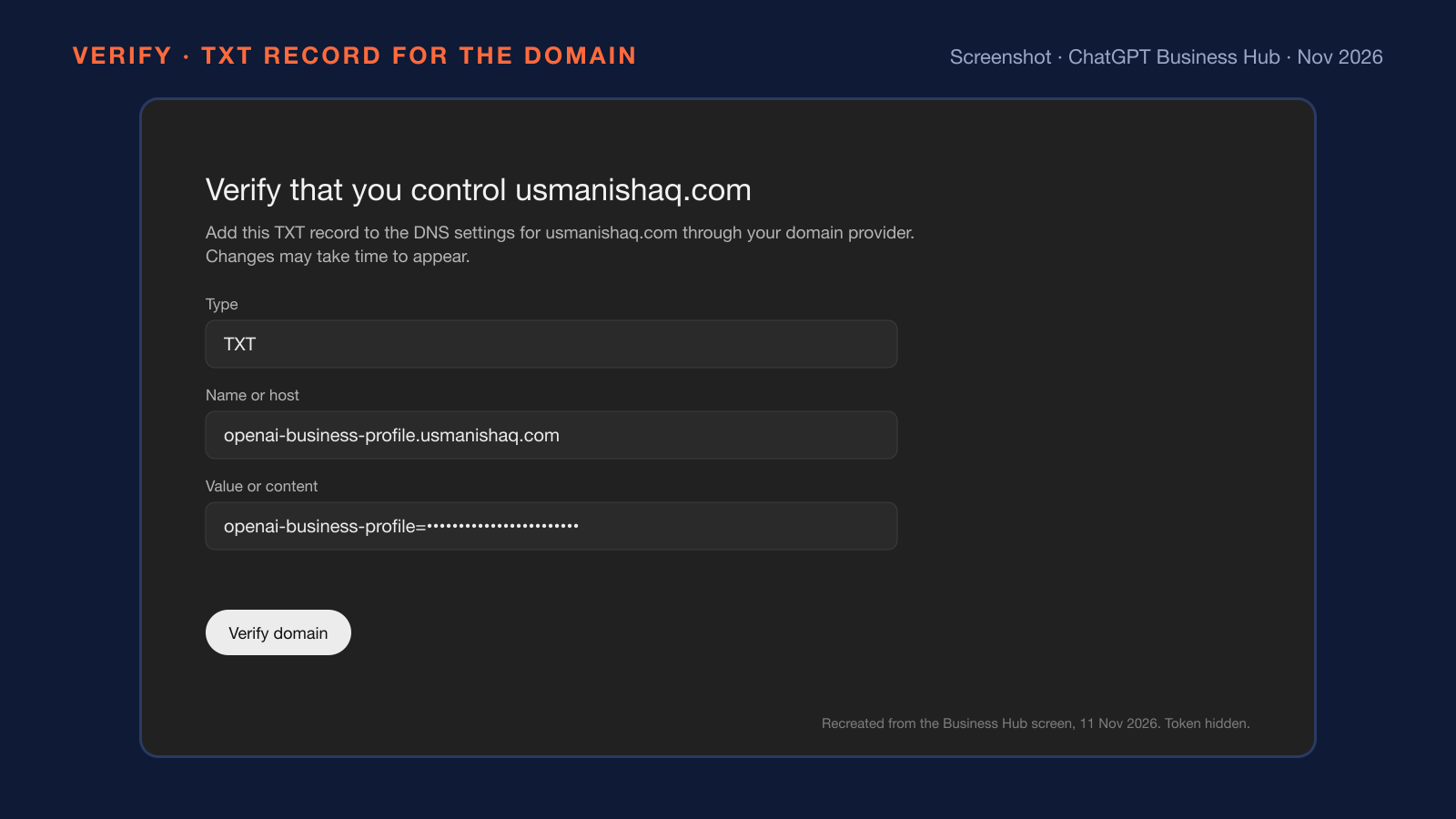
The surprise on the screen above was where the record belonged. The domain is registered at one company, but another company's nameservers answer for the domain, so a record added at the registrar would have done nothing. A nameserver lookup, such as dig NS usmanishaq.com, shows which provider holds the live records. I added the record there, and Google and Cloudflare resolvers returned the record about a minute later. A DNS change can take longer at other providers, so a failed domain check may pass later. Owners without DNS access should ask the web developer.
Persona may ask for a government ID, business registration information and proof of authority, and names, the address and registration or tax numbers must match official records. Persona approval unlocks profile edits, product feeds, insights and agents, and the blue check appears only after that approval.
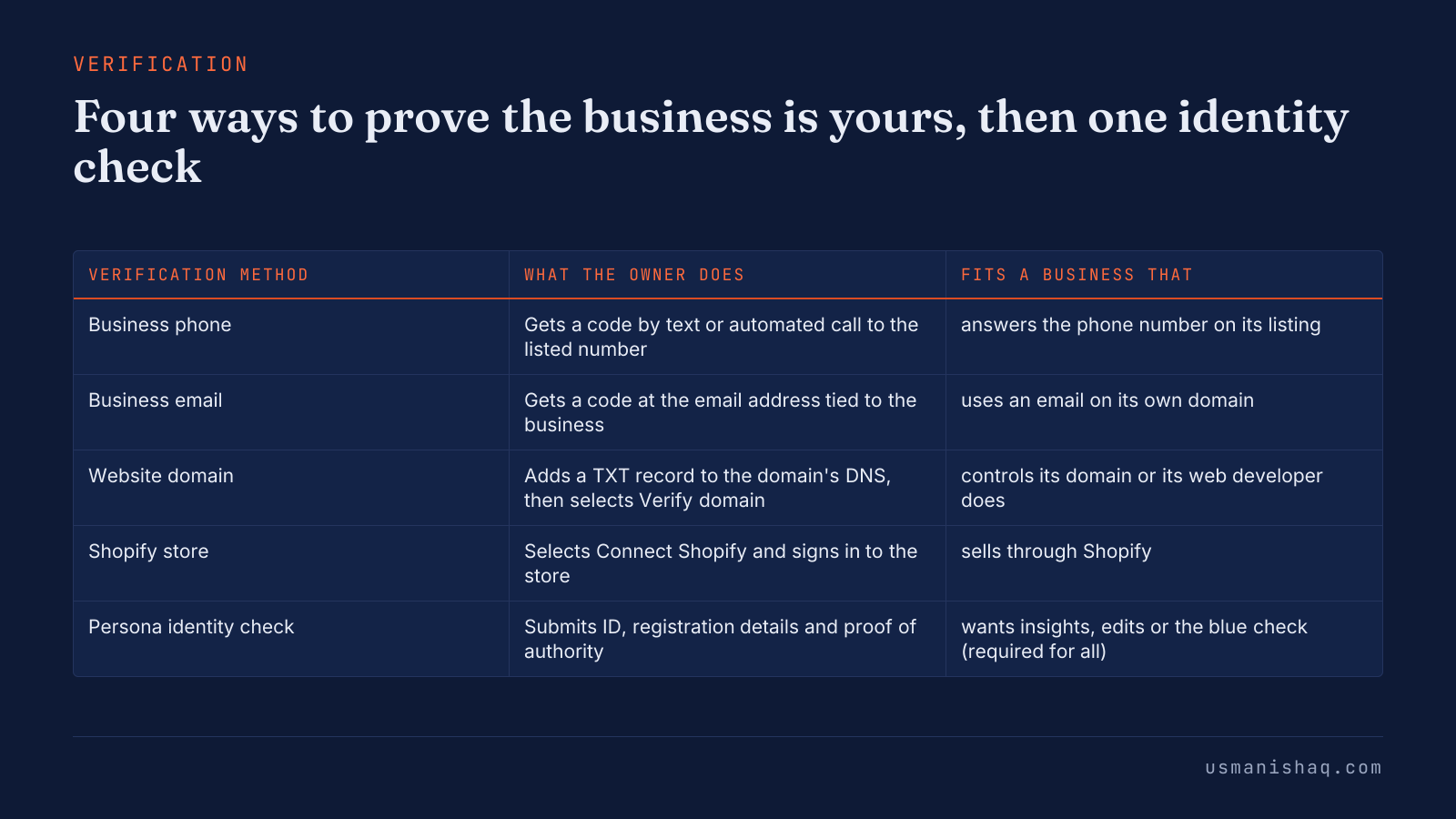
The table above answers a Reddit thread title from the search results: "need govt ID as well as verifying domain??". Both are needed, because the domain proves the business and the ID proves the person. Sole traders whose trading name differs from the legal name should check the documents first.
What do the Business Hub insights count?
Business Hub insights count three things over the past 28 days: mentions, website clicks and discovery topics. The three insights, as OpenAI's help article defines them, are given below:
- Mentions: an online business earns a mention when ChatGPT references the business's website, and the brand name alone does not count. A local business earns a mention when ChatGPT shows a result for that location, even when nobody opens the result.
- Website clicks: the number of recorded clicks on links to the business's website in ChatGPT.
- Discovery topics: the themes in answers that mentioned or cited the business. Discovery topics are not the prompts people typed and not a direct measure of intent.
Insights appear only after Persona approval and only once enough conversations pass OpenAI's thresholds. A blank metric does not mean zero. Business Hub shows no prompts, no conversations and no competitor data.
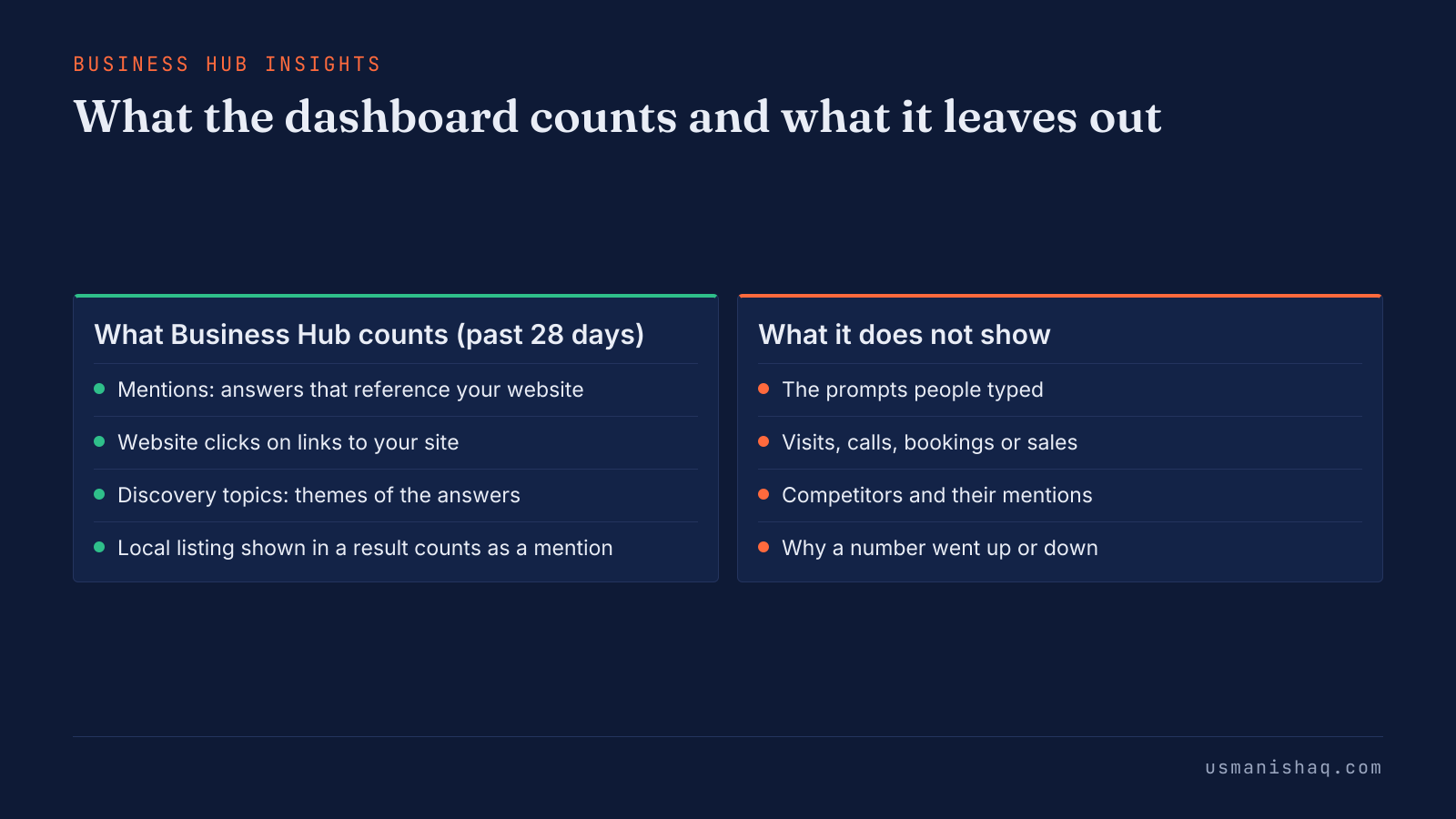
The comparison above sets the counted insights against the missing ones. A low-volume trade business, such as an electrician serving one town, can stay below the threshold and see blanks. The 28-day window reads best as a trend across several months. The click count needs the most care of the three.
Why do ChatGPT clicks not equal website visits?
ChatGPT clicks do not equal website visits, because Business Hub counts recorded link clicks inside ChatGPT, not arrivals on the website. The clicks tooltip in Business Hub reads: "Clicks don't confirm website visits or conversions." Search Engine Roundtable reported the tooltip wording on 10 November 2026.
Visits, calls and bookings belong in the site's own analytics. GA4 or another analytics tool should show sessions where the source is chatgpt.com. A launch-day test published on flaviocopes.com found ChatGPT links tagged utm_source=chatgpt.com, which makes ChatGPT sessions easy to filter.
Pew Research Center researchers Athena Chapekis and Anna Lieb measured a related gap on Google in a short read dated 22 July 2025. The study used the browsing data of 900 U.S. adults from March 2025. Users who encountered an AI summary clicked on a traditional search result link in 8 percent of all visits. Users who did not encounter an AI summary clicked on a search result nearly twice as often, in 15 percent of visits. The figures cover Google AI summaries, not ChatGPT. Google Search Console does not separate AI Overview clicks from normal web search totals. The owner's own records are the last of four moves after the launch.
What should an owner do after the launch?
An owner should claim, check, match and measure after the launch of Businesses in ChatGPT, in that order. The four moves that cover the ChatGPT side of AI search visibility are given below:
- Claim: claim or add the business in Business Hub before anyone else does, with the phone, email and domain records current.
- Check: ask ChatGPT about the business's services, area, hours and phone, and write down every wrong fact. Correct each fact through profile edits after approval, because OpenAI reviews every change before publishing.
- Match: make the website, the Google Business Profile and the directory listings state the same name, services, area and phone. ChatGPT may also use other sources besides the profile, according to OpenAI. Making the facts agree across the website and other sources is the work of AI Search Visibility.
- Measure: read the 28-day numbers in Business Hub, and confirm visits and calls in the site's own analytics.
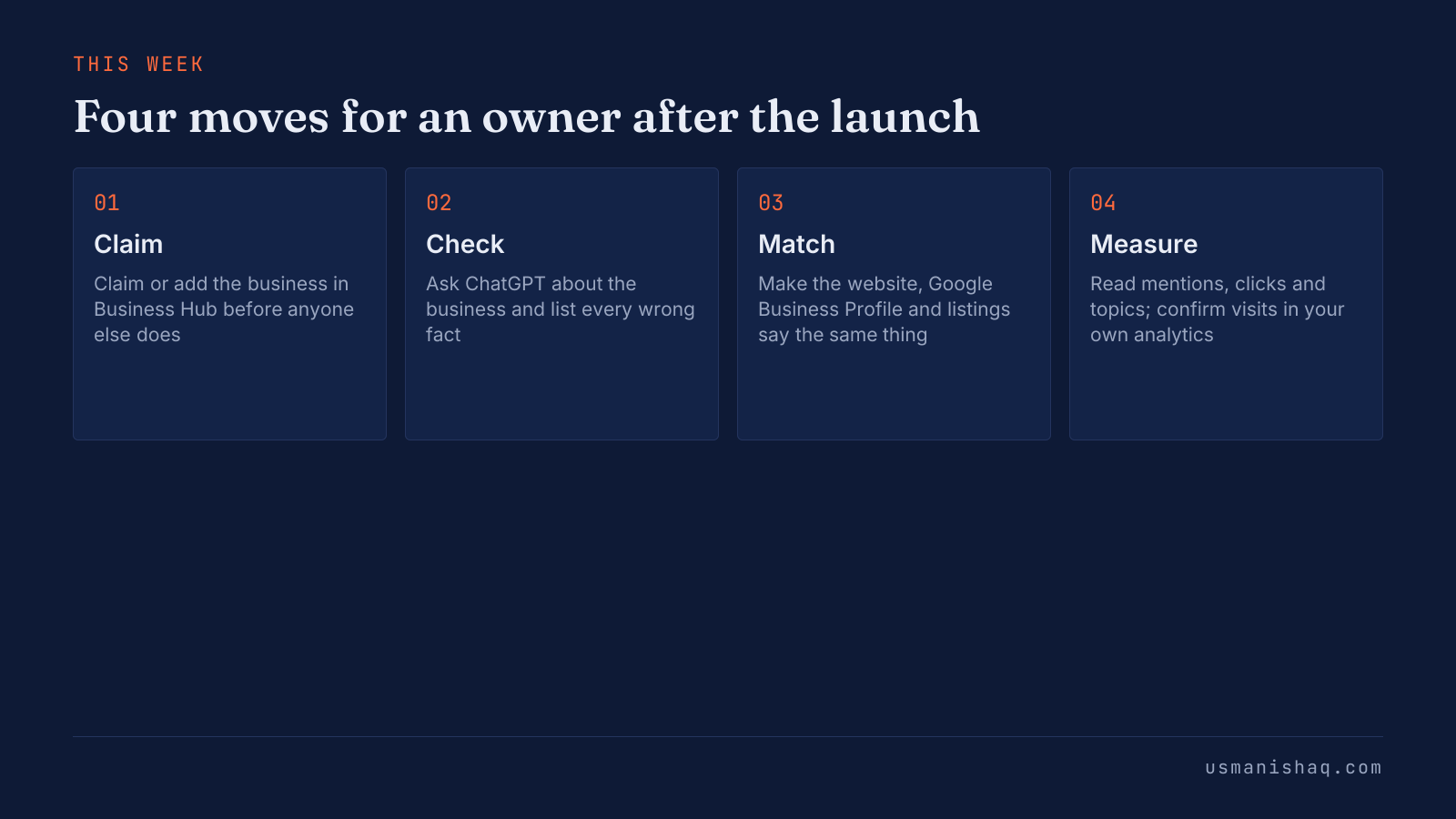
The flow above puts the four moves in order, and owners outside the US can start at Check while the claim waits. None of the four moves changes how ChatGPT ranks a business by itself.
What does claiming a business in ChatGPT not change?
Claiming a business in ChatGPT does not change ChatGPT's independent recommendations. OpenAI's landing page states that claiming does not guarantee higher placement or sales. The FAQ in OpenAI's setup guide adds that advertising does not influence ChatGPT's independent answers. The information about the business across the web decides what ChatGPT says. The website therefore has to state one clear description: what the business sells, to whom and where. Semantic SEO calls that description a source context statement. Owners who write one source context statement can repeat the same facts on the website, the Google Business Profile and every listing. Reactions, Business Agents and common questions complete the picture of Businesses in ChatGPT.
What are owners and marketers saying about Business Hub?
Owners and marketers welcomed Business Hub as the first visibility data from OpenAI itself, and launch-week posts raised worries about hidden prompts and ads. The main themes in launch-week posts are listed below:
- First-party data: an Australian entrepreneur on LinkedIn called Business Hub "the first time OpenAI has shown us its own AI search data". The Pew Research Center short read Google users are less likely to click on links when an AI summary appears in the results explains why marketers watch clicks.
- Discovery topics: a widely shared X post by a startup CEO called the discovery topics "a free content calendar".
- Hidden data: the same post said the dashboard "HIDES the prompts and your competitors".
- Ads: a Hacker News commenter wrote "Here we go, the ad machine is beginning to whir."
- Agency work: the startup CEO's post recalled that agencies made a living claiming and fixing business listings in the 2010s.
What are Business Agents?
A Business Agent is a chat assistant that an eligible business builds in Business Hub to answer customer questions from the owner's product and policy information. Eligible US ecommerce and online service businesses can build, preview and publish an agent after claiming, according to OpenAI's launch post. Agent chat is labelled and kept separate from ChatGPT's own answers. An agent does not take bookings, complete purchases or check orders today. A Business Agent can be sponsored as the destination for ChatGPT Ads. OpenAI's Business Agents Policy sets the rules an agent follows. A plumber, an electrician or a dental clinic has no Business Agent option yet, because the beta limits agents to eligible US ecommerce and online service businesses.
Questions about claiming a business in ChatGPT
Six common questions about claiming a business in ChatGPT are answered below.
Does claiming a business in ChatGPT cost anything?
OpenAI's pages list no price for claiming a business in ChatGPT. An Ads account is not required.
Does a business need Shopify to claim a ChatGPT profile?
A business does not need Shopify to claim a profile in ChatGPT. OpenAI's landing page states that claiming works without Shopify.
Can an agency run the ChatGPT profile for the owner?
An agency can work on the ChatGPT profile once the claiming admin adds the agency as a teammate or grants agency access. Each person signs in with their own ChatGPT account.
How long does OpenAI take to review a claim?
OpenAI says the review time for a Business Hub claim varies, and the decision arrives by email.
Can an owner delete a ChatGPT business profile?
An owner can delete only an unpublished draft profile in Business Hub. OpenAI Support does not delete, unpublish or hide a published profile.
Does a blank insight mean no activity?
A blank Business Hub insight does not mean zero activity. The help article names three causes: an unmet threshold, data still in collection, or an unavailable metric.
Claim your business in ChatGPT
Businesses in ChatGPT lets an owner claim the profile ChatGPT already shows, verify the business and read mentions, website clicks and discovery topics in Business Hub. The claim and the Persona check decide who controls the profile. Clicks are not visits, so the owner's own analytics remain the record of calls and bookings.