
Usman Ishaq reads the site, writes the schema and sets the order of the fixes. The Digital Vikingz build team or your developer applies them, and I check the result.
What arrives is five deliverables, ending in a handover note. Scope is fixed, and a written quote follows a 30-minute call.
What does a technical SEO and schema consultant do?
A technical SEO and schema consultant finds what keeps pages out of Google's index and writes accurate structured data.
Technical SEO covers crawling, indexing, rendering and speed. Schema covers the JSON-LD that labels what a page is, who runs the business and what it offers.
Content strategy is a separate job. A technical fault only decides whether Google can read a page. Whether the page deserves to rank is a content question.
Take a sample HVAC company with a furnace repair page. A script builds its quote form after load, so Google's crawler reads a heading and no form. The owner sees a working page and Google sees half of one.
Or take a sample dental practice that moved to a new theme. The staging robots.txt file went live with it, so every page carries a Disallow rule. Nobody sees that in a browser.
I start from Search Console, not from a tool score. Google reports what it did with each URL, and that report sets the first fix.
What the work covers
A technical SEO and schema consultant delivers five items, from a crawl and index report to a handover note.
The table pairs each deliverable with its purpose and its contents.
| Deliverable | Question it answers | Contents |
|---|---|---|
| Crawl and index report | Which pages Google can reach and keep | A Search Console reading and a site crawl, side by side, with each fault named |
| Fix list | What to repair first and who repairs it | Fixes in order, each with its owner |
| JSON-LD for each page type | Whether Google can read what each page is | One block per page type, written to match the visible text |
| Core Web Vitals reading | Whether speed work is needed | Field readings before the fixes and again after |
| Handover note | Who can maintain this afterwards | Notes on each block, the validator results and the open items |
Schema is written per page type, not per page. One block per type is filled from the page's own fields.
The crawl matters more beside Search Console, because the crawl shows what exists and Google's report shows what it kept. Alone, each tells half the story.
A plugin fills the same fields on every page too. The question is whether anyone checked those fields against the text.
How the work runs
A technical SEO and schema consultant runs six steps from access to handover, and each ends in something readable.
The numbered list below walks through the six steps.
- Access and crawl: I get read access to Search Console and the site, and a crawl lists every URL.
- Index and render reading: the page indexing report and URL inspection show what Google did with each URL.
- Fix list: the faults go in order and each one gets an owner.
- Schema writing per page type: I write the JSON-LD for each type so it matches the visible text.
- Fixes and validation: the fixes go live and each page type is checked in the Rich Results Test.
- Re-read and handover: Search Console is read again and the handover note goes to your developer.
The steps run in that order every time. A site with no faults still gets steps one and two, because the reading is what finds nothing.
I do not edit your site. The build team or your developer applies each fix, and I read the result.
Some audits stop at the list. I stay through validation, because a fix nobody rechecks is a guess. A wrong guess on a robots.txt rule can hide a whole section.
What stops a page from being crawled, indexed or read
A technical SEO and schema consultant reads the Search Console page indexing report to name what blocks a page.
The table below gives common faults, how each one shows in Search Console and the usual fix.
| Fault | How it shows in Search Console | Fix |
|---|---|---|
| A robots.txt rule blocks the page | The status reads "Blocked by robots.txt" | Remove the rule for any page meant to be indexed |
| A noindex tag survives from staging | The status reads "Excluded by 'noindex' tag" | Remove the tag from the template, then request a recheck |
| Duplicate URLs carry no canonical | The status reads "Duplicate without user-selected canonical" | Set one canonical per page and redirect retired duplicates |
| A live page returns a 404 | The status reads "Not found (404)" | Restore the page or redirect it to its nearest match |
| Text is added by script after load | URL inspection shows rendered HTML without the text, and the report may list the page as crawled but currently not indexed | Put the main text in the HTML the server sends |
| The server fails under load | The status reads "Server error (5xx)" | Fix it at the host or the CDN, then validate the fix |
Google's guide to blocking indexing says a robots.txt block does not keep a page out of results. Other pages that link to it can still surface it. It also says a noindex tag works only when the page can be crawled.
Blocking a page with both is a mistake, because Google never reads the tag.
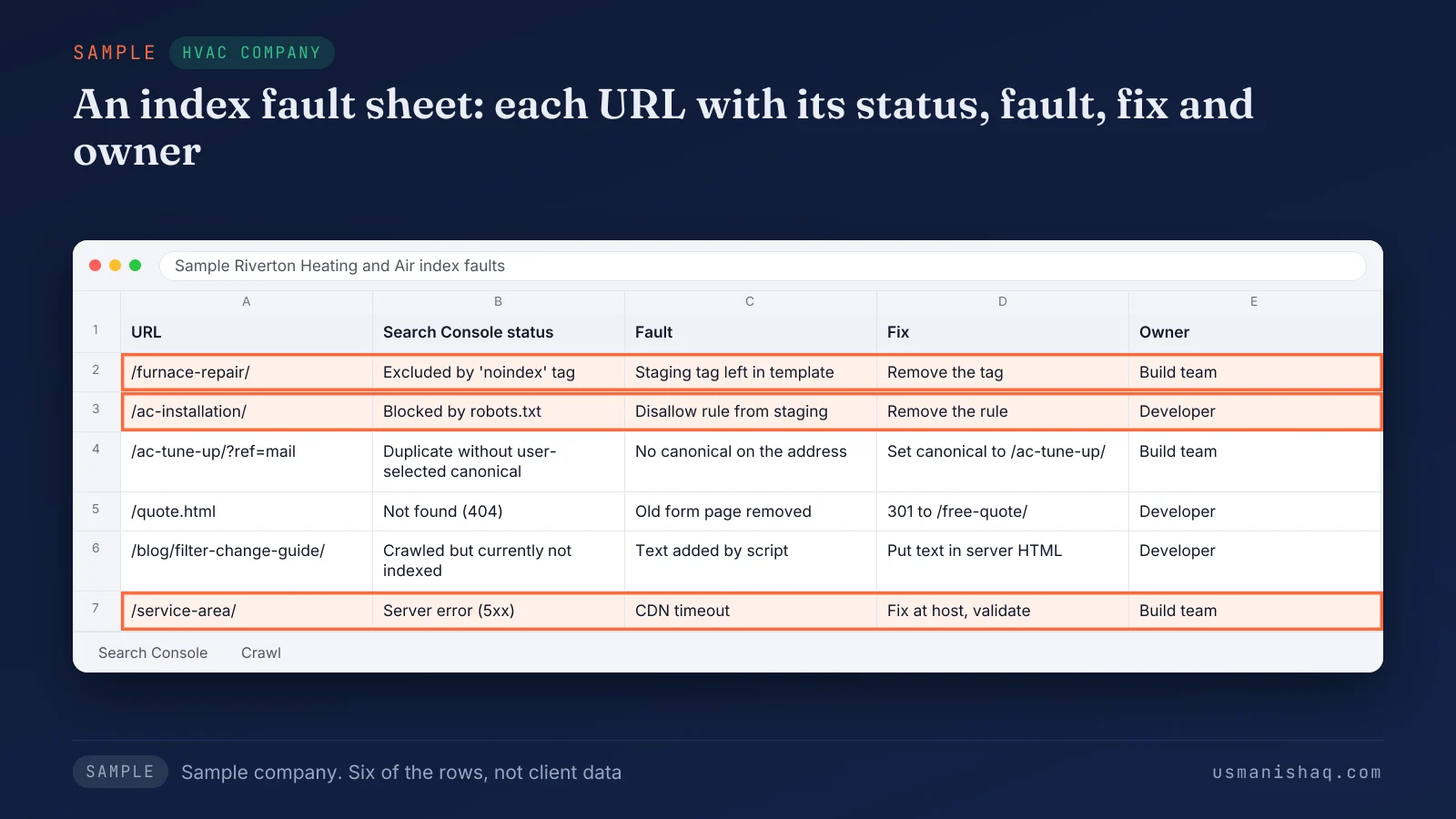
The figure below shows six rows from a sample HVAC site. A noindex tag from staging sits on the furnace repair page, and a robots.txt rule blocks AC installation.
An AC tune-up address with a tracking parameter has no canonical. Visitors to the old quote page get a 404, so it earns a 301 to the free quote page.
The filter change guide loads its text by script, which moves into the server HTML. A server error at the CDN hits the service area page, and the host gets the fix.
Google crawls, renders and then indexes a script-built page. It indexes only the content in the rendered HTML and follows only links written as an anchor with an href.
Crawl budget rarely matters for a small site. Google's guide on it is written for sites of a million pages that change weekly, or ten thousand that change daily.
Which schema each page type needs
A technical SEO and schema consultant gives each page type its own schema.org types, matched to visible text.
The table below gives each page type, its types, the properties to match and Google's rich result.
| Page type | Types | Properties that must match visible text | Google rich result |
|---|---|---|---|
| Home page | Organization, WebSite | Name, logo, address, phone | Organization is documented, and Google decides what shows |
| Service page | Service, with provider and areaServed | Service name, description, areas served | None in Google's search gallery |
| Location or practice page | HVACBusiness, Dentist or LegalService | Address, phone, opening hours | Local business is documented |
| Guide or article | Article, BreadcrumbList | Headline, dates, author as printed | Article and breadcrumb are documented |
| Product page | Product, Offer | Name, price, availability | Product snippets are documented |
| Questions block | FAQPage | Question and answer text | None, because Google retired the FAQ result in May 2026 |
Google chooses which features to show, so a valid block earns a rich result only when Google decides. I treat every row in the last column as a chance, never a promise.
The JSON-LD below is a sample for a made-up HVAC business, not a client.
Every detail is invented. It names Riverton Heating and Air at 214 Mill Street, Riverton. The phone is +1-555-555-0142, the hours are Monday to Friday, 8:00 to 17:00, and the area served is Riverton.
{
  "@context": "https://schema.org",
  "@type": "HVACBusiness",
  "name": "Riverton Heating and Air",
  "telephone": "+1-555-555-0142",
  "address": {
    "@type": "PostalAddress",
    "streetAddress": "214 Mill Street",
    "addressLocality": "Riverton"
  },
  "openingHours": "Mo-Fr 08:00-17:00",
  "areaServed": "Riverton"
}
The sample page prints the same name, phone, address, hours and service area in its footer, and the JSON-LD only repeats them. It adds nothing a visitor cannot read.
Suppose the markup said open 24 hours while the page said Monday to Friday. Google's guideline says not to mark up content that visitors cannot see, so that mismatch is a fault. When the hours change, both places change on the same day.
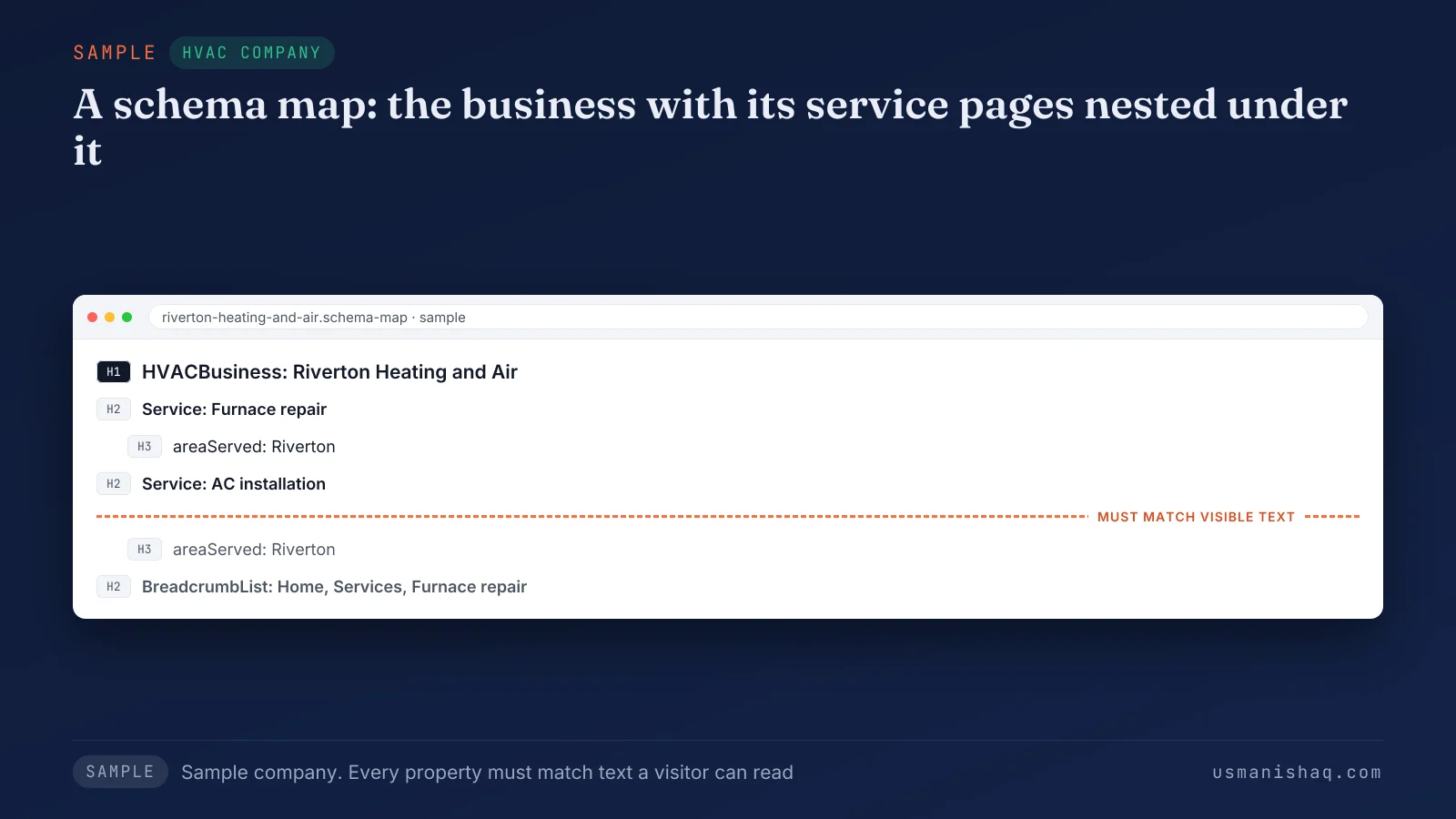
In the map, the HVACBusiness entity Riverton Heating and Air sits at the top. Furnace repair and AC installation hang under it as Service entries with Riverton as the area served.
What schema does and does not do
A technical SEO and schema consultant uses schema to state what a page is, never to promise a ranking.
The list below labels each claim by its source.
- Documented by Google, structured data can make a page eligible for rich results. No markup promises one.
- Documented by Google in 2020, structured data by itself is not a generic ranking factor.
- Documented by Google, markup that breaks the guidelines can bring a manual action. That action removes rich result eligibility and leaves ordinary ranking alone.
- Documented by Google, AI Overviews and AI Mode need no special markup or optimization. A page must be indexed and eligible to show with a snippet.
- Research by Chen and Koudas (2026) covered 158,099 AI answers with 468,037 citations. Comparing pages of one website, structured data did not set cited pages apart, and page properties explained little.
- Practitioner study by Ahrefs (May 2026) tracked 1,885 pages that added JSON-LD against 4,000 control pages. It found no clear effect on AI citations, and it studied pages already being cited.
None of these items gives a reason to sell structured data as an AI citation lever, so I do not.
Schema states a page's facts in a form Google reads directly. That helps only when the markup matches the page.
How speed and page experience fit
A technical SEO and schema consultant treats speed as a reading before and after the fixes.
Google documents Core Web Vitals as part of page experience. The three field metrics are Largest Contentful Paint, Interaction to Next Paint and Cumulative Layout Shift. Google publishes a good threshold for each.
Google recommends good Core Web Vitals. It says good page experience aligns with what its core ranking systems seek to reward.
I read the field data in Search Console before the fixes and again after. A score that moves is reported, and a score that does not move is reported too.
Slowness can trace to a heavy hero image, a third-party script or a late font. The fix list names which one and who changes it.
I promise no score. Field data comes from real visitors on real phones. A fix that helps one metric can leave another where it was.
What this work has produced
A technical SEO and schema consultant proves the work on one live site, with each step dated.
Usman Ishaq's work for a test-prep site that serves candidates worldwide is the proof. In January 2026 a renamed URL began returning a 404, and I restored it.
In October 2026 the technical pass ran through the CDN. I redirected 26 duplicate and AI-guessed addresses to the pages they belonged to, each with a 301. I also fixed the sitemaps and set noindex on private paths so paid files stay out of search.
In November 2026 I wrote connected schema for 26 pages. The test prep SEO case study gives the dated sequence.
I claim no result from the schema. The case's figures come from the guides. The technical pass landed in the last weeks of the period, so it barely shows in them.
I have no before and after figure for rich results, and I give none here.
Who this is for, and who it is not for
A technical SEO and schema consultant suits owners whose pages are missing from Google or are read wrongly.
Three situations call for this work, and they follow.
- Search Console reports pages as excluded, blocked or crawled and not indexed, and nobody knows why.
- The site moved, changed theme or changed platform, and URLs or canonicals may have shifted.
- A plugin writes schema that nobody has compared with the page text.
Two situations fit poorly. A site with thin pages needs a content job first, which is a different service. An owner who wants a promised position will not find it here.
How the work is priced
A technical SEO and schema consultant quotes one fixed scope, set by page types, indexed URLs and platform.
More page types need more JSON-LD blocks. More indexed URLs mean a longer crawl reading and more faults to sort. A 30-minute call sets those three numbers before anything is quoted.
The platform decides how each fix is made. A hosted builder with locked templates takes different fixes from a custom Next.js site.
No price appears on this page. Usman Ishaq lists the five deliverables in the quote, so you can compare delivery with the agreement.
Nothing in a quote promises a ranking, a rich result or a speed score.
How to choose a technical SEO and schema consultant
A sound technical SEO and schema consultant shows a sample fix list, matching schema and who applies each fix.
Run five checks before you sign anything.
- A sample fix list: ask to see one, with an owner against each fix.
- Schema that matches the page: ask for one block beside its text, and hold it against Google's structured data guidelines.
- Search Console readings before and after, with the limits stated.
- Who applies the fixes: ask who edits the site and who checks the result.
- No promises: Google says AI features need no special markup, so a promise of citations is a red flag.
Google's own pages settle many of these checks. Read Google's guide to blocking indexing for robots.txt and noindex, and Google's JavaScript SEO basics for rendering. Google's Core Web Vitals page covers speed.
A rebuild or a platform move is a different job. Website Development builds and migrations covers it, while a Semantic Content Audit of page meaning covers what the pages say. Owners who want AI answers tracked can read about AI Search Visibility work on AI answers.
How does a technical SEO and schema consultant compare with a schema plugin?
A plugin writes schema from page fields, while a technical SEO and schema consultant checks each field against the page.
Cost is low, and a plugin suits a site with plain page types and correct fields. If its output validates and matches the text, keep it.
A plugin fills the same template on every page. One wrong hours field then spreads to every page at once, and that is where a consultant earns the fee.
How does a technical SEO and schema consultant compare with a developer?
A developer applies fixes in code, while a technical SEO and schema consultant decides which fixes matter.
Your developer may know your stack better than I do. I know what Search Console reports and what each fix should produce when Google reads the page again.
You need both jobs done. They do not have to be one person, and the fix list is the handoff between them.
How does a technical SEO and schema consultant compare with an audit tool?
An audit tool lists detected faults, while a technical SEO and schema consultant sorts them by Google's handling.
Some tool warnings never touch indexing at all. I use a crawl for the list and Search Console for the verdict.
When the two disagree, I trust what Google reports about its own handling.
Who applies the fixes?
The agency I run applies fixes on request, and Usman Ishaq decides each fix and checks the result.
Your own developer can apply them instead. That team works at Digital Vikingz.
What else do owners ask about technical SEO and schema?
Owners ask four more questions about technical SEO and schema, on indexed pages, platforms, access and checking existing markup.
Do I need schema if Google already indexes my pages?
Yes, when the pages carry facts that markup can state, such as an address, hours or a product price.
Indexing means Google stored the page. Markup tells Google what each fact on it is.
Which platforms can you work with?
The work suits WordPress, Shopify, Wix, Squarespace and custom Next.js sites.
The platform sets which fixes need a developer. The fix list says which.
What access do you need?
A technical SEO and schema consultant needs read access to Search Console and a login for the site.
The build team or your developer applies the edits. Edit access to your hosting is not needed.
How can I check the schema I have now?
Paste one page into Google's Rich Results Test, then compare each value with the page text.
Any value a visitor cannot read is a fault. Fix that before adding more markup.
How to start
A technical SEO and schema consultant starts with a short call and ends the call with nothing to sign.
The 30-minute call covers your site, your platform and the page types that carry the business. Those details, with the indexed URLs, shape the written quote that follows.