
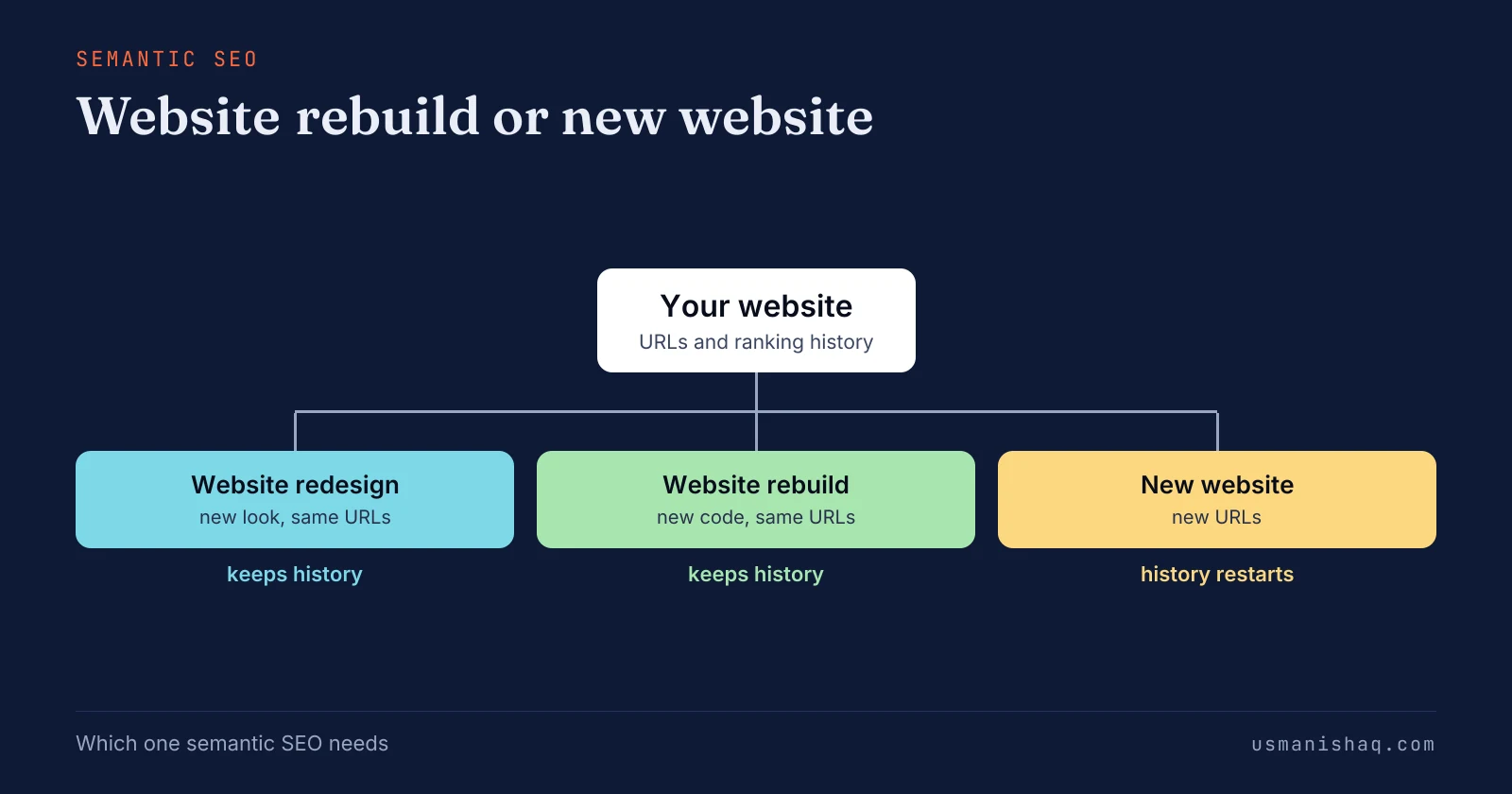
A website needs a rebuild on its current URLs, not a new website, when those URLs already bring searches, clicks and calls. Semantic SEO reads a website through its URLs and the searches each URL answers, so an owner can understand what a rebuild keeps.
A website redesign changes the look, a website rebuild changes the code on the same URLs, and a new website changes the URLs. Ranking history, the page list the business needs and the platform decide between a website rebuild and a new website.
An owner checks which project the website needs by matching the URLs and their ranking history to the page list, then testing the platform. Website development for semantic SEO starts from the URL check: every URL kept, merged or new before any template is made.
A new website hurts your SEO when URLs change without a permanent redirect, because those pages leave their ranking history behind. Semantic SEO plans the page list and the page templates before a website rebuild starts, so the build has a fixed target.
Four questions follow the choice: which query earns a page, how visual semantics shapes templates, whether SEO waits and what a new domain changes.
Do I need a new website for SEO?
No, your website needs a rebuild on its current URLs, not a new website, when those URLs already bring searches, clicks and calls.
A URL is the page address of one page, such as /drain-cleaning/. Semantic SEO reads a website through its URLs and the searches each URL answers, so an owner can understand what a rebuild keeps.
Owners who are pitched a new site often fear having to "start from scratch" on Google. The searches, clicks and links a site has earned sit in its URLs, not in its design. How old the design looks says nothing about what those URLs have earned.
A new website fits a business only when the current URLs and their ranking history hold nothing worth keeping. A new website also fits when the business itself changes its line of work. The choice for an owner's existing site therefore sits between a redesign, a rebuild and a new website.
What is the difference between a website rebuild, a redesign and a new website?
A website redesign changes the look, a website rebuild changes the code on the same URLs, and a new website changes the URLs.
A website redesign is a new look, layout and navigation on the same platform, content and URLs. A website rebuild is new code, templates or a new platform built on the same URLs, with permanent redirects only where a page merges. A new website is a site planned without the old URL list, on new URLs or a new domain.
Agencies also call a new website a new build. Many agencies use rebuild for a new platform with new URLs, so an owner should ask whether the URLs stay. The real difference between the three projects sits in what each one keeps from Google Search.
Ranking history is what a URL has earned in Google Search over time: the searches it appears for, its clicks and its links. The table below sets the three projects beside what each one changes and what each one keeps.
| Project | Look and layout | Code and platform | URLs | Ranking history |
|---|---|---|---|---|
| Website redesign | Changes | Stays | Stay | Kept |
| Website rebuild | Changes or stays | Changes | Stay; merged pages get a permanent redirect | Kept |
| New website | Changes | Changes | Change | Starts again, except on pages a permanent redirect carries |
Only the URL column separates a rebuild from a new website. Semantic SEO treats a redesign and a rebuild as one kind of project, because both keep the URLs and ranking history. What decides between the three projects is a set of three checks on the current site.
What decides between a website rebuild and a new website?
Ranking history, the page list the business needs and the platform decide between a website rebuild and a new website.
Most comparison guides decide by the site's age, its looks and the budget. None of the three shows what the current URLs have earned.
The three checks that decide the project are listed below:
- Ranking history: which current URLs bring impressions, clicks and links from other sites.
- Page list: which pages the business needs, one for each service, town and question.
- Platform: whether the current platform can hold every page on the list.
Semantic SEO reads the URLs and ranking history first, because the history leaves with the URLs. The figure below sets out the three checks, each one read on the current URLs.
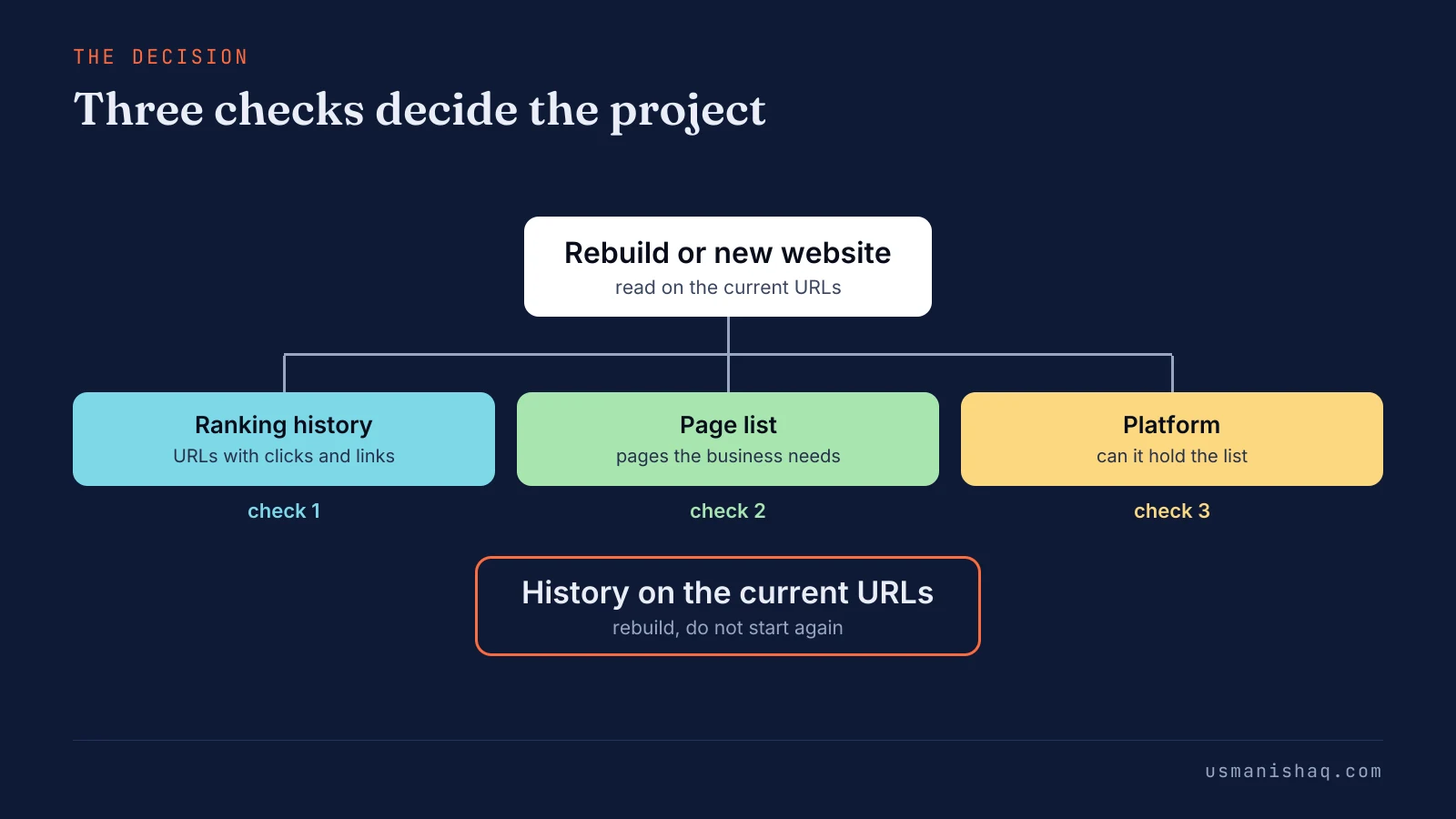
A website with ranking history and a platform that holds the page list needs a redesign at most. A website with ranking history and a platform that blocks the page list needs a rebuild on a new platform. A website with no URL worth keeping can start again as a new website.
The first check to read is the ranking history in the URLs.
What ranking history does a website keep in its URLs?
A website keeps ranking history in each URL: the searches the page appears for, its clicks and the links pointing to it.
Google Search Console is Google's free report on how a website appears in Google Search. The Pages tab of the Performance report lists impressions and clicks for each URL. Clicks from Google Search are the organic traffic each URL brings.
The Links report lists the pages of the site that other sites link to. Google's guide to site moves states: "301 and other permanent redirects don't cause a loss in PageRank."
A URL that changes without a permanent redirect leaves its ranking history behind. Redesign guides and a video title call that loss "years of SEO".
Ranking history is worth keeping when the URL still answers a search for a service the business sells. Semantic SEO keeps every URL that still answers a search the business wants. The searches the business wants come from its page list.
How does the page list a business needs decide the project?
The page list decides the project by showing which pages the current site lacks, such as one page per service or per town.
A topical map for a business website is the plan of every entity, attribute and question the website must cover. The plan gives each one an owning page, section or sentence. The page list is the set of pages the topical map gives a page of its own.
Each current URL is matched to the page list. A kept URL answers a page on the list. Two URLs that answer one search merge into one page with a permanent redirect.
A listed page with no URL is a new page in the site structure. Semantic SEO builds the page list before the website, so the platform is tested against real pages.
Owners name the gap themselves: "a separate page per service, not one Services page listing everything". A long list of new pages is a reason to test the platform, not to drop the old URLs.
Does a broken or outdated platform mean a new website?
No, a broken or outdated platform means a rebuild on a new platform, with the current URLs carried across to the new one.
Owners name the trigger as "a hacked or broken site". A URL belongs to the domain, so a new platform can serve the same URLs. Semantic SEO cares where a page lives, not which platform serves the page.
Some platforms force a fixed URL structure on every page. Each page that changes URL on such a platform gets one permanent redirect. Google's guide to site moves gives the heading "Change only one thing at a time".
Google's example lists three separate changes: "move your site to a new domain name, change your content management system (CMS), and update your site to use a new layout". A platform change and a domain change are two projects, each with its own check.
How do you check which project your website needs?
An owner checks which project the website needs by matching the URLs and their ranking history to the page list, then testing the platform.
The check runs on the current site before any work is bought, and before any quote is compared. The worked example after the steps shows one result on a trade site.
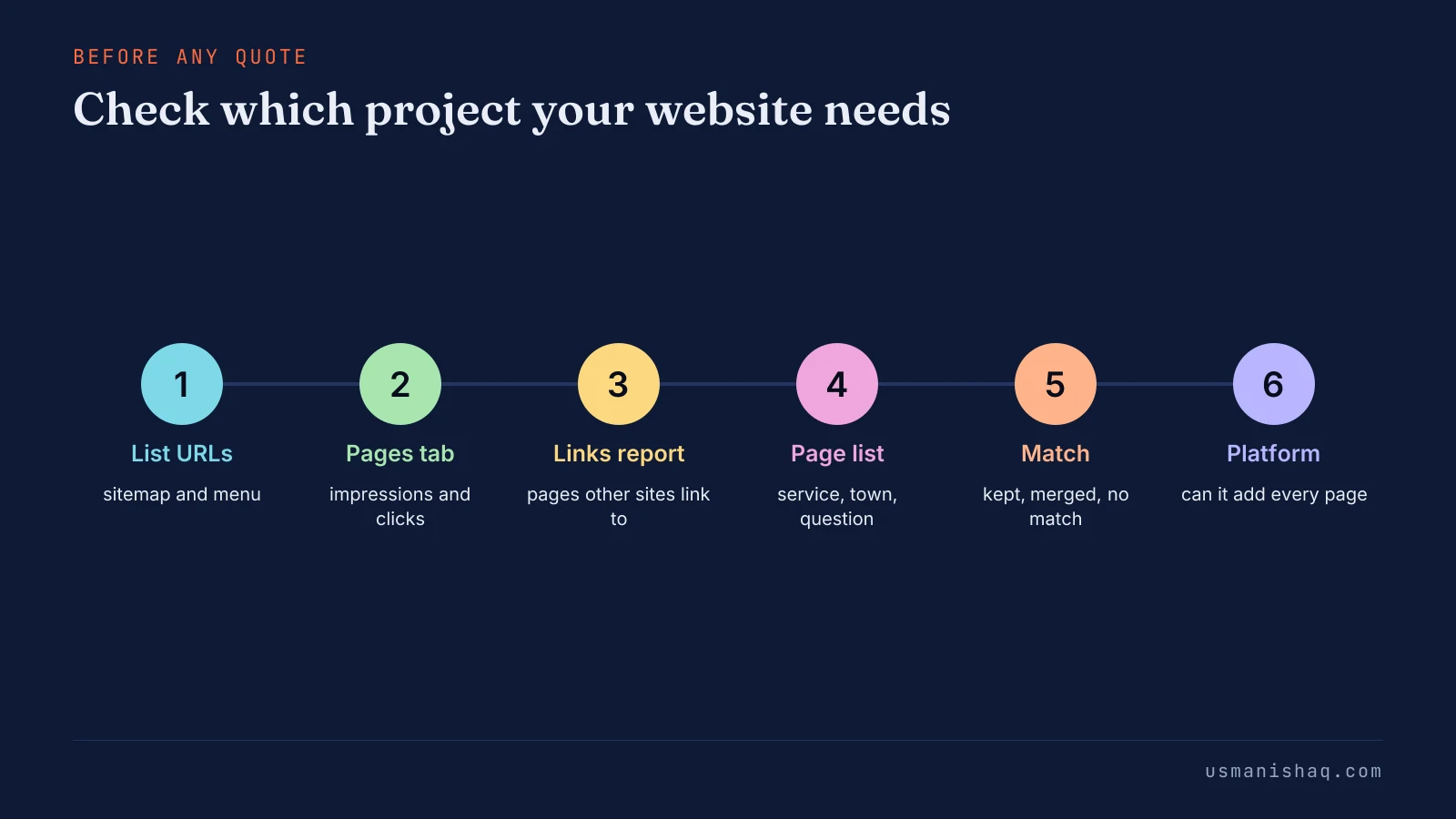
The steps to check which project a website needs are listed below:
- List every current URL from the sitemap and the site's menu, including old pages no menu shows.
- Export the Pages tab of the Search Console Performance report for the longest period on offer.
- Note the pages other sites link to in the Links report.
- Write the page list the business needs: one row per service, town and question.
- Mark each current URL as kept, merged or without a match on the page list.
- Test whether the platform can add every new page on the list, each on its own URL.
The figure below sets the six steps in order, from the list of URLs to the platform test.
Google's guide adds that "it's likely your most important URLs have been submitted in Search Console that way", meaning through a sitemap.
URLs with history and a platform that passes mean a redesign or a rebuild on the same platform. URLs with history and a platform that fails mean a rebuild on a new platform with the same URLs. No URL with history means a new website loses nothing.
Website development for semantic SEO starts from the URL check: every URL kept, merged or new before any template is made. The Website Development for semantic SEO service builds or migrates the site on that list, with one permanent redirect for each merged URL.
The six steps are easiest to read on one trade site, such as a plumbing company website.
What does the check show for a plumbing company website?
A URL check tells a plumbing company with ranking history on two URLs to rebuild on its current URLs, not start a new website.
The illustration uses the plumbing company of the site's worked example, based in Springfield, with seven services in two towns, Springfield and Franklin. The current site has six URLs: /, /services/, /water-heater-repair/, /gallery/, /about/ and /contact/.
Search Console shows impressions and clicks on / and /water-heater-repair/. A supplier's site links to /water-heater-repair/. No other URL has ranking history.
The plumbing company's map gives 14 pages that own a search. The current site holds one of them, water heater repair.
The page /water-heater-repair/ keeps its URL, even though a plan drawn from scratch would name the page /water-heater/repair/. The /services/ page keeps its URL as the hub for the seven service pages.
The /gallery/ page has no searches and no links, so the page merges into /about/ with one permanent redirect. The home page, /about/ and /contact/ stay on their URLs.
The map adds 13 pages that have no URL yet, including /springfield/repiping/ and /franklin/repiping/. Semantic SEO gives the plumbing company one page per search, so each of the 13 new pages fills one row of the map. The figure below shows each current URL kept or merged into its closest page.
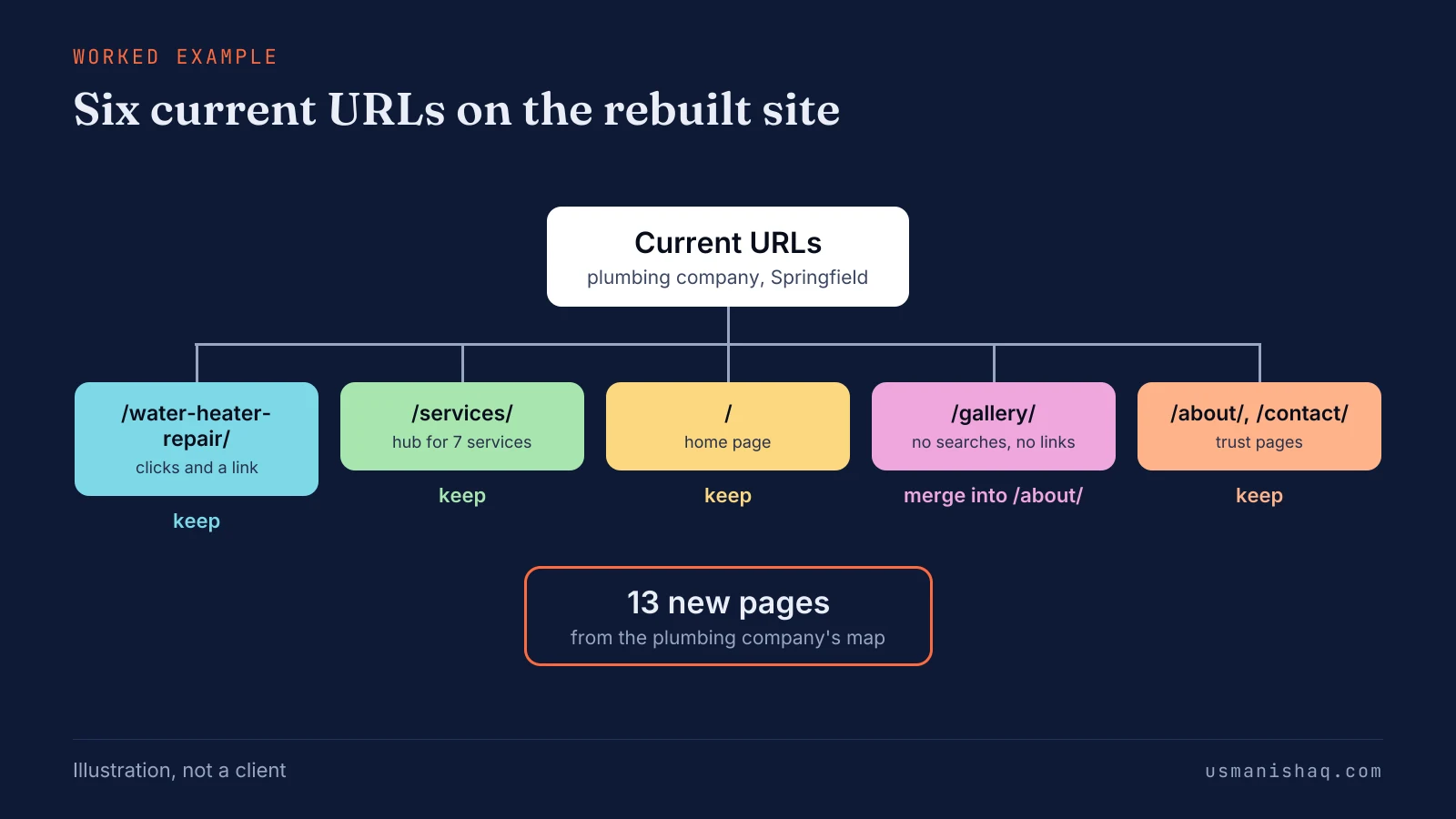
The current page builder does not allow URL folders such as /franklin/repiping/, so the rebuild moves to a new platform on the same URLs. The verdict is a rebuild, because two URLs carry history and only the platform blocks the list. The next question is whether the move would hurt rankings.
Will a new website hurt my SEO?
A new website hurts your SEO when URLs change without a permanent redirect, because those pages leave their ranking history behind.
Owners put the fear plainly: "lose my rankings". The risk sits in old URLs left without a permanent redirect. Google's "Redirects and Google Search" document states: "The 301 and 308 status codes mean that a page has permanently moved to a new location."
A 404 is the error a server returns for a page that does not exist. Semantic SEO counts a URL that returns a 404 as lost ranking history, so the URL check lists every old URL. Google's guide to site moves warns: "Expect temporary fluctuation in site ranking during the move."
I moved the site you are reading from WordPress to Next.js on 3 November 2026. The old category paths 308-redirect to the new /blog/ URLs. Three old paths, /copywriting/, /google-update/ and /portfolio/instagram-automation/, returned a 404 instead of a redirect.
The three 404s, not the new platform, were the part of the move that left ranking history behind. Pages that redirect correctly still need time for their rankings to settle.
How long do rankings take to settle after a website rebuild?
Rankings on pages a website rebuild redirects usually settle in a few weeks on a small or medium site, and larger sites take longer.
Google's guide states: "a small to medium-sized website can take a few weeks for most pages to move, and larger sites take longer." A rebuild that keeps every URL leaves Google nothing to move. Semantic SEO keeps the URLs during a rebuild, so most pages have no move for Google to process.
The same guide advises: "Keep the redirects for as long as possible, generally at least 1 year." A drop caused by a missing page or a broken redirect does not settle by waiting. A missing page is prevented by the plan made before the rebuild starts.
What does semantic SEO plan before a website rebuild starts?
Semantic SEO plans the page list and the page templates before a website rebuild starts, so the build has a fixed target.
Choosing the project settles what the site keeps. The plan settles what the rebuilt site must hold.
The topical map as a planning method comes from the framework of Koray Tuğberk Gübür. The framework is a method of work, not a statement by Google.
The three verdicts of a page decision are a page, a section and a sentence. The test for which query earns a page gives each search one verdict. The rebuilt site's page list follows the page test for which query earns a page, run on every search before a page is built.
The order of work is fixed: page list first, templates second, the build third. Internal links follow the page list, because each link joins two listed pages. Templates come second because each template repeats on every page of one type.
How should a rebuilt website's templates place the main content?
A rebuilt website's templates should place each page's main content first and keep one block order for every page of the same type.
Main content is the answer the page exists to give, such as the service, its price range and phone number on a service page. Block order is the sequence of sections a template repeats on every page of one type. Semantic SEO plans one template per page type, so every service page shares one block order.
Page layout carries meaning as well, a subject known as visual semantics. A separate guide explains how visual semantics reads page layout as meaning, block by block. Owners still hear advice to make SEO wait for the rebuilt templates.
Should SEO wait until the website is rebuilt?
No, SEO should not wait for a website rebuild, because the page list and the URL check decide what the rebuild must hold.
Owners report pitches such as "they can make me a better website to rank number 1 in google". A rebuild without a page list rebuilds the same gaps. The URL check also names the pages with history that the build must protect.
SEO first means the page list and the URL check are finished before the rebuild starts. Semantic SEO work on the page list carries into the rebuilt site, because the pages keep their URLs. Only work tied to the old templates waits, such as a layout fix on a template the rebuild replaces.
A domain change is a different matter, because a new domain moves every URL at once.
Is a new domain the same as a new website?
No, a new domain is a separate project from a new website, because every URL changes even when the pages stay the same.
The domain is the first part of every URL, such as the name before /drain-cleaning/. Google's guide to site moves lists "Domain name changes" among the kinds of site move. One forum answer separates the two as "the actual site rather than the URL".
Semantic SEO keeps the most ranking history when a website rebuild stays on the same domain. The same line between site and address runs through the questions owners ask after the choice.
Questions owners ask about a website rebuild or a new website
Owners weighing a website rebuild or a new website ask five more questions: going back, redirects, content, a new look and lost rankings.
Should I go back to the old website after rankings dropped?
No, an owner should find the cause of the drop first, because going back changes the URLs a second time. Google's guide to site moves names a common cause: "We frequently see people redirecting to the wrong (non-existent) URLs on the new site."
Are 301 redirects all a new website needs to keep rankings?
No, a 301 redirect carries a URL's history, but the new page still has to answer the searches the old page answered. Google's Redirects and Google Search document names 301 and 308 as the permanent redirects.
Will a website rebuild lose the existing content?
No, a website rebuild keeps the existing content. Content moves to the new templates on the same URLs where the map keeps them.
Does a redesigned website rank higher on its own?
No, a new look on the same URLs and content does not raise rankings by itself, because rankings follow the searches each page answers. Semantic SEO works on the page list and the answer on each page, not on the look.
Should a site that lost rankings start again as a new website?
No, a new website does not fix the cause of lost rankings, and a redirected new website carries the old signals with it. Google's Site moves with URL changes explains that a year of redirects "allows Google to transfer all signals to the new URLs".
What is the first step before a website rebuild or a new website?
The first step before a website rebuild or a new website is a list of every current URL with its ranking history.
The list lets an owner understand which URLs and ranking history a new website would put at risk. Semantic SEO then builds the page list on top, so the rebuild keeps what the site has earned.