
Pages on a small business website are not indexed because Google was told to skip them, could not reach them, sees them as copies, or crawled them and left them out.
Search Console names each of those reasons. Read the name and you know the next move. It may be a setting you change, a job for your developer, or nothing at all.
The Page indexing report is the place to look, and Google's own help page defines every status. Here are those definitions in plain words, with who fixes each one, and an order of checks that fits a lunch break.
Why pages on a small business website are not indexed
Pages on a small business website are not indexed for a reason that the Page indexing report names, and the table below lists the ones you will meet most.
Google's Page indexing report help page says the report shows the indexing status of every URL Google knows about in your property. Open it in Search Console, go to "Why pages aren't indexed", and click a row to see the affected pages.
| Status in the report | What Google's help page says it means | Who usually fixes it |
|---|---|---|
| URL marked 'noindex' | Google met a noindex tag and did not index the page | You or your developer |
| URL blocked by robots.txt | Your robots.txt file blocked the page | You or your developer |
| Soft 404 | A friendly "not found" message came back without a 404 code | Developer |
| Not found (404) | The page returned a 404 when requested | You, if the page should exist |
| Blocked due to unauthorized request (401) or access forbidden (403) | Googlebot was refused at the door | Developer or host |
| Page with redirect | A non-canonical URL redirects, so it is not indexed | Nobody, usually |
| Duplicate without user-selected canonical | A copy of another page with no preferred version declared | You or your developer |
| Alternate page with proper canonical tag | Marked as an alternate of an indexed page, correctly | Nobody |
| Duplicate, Google chose different canonical than user | You named one page as the original and Google picked another | Developer |
| Crawled - currently not indexed | Crawled by Google, not indexed | Depends on the page |
| Discovered - currently not indexed | Found by Google but not yet crawled | Wait, then check |
Two of those rows are fine as they are. Google says an alternate page with the proper canonical tag needs nothing from you. It calls a duplicate with no chosen canonical not an error.
Is it a problem when a page is not indexed?
Not every unindexed page is a problem, because Google's Page indexing report help page answers "Is it OK if a page isn't indexed?" with "Absolutely."
The same page lists pages Google leaves out on purpose. They include pages blocked by robots.txt or a noindex tag, copies of other pages, and filtered variations of a page. Google also says not to expect every URL on your site to be indexed, only the canonical pages.
So count the pages you want customers to land on. Nothing else. For a trade business that is the homepage, each service page, each town page and the contact page. Thank-you pages and search result pages can stay out.
Which statuses can you fix yourself?
You can fix the statuses that come from a setting, a redirect or a copy, and you can only wait on the rest.
Statuses that come from a setting
A setting causes the noindex, robots.txt, 401 and 403 statuses, and you fix each by changing the setting.
Google's help page says a page marked noindex is not indexed until the tag or header is removed. It also says a robots.txt rule is not recommended for blocking a page, because it stops Google from seeing a noindex tag.
A site builder setting or a plugin can add a noindex tag. Search the page source for the word noindex. If you find it on a page you want found, switch it off in the page's SEO settings, or ask the developer.
For a 403, the help page says Googlebot never provides credentials, so your server is returning the error wrongly and the page will not be indexed. A 401 is the same kind of refusal, a request for authorization.
Statuses that come from copies and redirects
Copies and redirects cause the duplicate, alternate and redirect statuses, and Google treats most of them as working as intended.
Google's help page calls "Duplicate without user-selected canonical" not an error. Google picked the other page. It will not serve this one. If Google picked the wrong one, name your preferred page with a canonical tag.
For example, take a company in Springfield, a sample, with a service page that opens at two addresses, one with a tracking code on the end. Google may list the second as a duplicate and index the first. Nothing is wrong.
The two "currently not indexed" statuses
Crawled and discovered "currently not indexed" mean Google has seen the URL and has not added it, for different reasons.
For "Crawled - currently not indexed", the help page says Google crawled the page, did not index it, and that the message is common and not necessarily an issue. It tells you to use URL Inspection if the page is important.
For "Discovered - currently not indexed", the page says Google found the URL and has not crawled it, because crawling it was expected to overload the site. The last crawl date is empty on the report.
Neither status says the page is bad. Check one thing first. Would a customer want this page? Does it give its own answer?
What is the fifteen-minute order for checking?
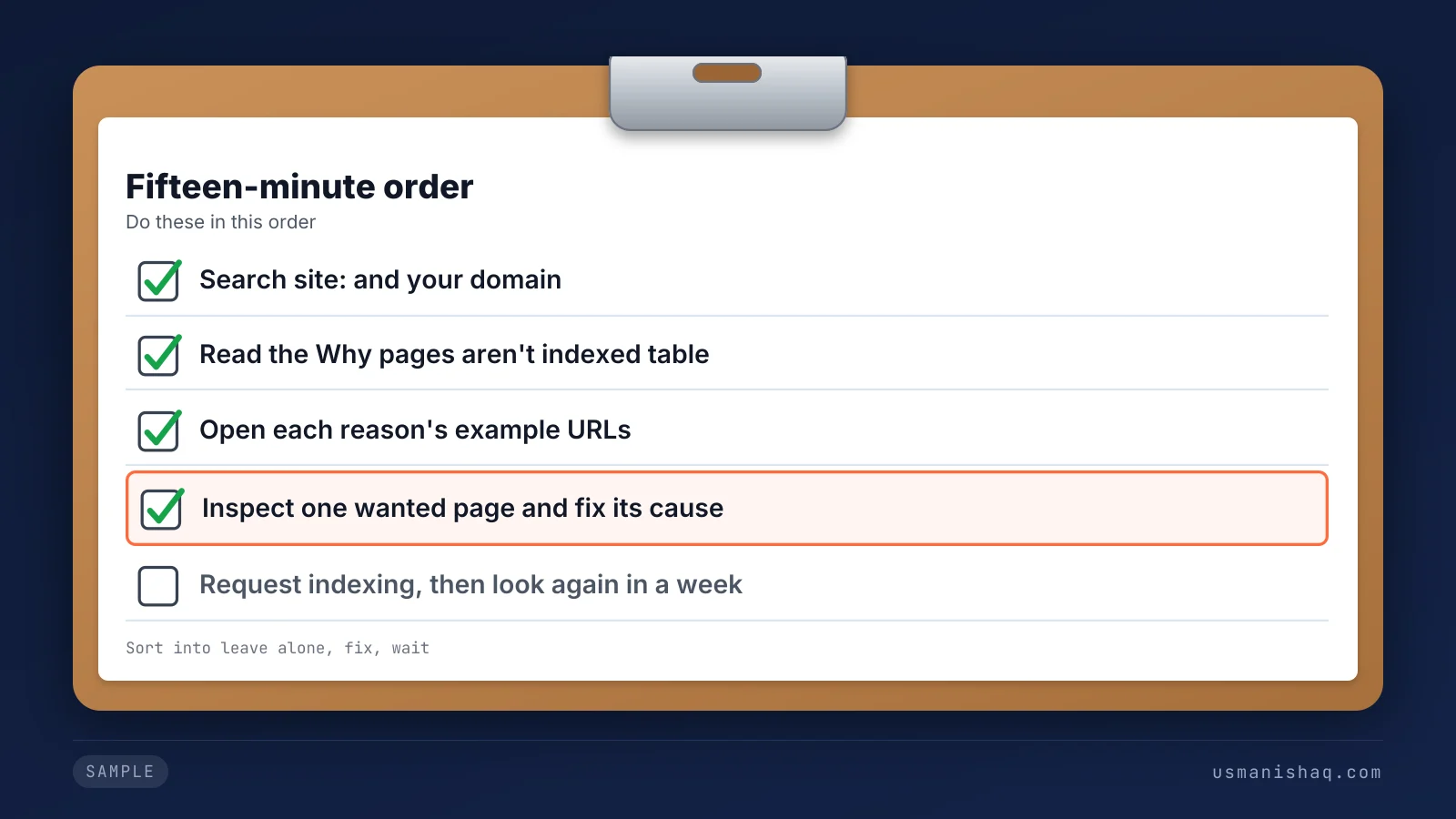
The fifteen-minute order starts with a search for your own site and ends with one page you request for indexing.
Fifteen minutes is my own estimate for a small site, not a Google figure.
- Search Google for site: followed by your domain, the check Google's missing-page help describes. Nothing back means the whole site is missing.
- Open the Page indexing report and read the "Why pages aren't indexed" table.
- Click each reason once and read the example URLs. Ask whether you want any of them found.
- For one page you want, run URL Inspection, read the reason it shows and fix that cause.
- Use "Request Indexing" on that page, write the date down and look again after a week.
Google's missing-page help says to allow at least a week after submitting a sitemap or a request before assuming a problem.
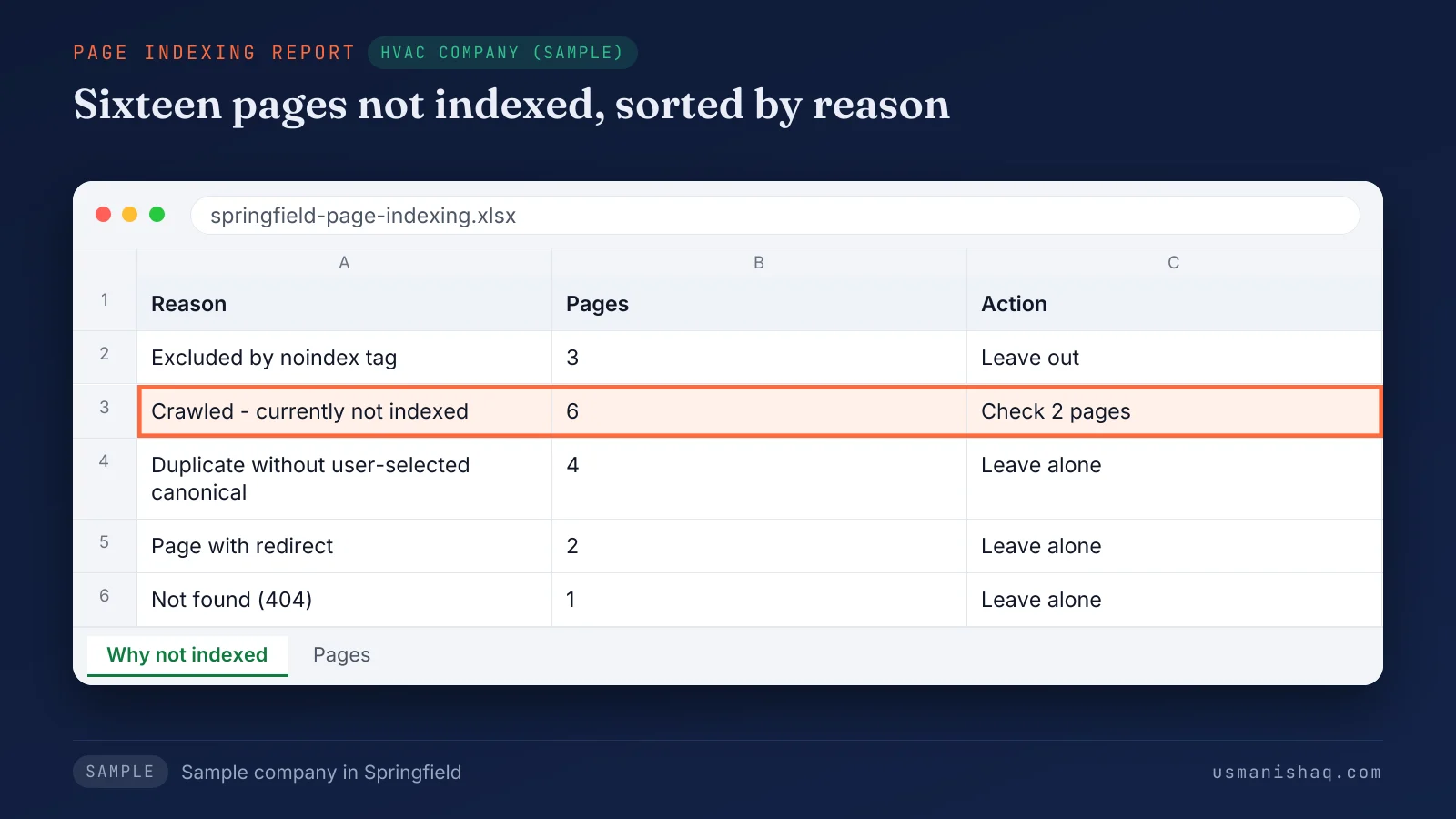
In that sample, the company has three pages marked noindex, six crawled but not indexed, four duplicates, two redirects and one 404. The three noindex pages are old staging copies, so they are right to stay out. The six crawled pages include two service pages the owner wants found. Those two get the check from step 4. The 404 is an old page with no replacement, so it stays out. Of sixteen unindexed pages, only two needed work.
A Technical SEO and Schema crawl and index report covers the same sorting for a site where the cause is not obvious.
Where to go from here
Once you have sorted the statuses, three questions about timing and content usually come next.
How long until a new page shows up?
A new page can take from a day or two to a few weeks to appear.
That range comes from Google's missing-page help, which says the total time depends on many factors. When a new town page starts to bring calls covers what happens after the page is indexed.
Do more blog posts get more pages indexed?
More posts do not get more pages indexed on their own, since Google says it does not index every page it finds.
Pages that repeat each other land in the duplicate statuses above. How many blog posts your services and towns need sets a number from your own services and towns.
Will AI-written pages get indexed?
The Page indexing report sorts pages by status, not by who wrote them, so the status is the test for AI-written pages too.
If most of a batch lands in "Crawled - currently not indexed", read the pages again and ask what each adds. Whether AI should write trade business pages sets out how I weigh that choice.
Pages not indexed
Pages not indexed usually have a named status in Search Console, and many of them need no fix.
Open the Page indexing report. Sort the reasons into leave alone, fix and wait. Request indexing for one page at a time, then look again after a week.