
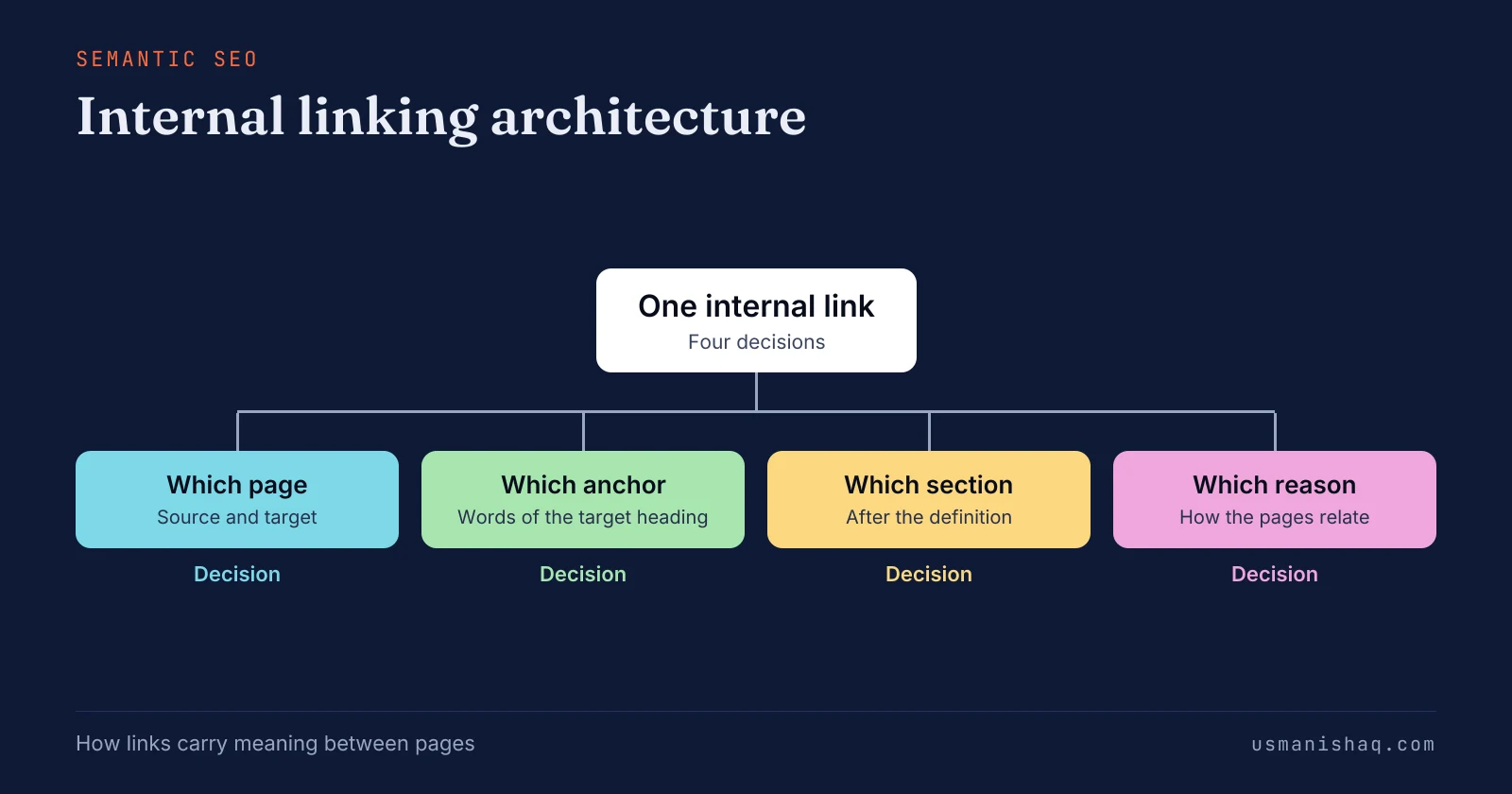
Internal linking architecture is the plan that decides which page links to which, with what anchor, from which section and for what reason. Semantic SEO reads each link in a semantic content network as a statement of how two pages relate, not only as a crawl path.
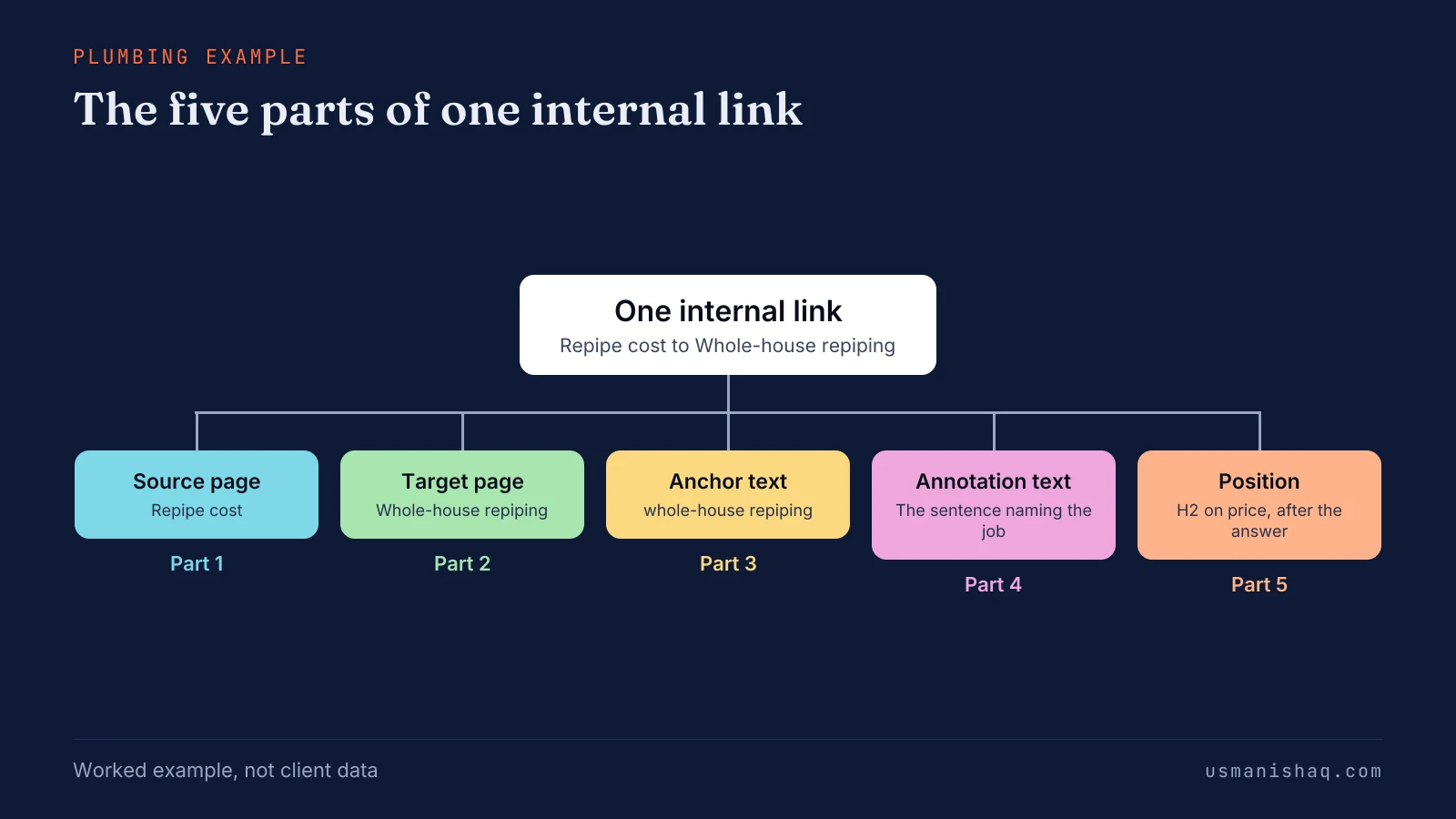
An internal link has five parts: the source page, the target page, the anchor text, the annotation text and the position on the page. Internal links run from supporting pages to the core page first, and the core page links back only where a reader needs the detail.
An internal link sits in the main content, after the sentence that defines the linked subject, and never inside the opening answer. A page needs one internal link for each page its reader needs next, because Google sets no ideal number of internal links per page.
Internal linking architecture is built in six steps, from the website's topical map to a link check after each new page goes live. Semantic SEO Architecture delivers the internal link plan beside the topical map and the publishing roadmap. An example of internal linking architecture for a plumbing company is a link plan for six repiping pages in two towns.
Seven internal linking mistakes stop links from carrying meaning, and the first is an orphan page that no other page links to. Internal linking architecture comes after the topical map, the content brief and the writing in semantic SEO, and before schema markup.
What is internal linking architecture in semantic SEO?
Internal linking architecture is the plan that decides which page links to which, with what anchor, from which section and for what reason. The reason states how the two pages relate, and that statement is the meaning a link carries.
An internal link is a hyperlink from one page of a website to another page of the same website. Google's 2008 post on link architecture describes link architecture as "the method of internal linking on your site". Google's link guidance states that "Google uses links as a signal when determining the relevancy of pages and to find new pages to crawl."
Owners who published post by post often find that "the posts never link to each other". Other owners find the service pages "only linked from the main navigation". Owners call the work internal linking or interlinking.
Semantic SEO plans internal links before the pages exist, so a link is a decision, not something added after publishing. Every planned link is built from the same set of parts.
What are the parts of an internal link?
An internal link has five parts: the source page, the target page, the anchor text, the annotation text and the position on the page. The five parts of an internal link are listed below:
- Source page: the page the link sits on, which vouches for the target page.
- Target page: the page the link points to, named by its main subject.
- Anchor text: the visible, clickable words of the link.
- Annotation text: annotation text is the sentence around the anchor. The sentence states how the source page and the target page relate.
- Position: the section of the page and the heading level the link sits under.
Google's link guidance states that "the words before and after links matter, so pay attention to the sentence as a whole". Google's patent US7308643B1 is titled "Anchor tag indexing in a web crawler system". The patent describes a system that stores the anchor text and annotations of each link for indexing the target page.
A patent shows a system Google has invented, not a confirmed ranking factor. The figure below splits one link of the plumbing example into its five parts, as a semantic SEO link plan records them.
Anchor text is the part owners ask about most.
What anchor text should an internal link use?
Anchor text for an internal link should name the subject of the target page in a few descriptive words that match its main heading. Google's definition reads: "Anchor text (also known as link text) is the visible text of a link." Google's guidance calls good anchor text "descriptive, reasonably concise, and relevant to the page that it's on and to the page it links to."
The four anchor rules of an internal linking architecture are listed below:
- Entity words: the anchor carries the words of the target page's main heading, such as "whole-house repiping" for the Whole-house repiping page.
- Varied phrasing: the words around the entity words change from link to link, such as "whole-house repiping service".
- Reuse cap: one anchor string appears at most three times across the site's main content, as the method's rule.
- One target per anchor: one anchor string never points at two different pages.
Owners ask whether exact match anchor text gets a site penalised. Google warns against cramming keywords into anchor text, not against naming the page the link points to. Google lists "Click here" and "Read more" as bad examples, because neither anchor names the target page.
The reuse cap holds across the whole site because semantic SEO counts every use of an anchor string. The anchor names the target, and the next decision is which page links to which.
Which page should link to which page?
Internal links run from supporting pages to the core page first, and the core page links back only where a reader needs the detail. A core page is the page the other pages support, usually a service page. Owners also say "pillar page" or "service page" for the same page.
The website's topical map names the core page of every supporting page before any page is written. The five direction rules of an internal linking architecture are listed below:
- Supporting page to core page: each question page links to its service page, such as Signs you need a repipe to Whole-house repiping.
- Core page to detail: the service page links to its price page and town pages where a reader needs them.
- Town page to service page: each town page links up to the service sold in that town.
- Easier page to harder page: a short page links to the longer page that settles the decision, such as Repipe cost to Whole-house repiping.
- Home page within reach: important pages sit within several clicks of the home page, as Google's 2008 post on link architecture advises.
A link with no reason a reader can name is left out. Practitioners call the value a link passes "link equity". The five rules point that value at the core page as the method's choice, not as a measured result.
The same five rules hold for every trade, because semantic SEO plans direction by page type, not by trade. Town pages raise one direction question of their own.
Should town pages link to each other?
Town pages should link to each other only where one page names the other town, as a shared base or a nearby service area. Each town page links to its service page and to the price page instead. City pages, as owners call them, often sit in a menu list of every town.
A menu list of towns is navigation, so the list states no relation between two towns that semantic SEO can read. The Franklin repiping page names the Springfield base, so a link from Franklin to Springfield has a reason a reader can name. The shared fact also sets the section of the page where the link sits.
Where in a page should an internal link sit?
An internal link sits in the main content, after the sentence that defines the linked subject, and never inside the opening answer. The four placement rules of an internal linking architecture are listed below:
- Main content: the link sits in the body of the page, not only in the menu, footer or sidebar.
- Defined subject: the linked subject is named and defined before the link, and the anchor phrase appears once in plain text first.
- Heading level: the core page link sits under an H2, and related-page links sit under H3 headings in the supplementary content.
- Spacing: one link per section, with words between links, never a chain of links side by side.
Google's link guidance says "Don't chain up links next to each other". The opening answer stays free of links so the answer stands alone when a search engine or an AI answer lifts the passage. Semantic SEO reads the heading above a link as part of the link's context.
Links added during writing often land in the first paragraph, before the subject is defined. I give each article on my site one link in its main content, to the service page the article supports. Menu and footer links follow different rules from main-content links.
How do main-content links differ from menu and footer links?
Main-content links sit inside a sentence that explains each link, while menu, footer and sidebar links repeat on every page without one. A main-content link carries the words before and after the link, and a menu link carries only its label.
Roger Montti of Search Engine Journal wrote on 30 January 2024 that Google divides a webpage into header, navigation, main content, sidebar and footer. Montti quoted Google's Martin Splitt, who said Google analyses the main content to work out what a page is primarily about. A link inside the main content can therefore carry more topical relevance than a menu, sidebar or footer link.
Menus and breadcrumbs still give every page a path, and Google's 2008 post says breadcrumbs "help users to understand where they are". A site with links only in the header, the breadcrumbs and the footer has paths but no reasons. A page the business needs found gets at least one main-content link in semantic SEO, and the next rule sets how many.
How many internal links should a page have?
A page needs one internal link for each page its reader needs next, because Google sets no ideal number of internal links per page. Google's link guidance states: "There's no magical ideal number of links a given page should contain." Google adds one line: "However, if you think it's too much, then it probably is."
Practitioner guides quote per-word link quotas, and the quotas disagree and give no reason. The semantic SEO link plan sets the count: one link for each target the map names for the page. An owner who links to meet a quota ends up linking pages that share no subject.
The Repipe cost page needs one main-content link, to Whole-house repiping, because the price question leads to the job. The count, the direction and the position come together in six build steps.
How do you build an internal linking architecture?
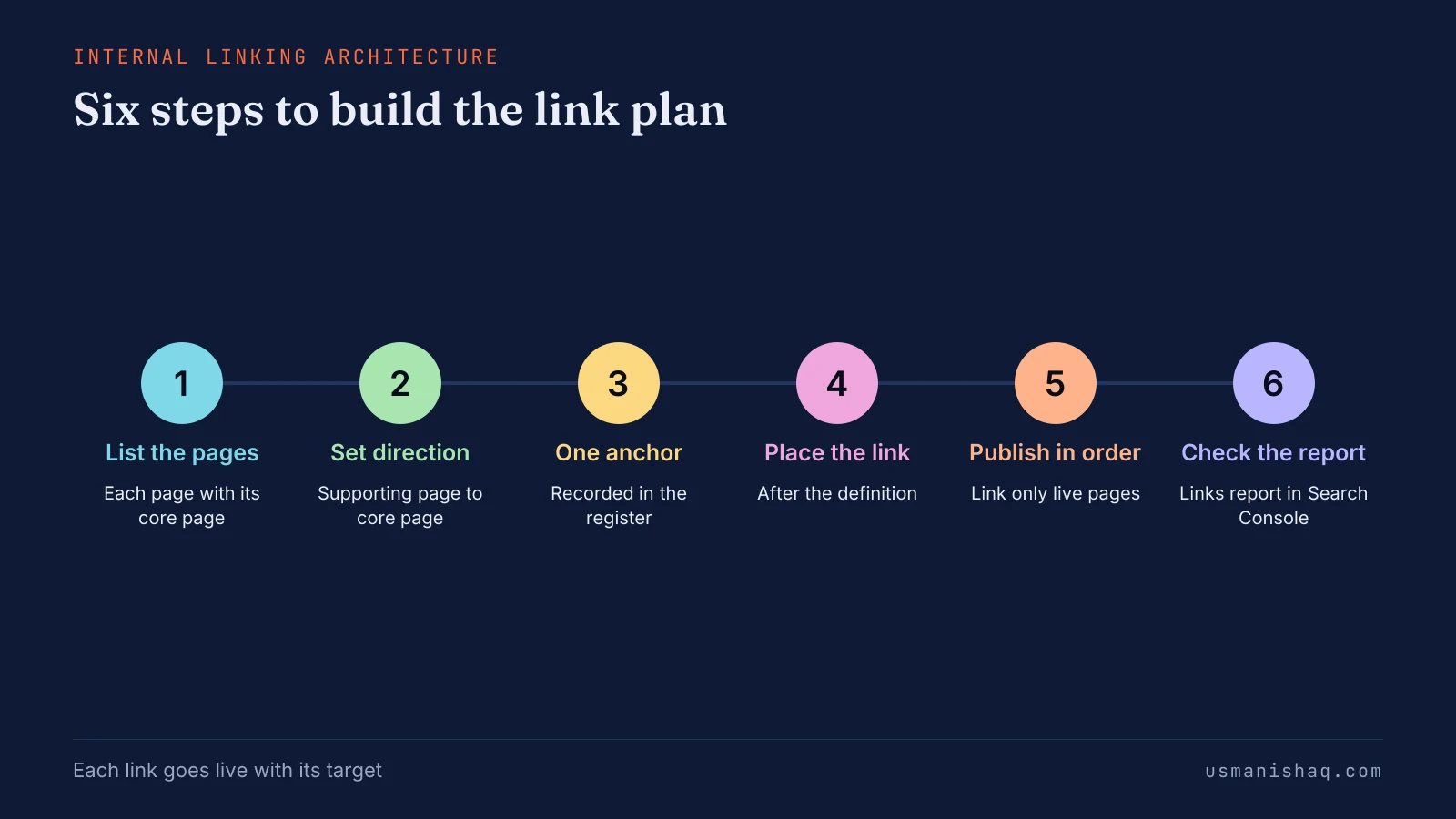
Internal linking architecture is built in six steps, from the website's topical map to a link check after each new page goes live. The six steps to build an internal linking architecture are listed below:
- List every page of the topical map with the core page each page supports.
- Set the direction of each link, from supporting page to core page first.
- Give each target page one canonical anchor and record the anchor in an anchor register.
- Place each link in its section, after the sentence that defines the target.
- Publish in order and add each link only after its target page is live.
- Check the Links report in Google Search Console after each new page goes live.
An anchor register is a list of every target page with its canonical anchor, the pages that use the anchor and the use count. I record every anchor on my site in an anchor register, with the page the anchor sits on and the date. I hold a link to a planned page until the page is live, because a link to an unpublished URL returns a 404 error.
Search Console is Google's free report on how a site appears in Google Search. The figure below sets the six steps on one line, in the order a site runs them.
Semantic SEO architecture covers the six steps for a whole website. The internal link plan is one deliverable of a Semantic SEO Architecture project, beside the topical map and the 12-month publishing roadmap. A business that has the plan can build its pages in order and link each page on the day the page goes live.
What is an example of internal linking architecture for a plumbing company?
An example of internal linking architecture for a plumbing company is a link plan for six repiping pages in two towns. The company is based in Springfield and also serves Franklin.
The table below lists seven links of the plan, each with its source page, target page, anchor, section and reason.
| Source page | Target page | Anchor | Section | Reason |
|---|---|---|---|---|
| Repipe cost | Whole-house repiping | whole-house repiping | H2 on price, after the price answer | A reader who knows the price looks for the job |
| PEX vs copper repipe | Whole-house repiping | whole-house repiping service | H2 on the material choice, after the comparison result | The material decision comes before the job |
| Signs you need a repipe | Whole-house repiping | whole-house repiping | H2 on the next step, after the last sign | A reader who sees the signs needs the job |
| Repiping in Springfield | Whole-house repiping | how whole-house repiping works | H2 on the job, after the town answer | The town page answers local questions; the service page explains the job |
| Repiping in Springfield | Repipe cost | repipe cost | H2 on Springfield prices, after the local answer | The price page holds the full price factors |
| Repiping in Springfield | Signs you need a repipe | signs you need a repipe | Supplementary section, added after the question page goes live | A reader unsure about a repipe checks the signs first |
| Whole-house repiping | Repiping in Springfield | repiping in Springfield | Section naming the service towns | The service page names every town the company serves |
Whole-house repiping receives four links, and the anchor "whole-house repiping" appears twice, under the three-use cap. Row 6 waits until Signs you need a repipe is live, and every other row goes live with its source page.
The figure below shows the service page and the four pages that link to the service page, with the anchor words of each.
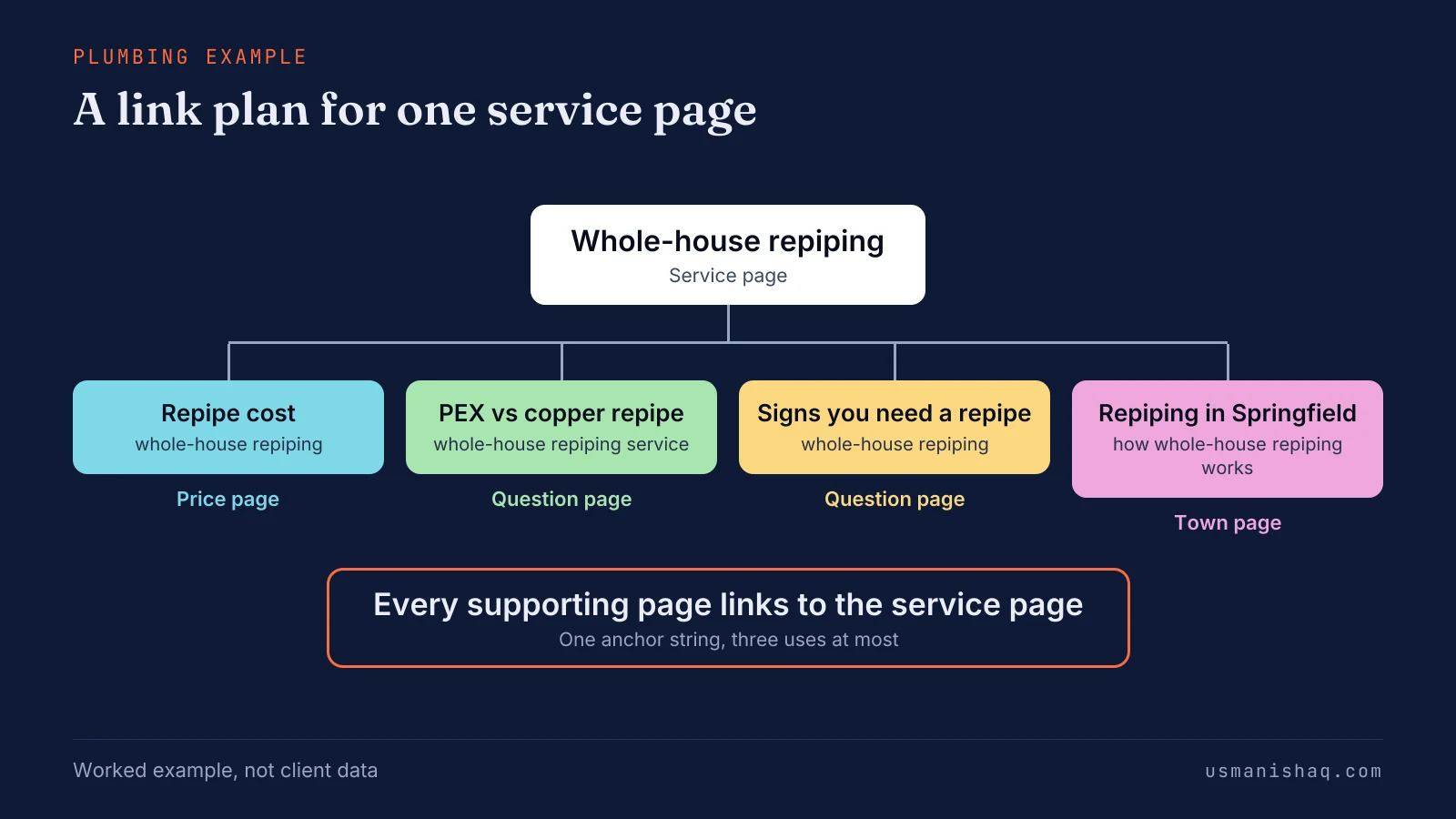
The plumbing pages are a worked example, not a client result. A semantic SEO link plan template for another trade keeps the five columns and changes only the pages, the anchors and the reasons. A plan with all five columns filled exposes the common linking mistakes before publishing.
Which internal linking mistakes stop links from carrying meaning?
Seven internal linking mistakes stop links from carrying meaning, and the first is an orphan page that no other page links to. The seven internal linking mistakes are listed below:
- Orphan page: a page with no internal link pointing to the page is harder for Google to find. Google's guide says, "Every page you care about should have a link from at least one other page on your site."
- Generic anchor: "click here" and "read more" name no target page.
- One anchor for two pages: the same anchor string points at two different pages, so neither page owns the words.
- One anchor everywhere: the identical string repeats on every link to one page, past the three-use cap.
- Menu-only links: the service page is "only linked from the main navigation", in the owners' words, with no main-content link.
- Unrelated links: a link between two pages that share no subject gives a reader no reason to follow the link.
- Links to unpublished pages: a link to a planned URL returns a 404 error until the page is live.
None of the seven needs a tool; each needs a decision. A semantic SEO link plan prevents all seven before publishing. Search Console then shows which planned links reached the live pages.
How do you check internal links in Search Console?
The Links report in Search Console shows which pages receive the most internal links and which pages link to each one. The three checks in the Links report are listed below:
- Open the internal links table "Top linked pages" and confirm the core pages sit near the top.
- Select a page to see which pages link to the selected page, and compare the list with the link plan.
- Look for each new page after launch, and add the planned links the page is missing.
Search Console Help gives the use: "Confirm that the core site pages (home page, contact page) are properly linked within your site." The report shows a sample of links, not every link, so the semantic SEO link plan stays the record of every link. Internal linking architecture sits after the topical map in semantic SEO work.
Where does internal linking architecture sit in semantic SEO?
Internal linking architecture comes after the topical map, the content brief and the writing in semantic SEO, and before schema markup. The map decides the pages, the brief decides each page's headings, and the link plan joins the pages. A contextual bridge is a sentence or a section that gives a reader a reason to move from one page to a related page.
A case study for Oncrawl by Koray Tuğberk Gübür described contextual bridges and the role of anchor text with annotation text. The case study, "Creating Semantic Content Networks with Query and Document Templates", was published on 11 January 2022. The case study sets out a working method, not a Google statement.
Semantic SEO keeps the four related subjects below on their own pages, and each gets one answer here. The first related subject is the topical map.
How does a topical map set the internal links of a website?
A topical map sets the internal links of a website by naming each page's section, parent page and core page before writing starts. Outer pages link to core pages in a semantic SEO topical map, so the section sets the direction of the main link. Owners who add links after publishing decide each link page by page, from memory.
The map row of Signs you need a repipe names Whole-house repiping as its core page. The link between the two pages is decided before the question page is written. Each column of the map is explained in the guide to the topical map for a business website.
Pages from one map, linked in publishing order, form a semantic content network.
How do internal links join a semantic content network?
Internal links join a semantic content network by connecting pages built from one template in the order the pages are published. Semantic SEO adds each link when its target page goes live, which keeps the semantic content network free of links to missing pages. A business that publishes question pages before the service page has nothing to link the questions to.
The Springfield repiping page carries a link to Repipe cost from launch day, and the question-page links follow once those pages are live. The parts and the publishing order sit in the semantic content network for a business website.
A network linked in that order also supports topical authority.
How do internal links support topical authority?
Internal links can support topical authority by joining every page on one topic to the core page of that topic. Topical authority is the standing a website earns by covering one subject fully and ranking across that subject over time. Google's Link best practices for Google advises owners to "link to those pages in context".
Helen Pollitt wrote in Search Engine Journal on 5 February 2026 that links from unrelated pages can dilute the destination's topical authority. A semantic SEO link plan joins only pages that share a subject. Backlinks are a separate kind of link with a separate owner.
What is the difference between internal links and backlinks?
An internal link points to another page of the same website, while a backlink points to the website from a page on another site. Search Console Help defines a backlink as "a link on a page from another site that links to a page on your site." The owner places every internal link, while backlinks come from other sites.
Internal linking is not a kind of link building, although owners often file both under one word. The difference matters in semantic SEO, because the owner decides the target, the anchor and the section of every internal link. Owners raise a few more questions once the difference is clear.
Questions about internal linking architecture
Owners ask six more questions about internal linking architecture, from ranking harm to small websites and link tools.
Can internal links hurt rankings?
Internal links can hurt rankings when the anchor text names one page and the link points at another. Google's guidance says anchor text tells Google about the linked page, so a service name linking to a blog post names the wrong page.
Should repeated internal links be nofollowed?
No, repeated internal links do not need nofollow, because a 2008 Google post called internal nofollow for PageRank flow not worth the time. Google's link guidance keeps nofollow for sources a site does not trust.
How many times should one page link to the same page?
One link from a page to a target page is enough, because a second link repeats the same statement. Search Console combines duplicate links from one source URL to one target URL in its Links report.
Does a small website need an internal linking plan?
Yes, a small website needs an internal linking plan, because even five pages need a direction from the supporting pages to the service page. Semantic SEO starts the plan with the first page, so no page is published without its links.
Can a blog post link to two service pages?
Yes, a blog post can link to two service pages when the post's question concerns both services. The service the main question names gets the main-content link, and the second service gets a link in the supplementary content.
Can a tool add internal links automatically?
A tool can suggest internal links from matching words, but the link plan still decides the target, the anchor and the section. Each suggestion is checked against the plan before the link goes live.
What does internal linking architecture decide for a business website?
Internal linking architecture decides, for every page of a business website, the target of each link, its anchor and its section. Each link then carries a reason a reader can name, which is the meaning between two pages.
An owner who understands the five parts of a link can read any page and see why each link is there. Semantic SEO builds the plan before the pages, so each link goes live with the page that needs the link.