
A service business homepage says what you sell, where you work, why customers can trust you and how to reach you.
Someone lands on your homepage with one problem, a leaking pipe or a cracked tooth. In a few seconds they decide whether you fix it.
Four facts cover most of the job, and a five-second test shows whether the first screen carries them. A sample sheet for a dental clinic then ties each section to the page that owns the detail.
What should a service business homepage say?
A service business homepage says four things in order: service, place, proof and next step.
The service is a plain name, such as "emergency dental care", and the place is the towns you serve. The reason to trust you is something a customer can check. The next step is one phone number or button.
GoDaddy, DreamHost, NorthMac and Pagio all rank for this question. They agree on the basics: a clear value statement, proof and easy contact. None of them gives you a way to test your own page. The next section does.
First screen: what a visitor needs in five seconds
The first screen should answer three questions: what you do, where you do it and what to do next.
Take a sample plumber in Franklin. The heading reads "Water heater repair and replacement in Franklin and Riverton". Under it sits one sentence, one phone number and one booking button.
That screen passes. A heading that says "Quality service you can trust" fails, because it names no service and no town.
If you stall on the heading, fill in one line. It reads "[service] in [town] for [customer]", and the next sentence adds one proof. For the plumber it becomes "Water heater repair in Franklin for homeowners. Same-day visits when you call before noon." Use that second sentence only if the business keeps the promise.
Run the five-second test before the page goes live. The steps and the pass mark are my own rule of thumb, not a published standard.
- Show the first screen at phone size to someone outside your trade.
- Hide it after five seconds.
- Ask what the business does, where it works and how to reach it.
- Count the answers they got right.
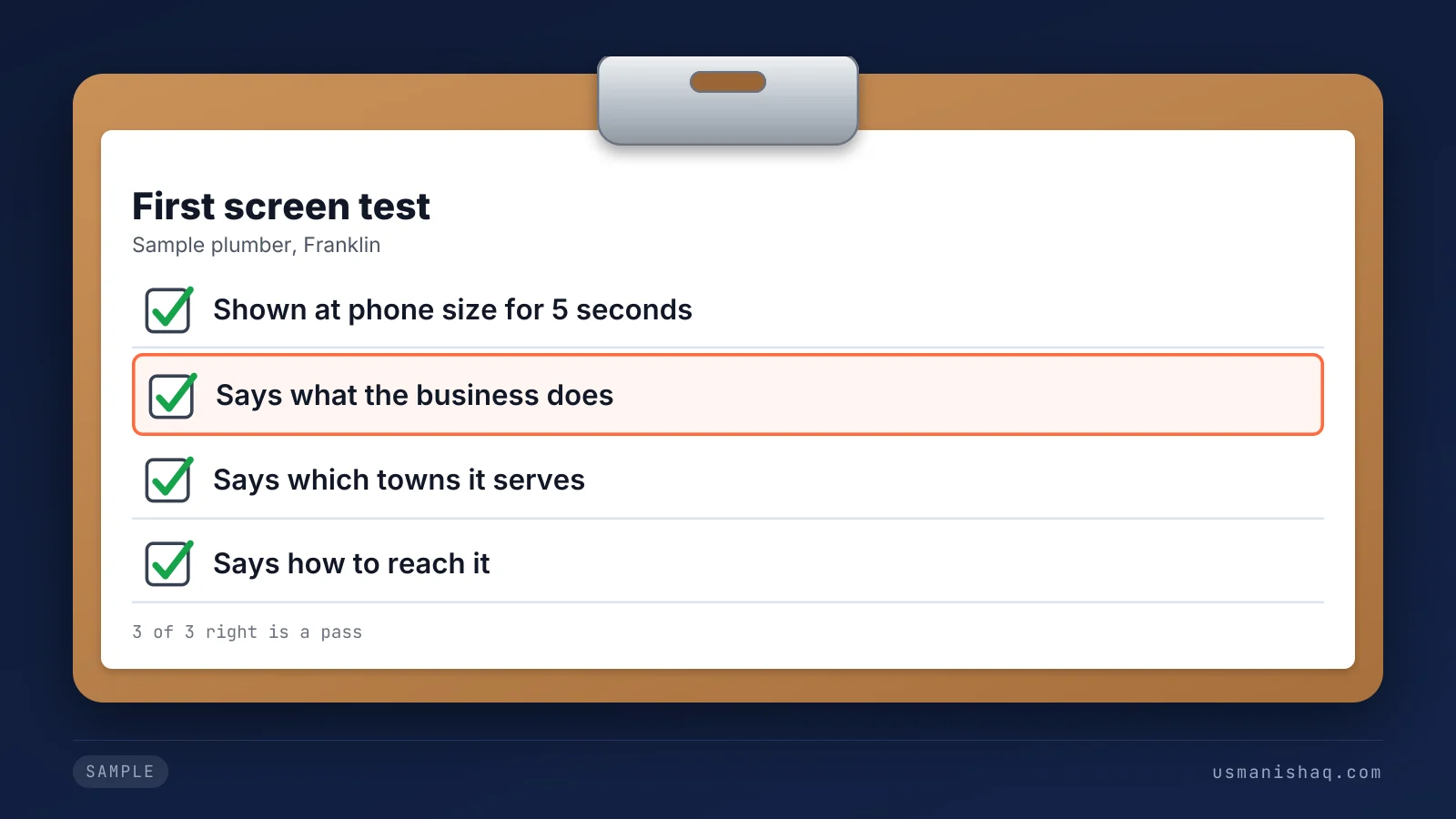
Three right answers is a pass. If they name the trade but not the town, change the heading before you touch anything else.
A wrong answer is useful, because it points at the exact line to rewrite. Change the line, then test again with a different person, because the first tester has already seen the old page.
Proof a service business homepage can show
Proof on a service business homepage is anything a customer can check, such as job reviews, a licence or work photos.
A review that says "fixed our boiler the same evening" tells a customer more than "great service". Put two or three near the top. Tie each one to the service it praises, so a visitor sees the match at once.
No reviews yet? Then show what exists, such as your licence, your insurance and the steps from first call to finished job. Say how long you have been in town only if it is true. Never write a number you cannot show.
How does a service business homepage hand visitors to service pages?
A service business homepage hands visitors on with one short block per service, linked to the page that owns it.
Each block holds the service name, one sentence on who it fits and a link. The explaining happens on the service page. Where the website development templates and block order are set, these blocks sit in the template list.
Take the sample clinic. Its emergency block reads "Emergency dental care. For a cracked or aching tooth today." followed by a link. That is two short lines, and the page behind it holds the hours, the steps and the questions.
Two limits keep the homepage honest. List only services that have their own page, so no block leads nowhere. And repeat every fact exactly as the linked page states it. If the homepage says "open until 8" and the service page says "open until 6", a customer trusts neither.
A worked homepage sheet for a sample dental clinic
A homepage sheet lists each section, the question it answers and the page it links to.
Take a sample dental clinic in Riverton. The sheet below is a plan, not a design.
| Section | Question it answers | Sample content | Links to |
|---|---|---|---|
| First screen | What do you do, where, how do I reach you? | "Family and emergency dentist in Riverton", phone, book button | Contact page |
| Services | What can I hire you for? | Four blocks: check-ups, fillings, emergency care, whitening | One page per block |
| Proof | Why should I trust you? | Two named-job reviews, dentist registration number | Reviews page |
| How it works | What happens after I call? | Three steps from call to visit | Booking page |
| Towns | Do you come to my area? | Riverton and Franklin, with the address | Location page |
| Contact | How do I reach you now? | Phone, address, opening hours | Contact page |
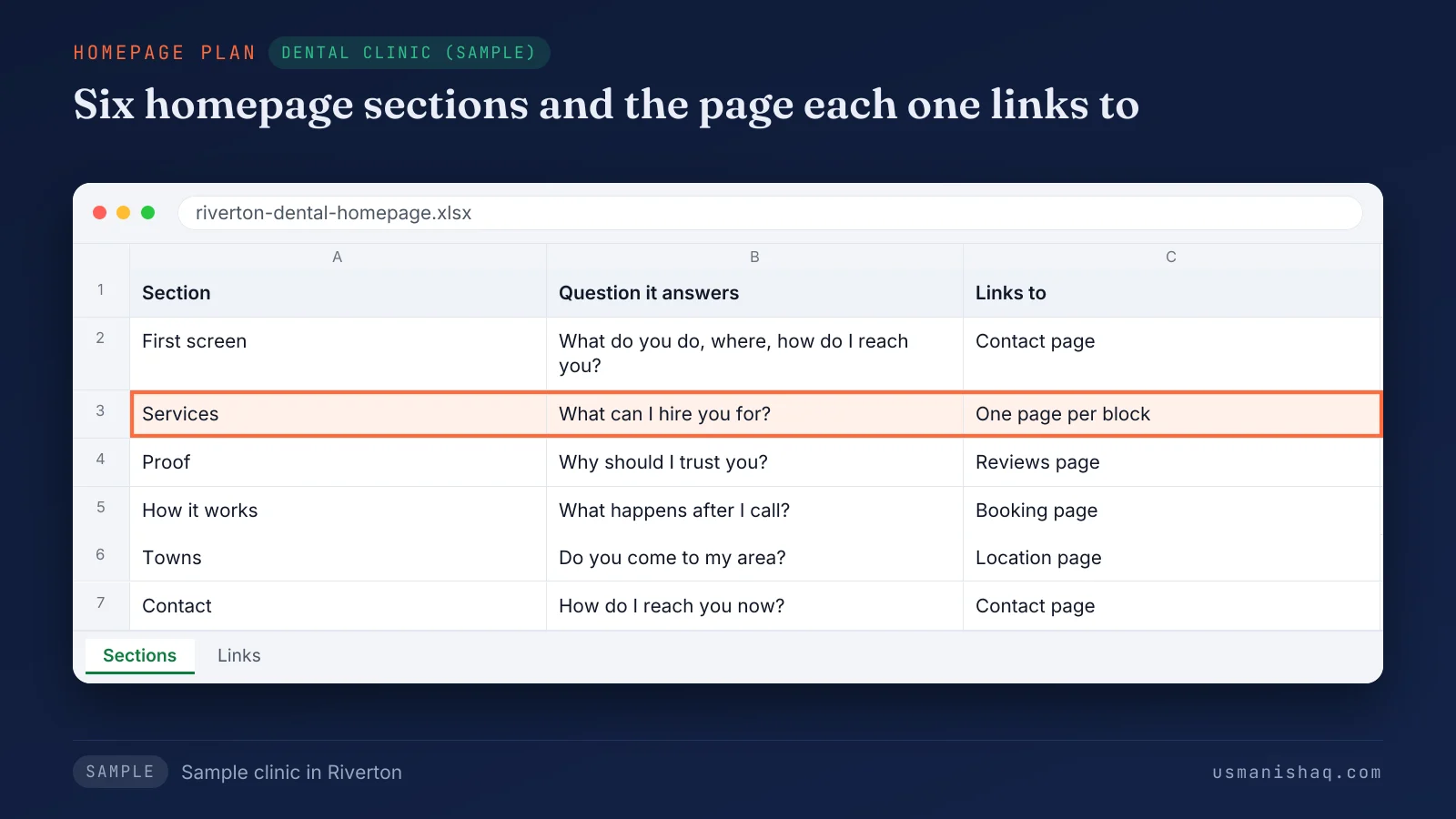
The sheet shows six sections, and each section has one job. Services has the most links, because it hands the visitor on. No section explains a treatment.
What to leave off a service business homepage
A service business homepage should leave off long company history, full service explanations, stock photos of strangers and news feeds nobody updates.
Each item has a better home. A homepage with all four runs long. The caller who wanted a phone number scrolls past them on a small screen.
- Company history goes on the About page.
- Full service explanations go on the service pages.
- Stock photos show a customer nothing real, while your van, your clinic and your people do.
- A blog feed that stopped in March can look like a business that stopped.
What else do owners ask about a service business homepage?
Once the plan is set, owners ask about listing every service, matching their profile and the pages behind the homepage.
Should my homepage list every service?
No, list the services that have their own page and send the rest to a services page.
A long list buries the one a caller wants. If you want to see what a service page should hold, read a service page written to rank and bring calls.
Does my homepage need to match my Google Business Profile?
Yes, the name, phone number, categories and towns should read the same on both.
A caller who sees one phone number on Maps and another on your site stops to wonder which is right. What must match between your Google Business Profile and website lists the fields.
Pages behind the homepage
Give each searched service a page, add town pages where towns are searched and keep a few trust pages.
For a trade, the page list for a plumbing company website shows how that looks for a sample business.
Homepage in short
A service business homepage states the service, place, proof and next step, then hands each visitor to the right page.
Run the five-second test on the first screen. Link only to services that have a page, and repeat facts exactly as those pages state them.