
A topical map for an HVAC company website is the plan of heating, cooling, maintenance and town pages, one owner per search. An HVAC company website needs heating and cooling service pages, a maintenance plan page, question pages, town pages and trust pages. Semantic SEO plans the map so search engines understand which page answers each HVAC search.
An HVAC company website is structured as heating, cooling and heat pump folders plus town folders, published in a set order. An HVAC company's topical map is measured in calls, quote requests, booked jobs and plan sign-ups per page.
What is a topical map for an HVAC company website?
A topical map for an HVAC company website is the plan of heating, cooling, maintenance and town pages, one owner per search.
A heating and cooling company needs pages for the jobs customers call about. The plan also covers the towns served and the questions homeowners ask before they call.
Service pages name the job, such as "furnace repair", "AC replacement" or "heat pump installation". Town pages name one service in one town. Question pages answer the words a homeowner types when the house is too cold or too warm.
HVAC company owners ask "what pages does my website need" and never say "topical map". The map answers that question page by page, as an "hvac website pages" search expects. Semantic SEO keeps the map as rows: one page, its owning search, its intent and its URL.
What pages should an HVAC company website have?
An HVAC company website needs heating and cooling service pages, a maintenance plan page, question pages, town pages and trust pages.
Trust pages are the home page, the about page with licence and insurance, the reviews page and the contact page. Trust pages own no search beyond the company name, so the table leaves them out.
The table below is a sample topical map for an HVAC company selling heating, cooling and heat pump work in two towns.
| Page | Section | Owning search | Intent | URL |
|---|---|---|---|---|
| Emergency HVAC repair | Core | emergency hvac repair | Transactional | /emergency-hvac-repair/ |
| Furnace repair | Core | furnace repair | Transactional | /heating/furnace-repair/ |
| Furnace replacement | Core | furnace replacement | Commercial | /heating/furnace-replacement/ |
| AC repair | Core | ac repair | Transactional | /cooling/ac-repair/ |
| AC replacement | Core | ac replacement | Commercial | /cooling/ac-replacement/ |
| Ductless mini-split installation | Core | ductless mini split installation | Commercial | /cooling/ductless-mini-split/ |
| Heat pump installation | Core | heat pump installation | Commercial | /heat-pumps/installation/ |
| Maintenance plan | Core | hvac maintenance plan | Commercial | /maintenance-plan/ |
| AC replacement cost | Core | ac replacement cost | Commercial | /cooling/ac-replacement/cost/ |
| Furnace repair in Fairview | Core | furnace repair fairview | Transactional | /fairview/furnace-repair/ |
| AC repair in Clinton | Core | ac repair clinton | Transactional | /clinton/ac-repair/ |
| Furnace blowing cold air | Outer | furnace blowing cold air | Informational | /heating/furnace-repair/blowing-cold-air/ |
| AC running but not cooling | Outer | ac running but not cooling | Informational | /cooling/ac-repair/not-cooling/ |
| Heat pump vs furnace | Outer | heat pump vs furnace | Informational | /heat-pumps/vs-furnace/ |
No two rows share an owning search. The rows are a worked example, not a client result.
Each owning search is confirmed in Google Search Console or search suggestions before a page is built. An informational intent is to learn, a commercial intent is to compare or to price, and a transactional intent is to book.
Semantic SEO treats each row as one page decision, so the table is also the build list. The core rows start with the split between heating and cooling.
Why do heating and cooling get separate service folders?
Heating and cooling get separate service folders because each season brings its own equipment, its own failures and its own searches.
A homeowner with a dead furnace in January types different words from one with a warm house in July. Website guides for HVAC companies agree on the split, often as separate heating and air conditioning sections.
The heat pump breaks the pattern. A heat pump heats and cools, so its pages take a folder of their own, linked from both seasons.
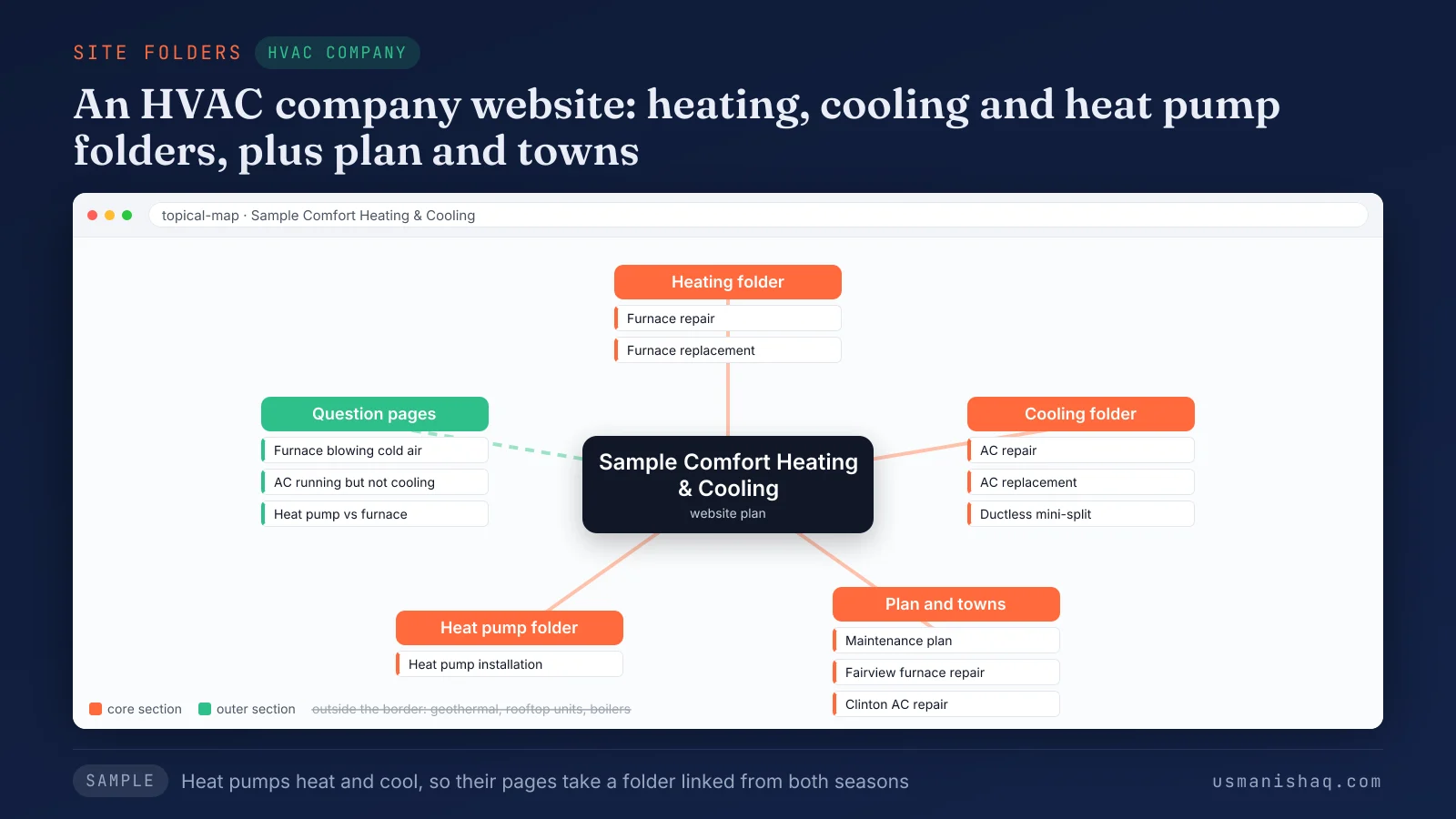
The figure puts furnace pages under heating and AC and mini-split pages under cooling. Heat pump pages sit in a third folder, and the question pages sit in the outer section. Geothermal, rooftop units and boilers stay outside the border.
Semantic SEO splits folders where the searches split. The next decision inside each folder is which services earn a page.
Which HVAC services earn their own service page?
An HVAC service earns its own page when the job, price, proof or next step differs from the other services.
The HVAC services that most HVAC company maps hold as service pages are listed below:
- Emergency HVAC repair: no heat or no cooling that needs a visit the same day.
- Furnace repair: a furnace that stops, short cycles or blows cold air.
- Furnace replacement: an old or failed furnace, priced and compared before the job.
- AC repair: an air conditioner that runs but does not cool.
- AC replacement: a new central air system, with a quote and an install date.
- Heat pump installation: one system that heats and cools the home.
- Ductless mini-split installation: rooms or homes without ducts.
Repair and replacement of the same unit are two pages, not one. Somebody who wants the old furnace running tonight is not shopping for a new one yet.
Semantic SEO names each service page by the job customers type, not by a category label.
Does a maintenance plan need its own page?
Yes, a maintenance plan needs its own page because the plan owns a search, a price and a sign-up of its own.
The page states what each visit covers, the systems covered, the towns served, the price and the way to join. Tune-up searches such as "ac tune-up" and "furnace tune-up" stay sections of the plan page.
Owners call the plan a tune-up club, a membership or a service agreement. The page uses the name customers search, with the other names in its text.
CI Web Group, a web design vendor for the trade, describes plans "buried" in a sub-menu under standard services.
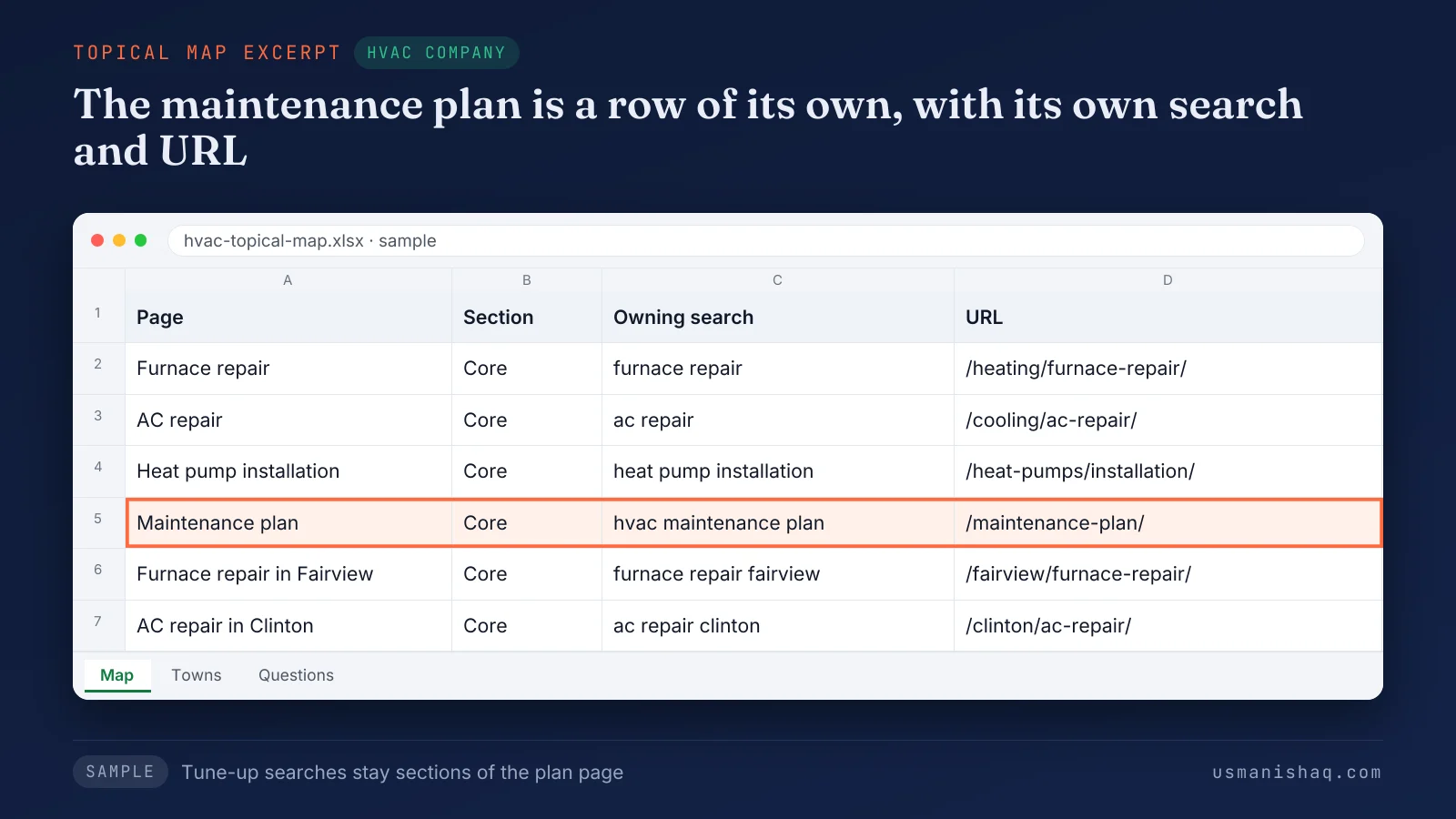
The sheet lists furnace repair, AC repair, heat pump installation and two town pages. The maintenance plan row is marked as a page of its own.
Semantic SEO gives the plan a core row, the same as a service. Homeowner questions follow a separate test.
Which HVAC questions earn a question page?
An HVAC question earns a question page when the question's search differs from the search the service page owns.
A search earns a page when customers type the search. The search must name a different service, town or thing from every other page. The search also shows different results in Google from the searches other pages own.
A homeowner in a cold house types the symptom, not the service name. "Furnace blowing cold air" and "ac running but not cooling" each earn a question page linked to the repair page. "Heat pump vs furnace" earns one in the heat pump folder.
The question "how often should hvac be serviced" stays a section of the plan page. A cost question earns a price page in the core section, such as AC replacement cost.
Semantic SEO keeps question pages in the outer section, each one feeding a service page. Each kept row then takes a place in the site structure.
How is an HVAC company website structured?
An HVAC company website is structured as heating, cooling and heat pump folders plus town folders, published in a set order.
The five parts of an HVAC company website structure are listed below:
- Service folders: /heating/, /cooling/ and /heat-pumps/, one for each group of jobs.
- Pages inside a folder: price and question pages, such as /cooling/ac-replacement/cost/.
- Town folder: one page for one service in one town, such as /fairview/furnace-repair/.
- Links: each town page links to its service page, and each service page links to its town pages. The home page links to every folder, the emergency page and the plan page.
- Schema: HVACBusiness, Service and areaServed on each town page, stating only what the page shows.
Some guides nest every town page inside a trade folder. The map above keeps the service page as the hub, so one page owns the service in every town.
Semantic SEO sets the folders before the pages, so every URL follows its row and goes live in a set order.
In what order should an HVAC company publish its pages?
An HVAC company should publish the emergency page first, then the coming season's folder, the plan page and the remaining pages.
The steps to publish the pages of an HVAC company website are listed below:
- Publish the emergency HVAC repair page first.
- Publish the folder of the coming season: heating before cold weather, cooling before hot weather.
- Publish the maintenance plan page before the quiet weeks between the two seasons.
- Add price pages and town pages that pass their tests.
- Add the question pages, each linked to its service page.
A cooling folder that goes live in the first heat wave is already late. Semantic SEO architecture writes the publication order into the topical map before the first page goes live.
A fixed-scope project, the Semantic SEO Architecture topical map and 12-month roadmap, produces the map and its order for one business. Each published page is then judged by the action the page brings.
How is an HVAC company's topical map measured?
An HVAC company's topical map is measured in calls, quote requests, booked jobs and plan sign-ups per page, which decide its worth.
Each page type should bring one action.
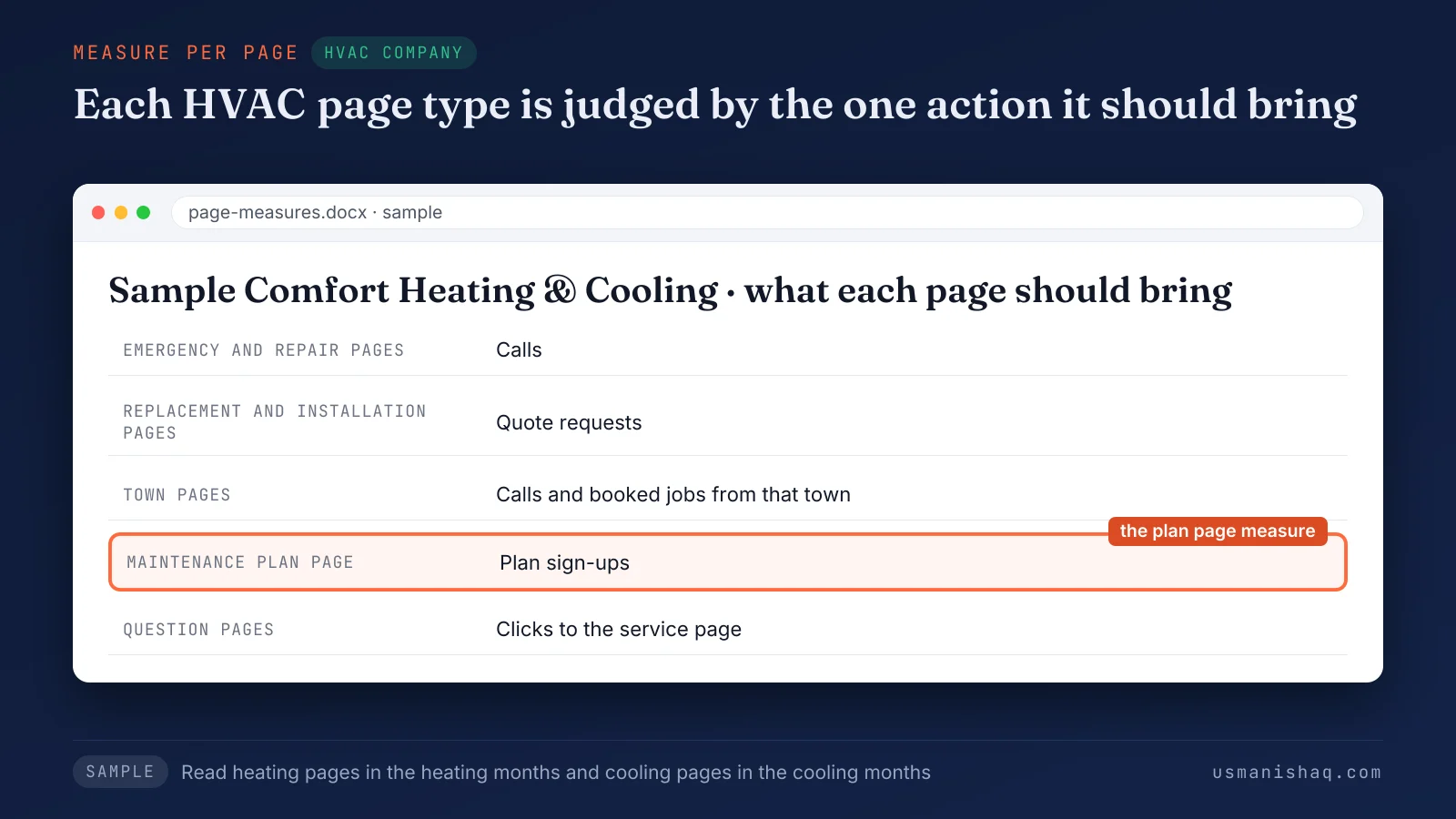
The emergency and repair pages should bring calls, and replacement pages should bring quote requests. Town pages should bring jobs from that town. The plan page should bring sign-ups, and question pages should bring clicks to the service page.
Search Console shows the impressions and clicks of each page. The HVAC company records which page each call, quote request or sign-up came from.
Season matters to the reading. A furnace page read in midsummer shows few calls, and that says little about the page.
A town page with impressions and no calls needs a better answer on the page, not more pages. Semantic SEO reads each row of the map against its action.
Which faults break the topical map of an HVAC company website?
An HVAC company map fails through five faults: one services page, rival posts, unsold jobs, a buried plan, cloned town pages.
The five faults that break the topical map of an HVAC company website are listed below:
- One services page: a "Heating & Cooling Services" page holds every job, so no job owns a search. The fix is a service page for each job.
- Rival posts: a seasonal blog post answers the search a service page or the plan page owns. The fix keeps one owner and turns the post into a section or a link.
- Unsold jobs: geothermal or boiler pages sit on the site of a company that does not install them. The fix is a border around the work the company sells.
- A buried plan: the maintenance plan is one line on the services page. The fix is a plan page of its own, linked from the home page.
- Cloned town pages: town pages repeat one text with the town name swapped. Google's "Spam policies for Google web search" name pages that "funnel users to one page" as doorways. Google's same document lists "substantially similar pages" as a second example. The fix is content that exists only for that town.
Semantic SEO checks the map for all five before a page is written. The same checks apply when the HVAC company adds a second trade or a new town.
How does an HVAC company's topical map change for a second trade or a new town?
An HVAC company's topical map holds the same five columns for added plumbing, a new town and any other service business.
Every trade needs a different topical map, since the services, the towns and the customer questions differ. The five columns stay: page, section, owning search, intent and URL.
Semantic SEO keeps the columns fixed so maps of different trades compare row by row. The first case is an HVAC company that adds plumbing.
How does the map change for an HVAC company that adds plumbing?
An HVAC company that adds plumbing keeps one website, with plumbing in its own folder beside heating and cooling.
Owners of two-trade companies ask if two trades need two websites. One website with a folder per trade keeps plumbing rows out of the heating and cooling folders.
Shared equipment, such as a water heater, keeps one owner page in one folder. The plumbing rows follow the topical map built for a plumbing company website, with its service, town and question pages.
Semantic SEO gives each trade a folder and each shared job one owner. A new town changes the map in a different way.
How does the map change when an HVAC company adds a town?
A new town joins an HVAC company's topical map as a row, which turns into a town page once earned.
A town earns its own page when the town has its own searches, its own jobs and its own proof. Owners often call such pages city pages. A town that fails the test stays a section or a mention on the service area list.
An owner who books jobs in one town only should read the reasons a website ranks in one town first. Semantic SEO applies the same town test to every new town, in every trade.
Which parts of an HVAC company's map apply to every service business?
Service pages, town pages, question pages and two-way links apply to every trade and service business, not only an HVAC company.
Five steps plan any topical map: describe the business, collect the searches, decide each owner, set page types, order pages. The steps are set out in the guide to the five steps of a topical map for a business website. The planning method comes from the framework of Koray Tuğberk Gübür.
The structure, order and measure for any service business sit in the semantic SEO structure for trade and service businesses. Semantic SEO applies one structure across trades and changes only the rows. The same rows answer the other questions owners ask about website pages.
Questions HVAC company owners ask about website pages
HVAC company owners ask three more page questions: the need for a website, the page count and prices.
Do HVAC companies need a website?
Yes, an HVAC company needs a website to hold a page for each service, town and question that customers search. The website and the Google Business Profile list the same services and towns.
How many pages should an HVAC website have?
An HVAC company website needs one page for every search that passes the page test, so no fixed number applies. The semantic SEO example above holds 14 pages. Seven are service pages, and the rest are one plan page, one price page, two town pages and three question pages.
Should an HVAC website show prices?
Yes, an HVAC website should show a price range where customers search the cost of a job, such as AC replacement cost. Prices for other jobs stay a section of their service page.
The topical map for an HVAC company website and the next step
An HVAC company's next step is a topical map that gives each service, town and question one owning page. Search engines understand an HVAC company through pages that each name one job, one town or one question. The owner builds the pages in the map's order, emergency page first.
A semantic SEO topical map lists the pages an HVAC company website needs before the first page is written.