
A project page for a contractor is one page about one finished job. It helps SEO when it adds real facts about the town, the work and the result.
A homeowner who has found your service page still wants to know if you have done this job near them. Your project page answers it with a named town, a real problem and a real result.
Most contractor sites do one of two things. They post a gallery of photos with no words, or they write the same paragraph under every photo. Neither gives a search engine or a customer anything to read.
What is a project page on a contractor website?
A project page on a contractor website is a page about one finished job, with its town, scope, photos and result.
Many jobs sit on one gallery page, with a caption at best. One job sits on a project page, and the page explains it.
The page does a different job from a service page, and that difference is the whole reason to build it. Your service page says what you do and for whom. A project page proves that you did it, in a named town, with a problem a customer will recognise.
WebFX, a marketing agency, says portfolio pages should read like case studies. It wants the project type and location in the headline, and a narrative of the challenge and the solution. That is an agency's advice, not a Google rule. It still matches what a buyer wants to see before picking up the phone.
Do project pages help contractor SEO?
Project pages help contractor SEO when each one carries facts no other page on the site has. They do little when they repeat each other.
Nobody outside Google can show that a project page ranks a service page higher. I have no test of my own on this, so I will not give you a figure.
What I can say is narrower. A project page can match searches such as a job type plus a town, because it names both. It also gives your service page and your town page a link to real proof.
You can check it yourself. Open the page report in Search Console after a couple of months and filter by one project page. Look at the queries. If you see the job and the town in them, the page is matching real searches. If it shows no impressions at all, it is either too new or too thin to be worth keeping.
A page with the same paragraph and a different photo does neither. It is a thin page, and it dilutes the site.
What counts as thin is easy to spot from the customer's side. They open the page, scroll once and learn nothing new. Say a plumber posts six pages titled "Water heater install", each with one photo and the same two lines. A buyer reads one and leaves. In Search Console, such pages would likely show thin impressions spread across several addresses.
Fewer, fuller pages avoid that, and you also have less to keep current across the whole site.
What does one project page need?
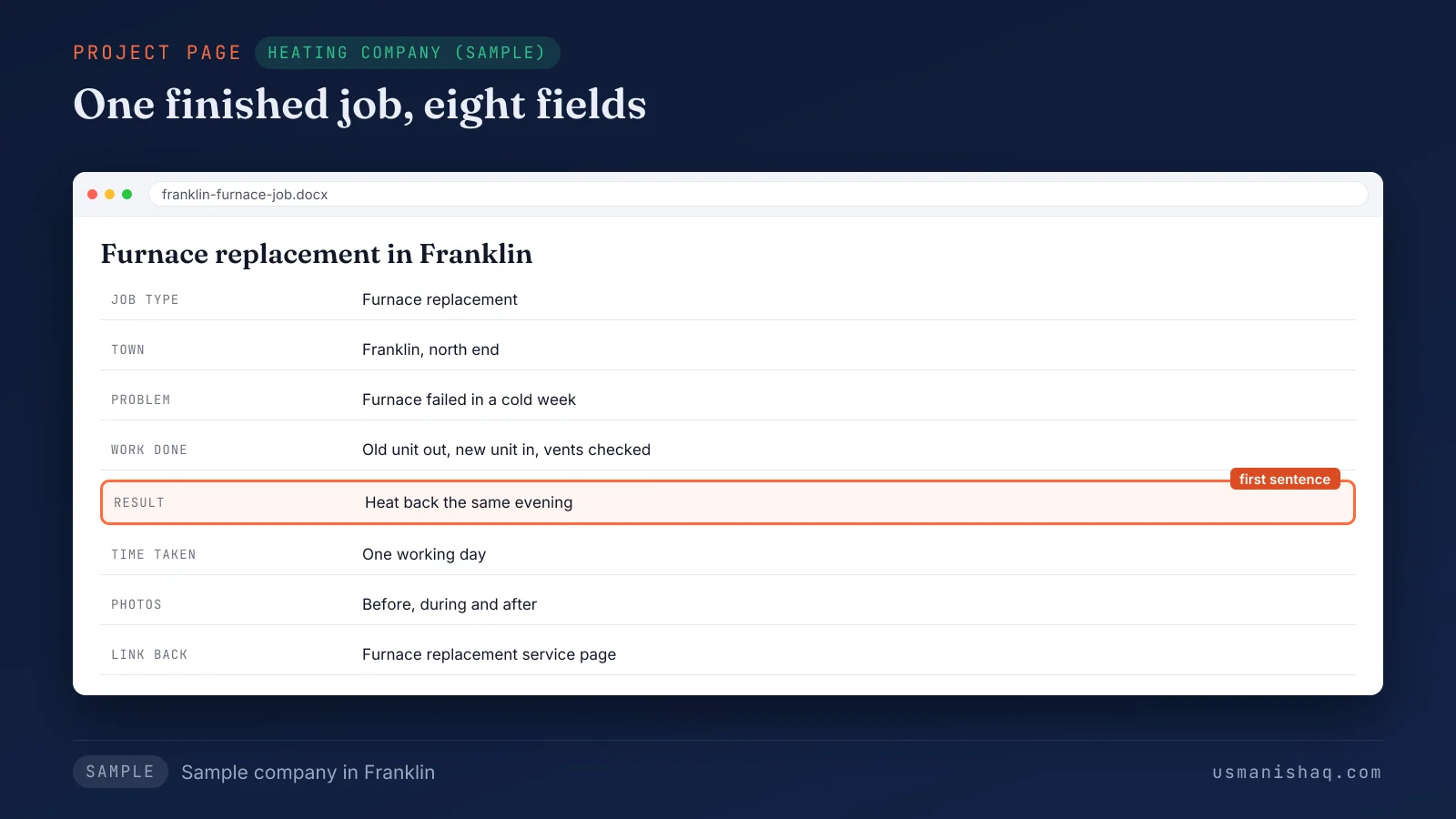
One project page needs eight fields: job type, town, problem, work done, result, time, photos and a link back.
The table lists the eight fields, a sample value for a heating company in Franklin and the job each field does.
| Field | Sample value | What it does |
|---|---|---|
| Job type | Furnace replacement | Matches the service page it supports |
| Town | Franklin, in the north end | Gives the page its local match |
| Problem | Furnace failed in a cold week | Lets a buyer see their own case |
| Work done | Old unit removed, new unit fitted, vents checked | Shows the scope in plain words |
| Result | Heat back the same evening | The line a buyer remembers |
| Time taken | One working day | Sets expectations before the call |
| Photos | Before, during and after | Proof that you were there |
| Link back | Furnace replacement service page | Sends the reader to the next step |
Every value in that table is a sample for a made-up business. Use your own job notes, never a polished guess. Skip any field you cannot fill truthfully.
Put the answer first. Your opening sentence says the job, the town and the result, in that order. After that, tell the story the way you would tell it to a customer on the phone. What went wrong, what you found and what you did about it. Skip the sales talk, because a plain account of a hard job reads as more honest than praise for yourself.
Photos need words. Put a sentence beside each one. Say what the buyer is looking at, such as the old flue before it was cut out. A caption that names the thing helps a person and a search engine alike.
When should a job get its own page?
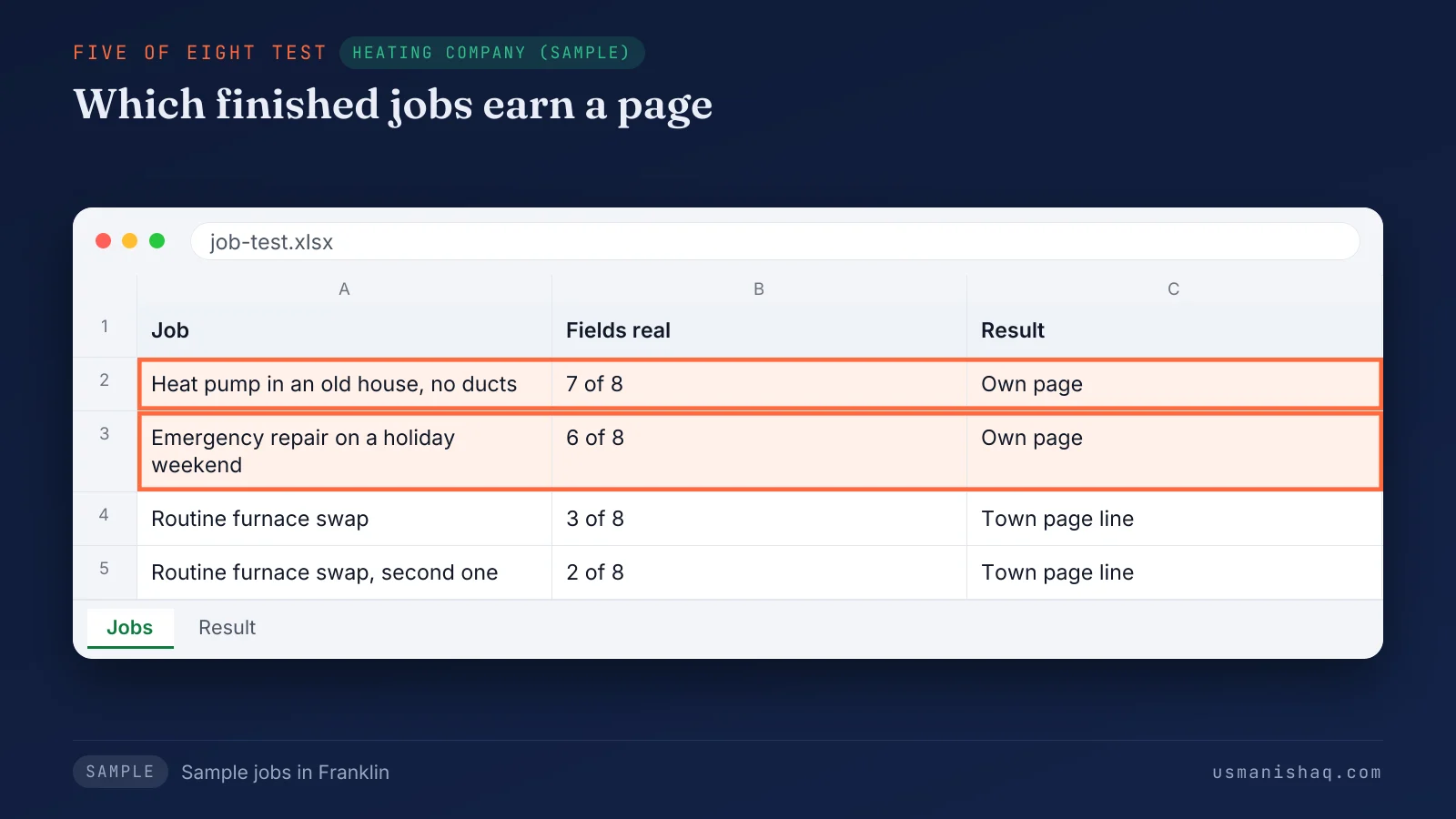
A job gets its own page when at least five of the eight fields hold real, different facts. Otherwise it belongs on a town page or in the gallery.
I use this five-of-eight test because it is easy to run on a phone after a job. It is my planning habit, not a Google measure.
Picture a heating company in Franklin that finishes 14 jobs in a month (a sample month). Most are routine swaps with the same problem and the same result. Two stand out. One was a heat pump install in an old house with no ductwork. The other was an emergency repair on a holiday weekend.
Those two score seven and six out of eight on the sheet above. They get a page each. The routine swaps score two or three, so they become single lines on the Franklin town page, each with a photo.
This keeps the site small and honest, because you publish fewer pages and each one has something to say.
Two checks keep a project page from going thin. Run them before you publish.
- Read it without the photos. If it says nothing, it is a gallery caption.
- Compare it with your last project page. If only the town changed, merge them.
Building these pages into a template is a build job as much as a writing job. Website Development for project page templates shows how I build templates that give every job page the same fields.
Project pages and the rest of the website
Project pages sit under the service pages they prove, and they link in both directions.
Customer names and street addresses
Do not publish a customer's name or street address on a project page, and name the town or the neighbourhood instead.
A town is enough for the local match. A street address adds a privacy risk and no local match. If the customer agrees to be named, get that in writing first.
Project pages or a gallery
A trade business can keep a gallery and project pages together, if the gallery links to each project page.
Buyers in a hurry scan the gallery. Buyers who need convincing read the project page. My roofing map has a section on a project gallery on a roofing website. Each entry names the town and the material, so the right page can link to it.
How long before project pages bring calls
Project pages usually take months to bring calls, the same as any new page, and nobody can promise a date.
They also work as proof for pages that already get visits. I wrote about the stages in when a new town page starts bringing calls. A project page follows the same path.
What a service page holds besides proof covers the rest, so the project page does not need to repeat it.
Who writes the page
The person who did the job should give the facts, and someone else should write them up.
A technician rarely has time to write. Ask for a two-minute voice note after each job, with the problem, what was found and what was done. Turn that note into the page. The facts stay yours, so the page cannot drift into the generic copy every other contractor site carries.
Short answer on project pages
A project page is worth publishing for a job with a real problem, a named town and a result you can state. Skip the rest and keep them as lines on a town page. Fewer, fuller pages beat a long run of near copies.