
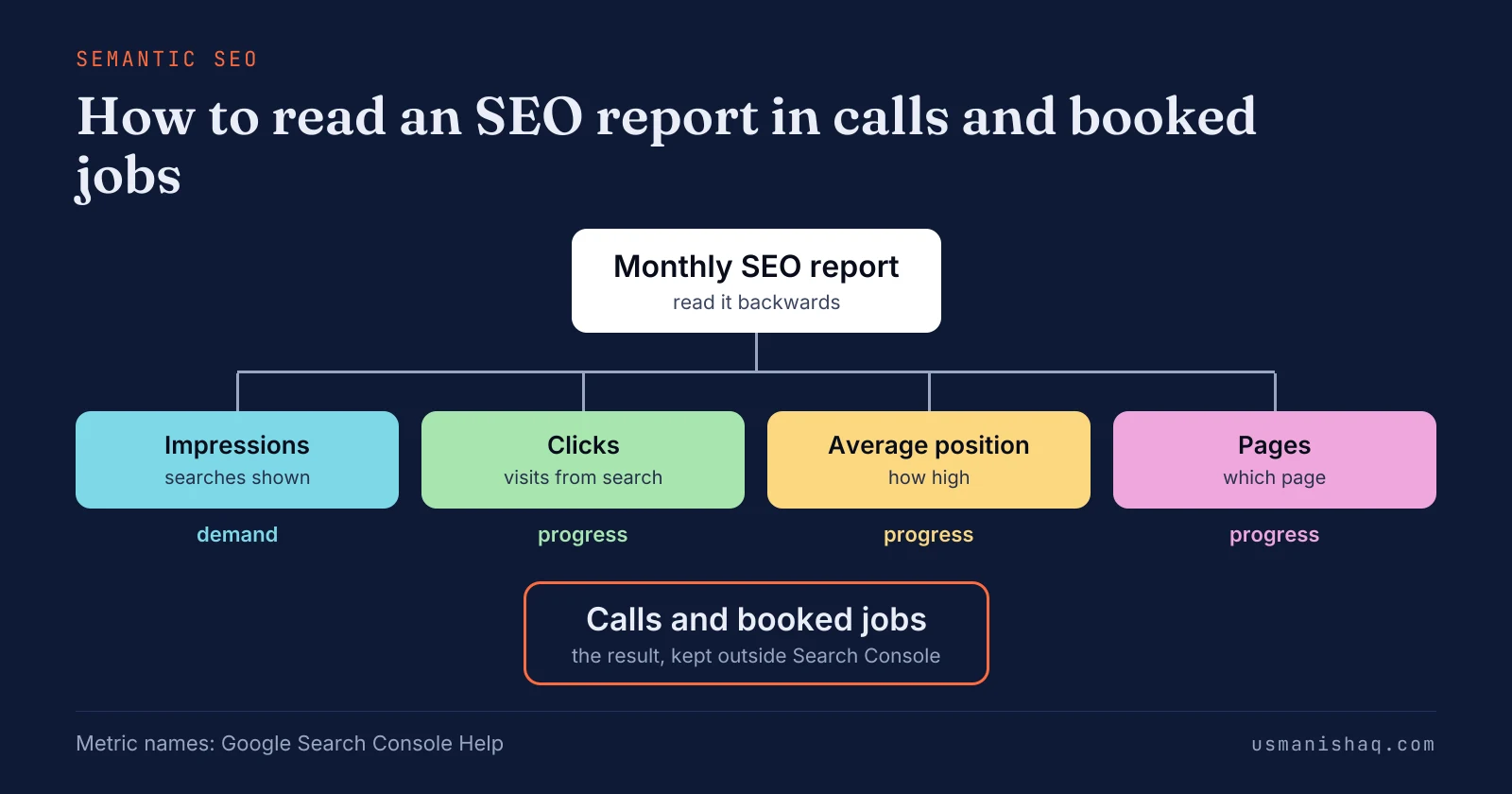
An owner reads an SEO report backwards: calls and booked jobs first, then the pages and searches behind the calls, then the invoice. Semantic SEO plans each page for one search, so an owner can understand each page's searches, clicks and calls.
An SEO report should show calls and booked jobs, Search Console numbers, the pages changed, the work done and next month's plan. SEO report numbers sort into three classes: impressions show demand, clicks and position show progress, and calls and booked jobs show the result.
An owner checks an SEO report in Google Search Console by comparing three months with the three before, without searches for the business name. A semantic content audit reads the same Performance report against the site's semantic SEO plan, not against last month.
An SEO invoice pays for its listed lines, and each line should match a page, a fix or a document the owner can open. An owner should ask five questions about each monthly SEO report, each tied to a call, a page or an invoice line.
An owner finds where the chain stops, at demand, progress or result, and asks for the fix at that point before the next invoice. A report without calls raises four questions: monthly SEO retainers, town page timing, how to test an SEO consultant and semantic SEO consultants' fees.
How do you read an SEO report?
An owner reads an SEO report backwards: calls and booked jobs first, then the pages and searches behind the calls, then the invoice.
An SEO report is the monthly summary an SEO provider sends of the site's Google Search numbers and the work done. Owners name the goal in four words: "calls, not vanity traffic".
Most reports open with rankings and traffic, and the owner's question sits at the other end. Semantic SEO plans every service and town page for its own searches, so each page in the report has a job to do.
The order for reading an SEO report is listed below:
- Read the calls and booked jobs for the month, the result the report exists for.
- Read the pages that took clicks from Google Search, the progress behind the calls.
- Read the searches and impressions behind those pages, the demand the site reached.
- Read each invoice line against a page, a fix or a document named in the report.
The same four steps work for any trade, from plumbing to towing. Each step depends on what an SEO report should show.
What should an SEO report show?
An SEO report should show calls and booked jobs, Search Console numbers, the pages changed, the work done and next month's plan.
Owners meet the same test before hiring, when a consultant sends a sample report. A sample SEO report from a consultant should show the work done, the pages changed and what changed in Search Console, in plain words. A monthly report adds the calls and booked jobs that the work produced.
The five parts of a useful SEO report are listed below:
- Calls and booked jobs: the count for the month, by service and town, from the business's own records.
- Search Console numbers: impressions, clicks and average position for the service and town pages, against the months before.
- Pages changed: each new or rewritten page with its live URL.
- Work done: each task of the month, matched to a line of the invoice.
- Next month's plan: the pages and searches the Search Console reports show as open, and what did not move.
A semantic SEO report lists each page by the search the page was built to answer. The numbers inside those five parts fall into three classes.
Which numbers in an SEO report show demand, progress and the result?
SEO report numbers sort into three classes: impressions show demand, clicks and position show progress, and calls and booked jobs show the result. The three classes follow the order in which semantic SEO measures a page: seen, opened, then phoned.
Rankings, traffic and impressions are the traditional SEO metrics most reports lead with. Rankings and traffic are signals. Calls and booked jobs are the result.
The table below sets each common number in an SEO report beside its class, what the number says and where the number comes from.
| Number | Class | What the number says | Where the number comes from |
|---|---|---|---|
| Impressions | Demand | How many times the site appeared in Google Search results | Search Console |
| Searches without the business name | Demand | Which new customers searched for a service the site offers | Search Console, Queries tab |
| Clicks | Progress | How many searchers opened the site from Google Search | Search Console |
| Average position | Progress | How high the site appeared, averaged over every impression | Search Console |
| Pages | Progress | Which page took each click | Search Console, Pages tab |
| Calls and booked jobs | Result | How many customers phoned and booked | Call records, the job book, Google Business Profile |
Only the last row is a result, and the last row is the one Search Console does not hold. The demand class starts with impressions.
What do impressions show in an SEO report?
Impressions in an SEO report show demand, counting each time a link to the site appeared in Google Search results. Search Console Help defines impressions as "How many times your site appeared in Search results."
Google's help page on impressions states that an impression means a user "has seen (or potentially seen) a link to your site". Google's example is a result "on page 3 of search results" for a user who "only views page 1". The position "is not recorded for that query".
An impression is not a visit, and a visit is a click. Owners who see "crazy high impressions and crazy low clicks" are reading demand, not visitors.
The impressions that matter to a trade business come from searches that name a service and a town. Semantic SEO reads impressions page by page, because each page is planned for its own group of searches. Demand becomes progress when the impressions turn into clicks.
What do clicks and average position show in an SEO report?
Clicks and average position show progress: clicks count visits from Google Search, and average position shows how high the site appeared.
Search Console Help defines clicks as "The number of times a user clicked your site from Google Search results." Average position, in Google's words, is "The average position of the topmost result from your site." Click-through rate is "The click count divided by the impression count."
The Pages tab of the Performance report shows which page took each click. A click counts most in semantic SEO when the click lands on the service or town page planned for that search.
Average position can fall while impressions rise, when new pages first appear low in results. Neither number shows calls and booked jobs.
Where do calls and booked jobs come from in an SEO report?
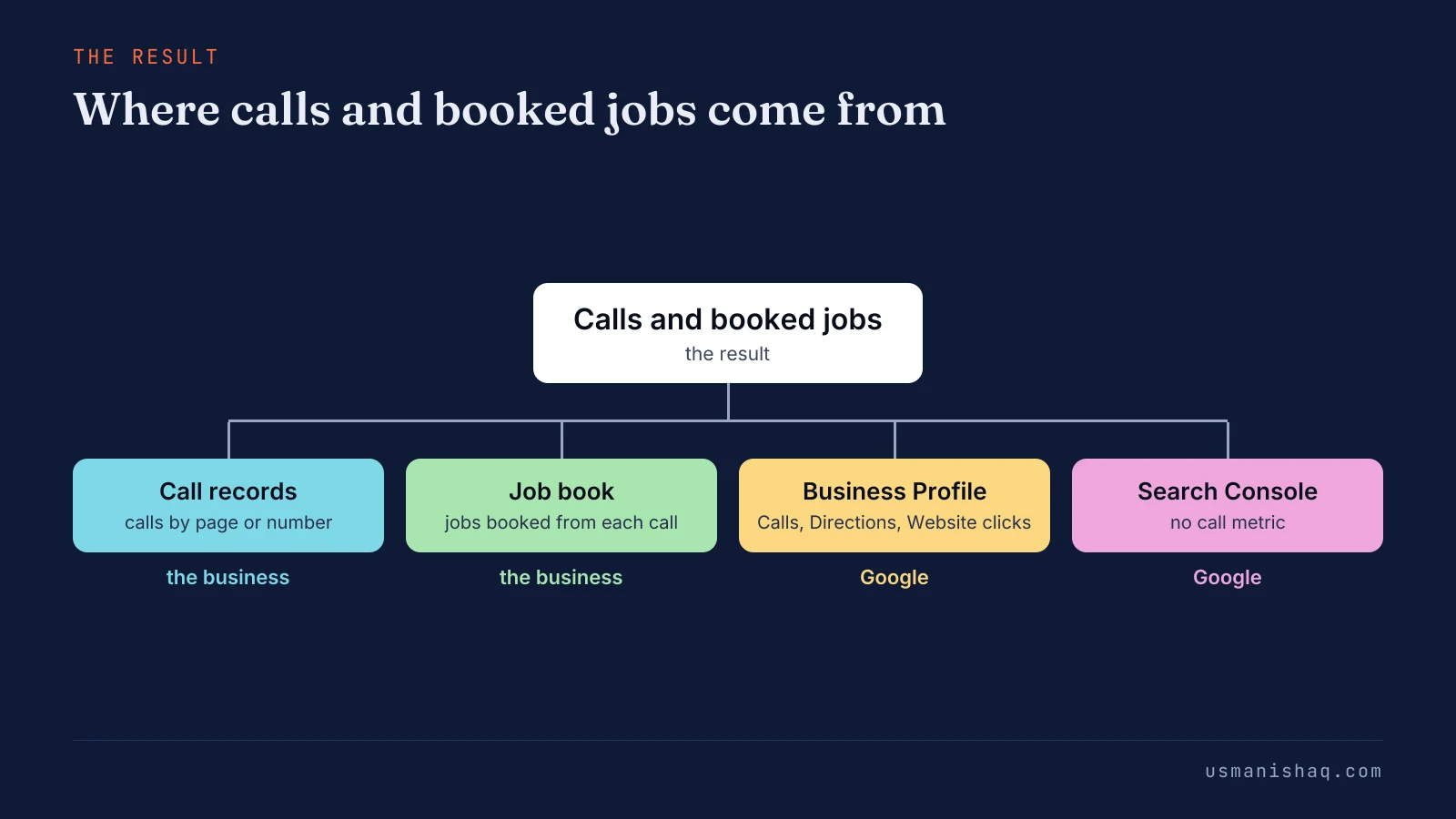
Calls and booked jobs come from the business's own records and the Google Business Profile, because Search Console counts searches and clicks only. The Performance report lists clicks, impressions, click-through rate and average position, and no call metric.
Call records log each call by the page or by the phone number shown on the website, town by town. The job book matches each booked job to the call that started the job.
Google Business Profile Help defines Calls as "The number of times a customer clicked on the call button on your Business Profile." The profile reports Directions and Website clicks as its other customer actions. A profile call is counted apart from a call that starts on a page of the website.
The figure below sets out four places an owner looks for the result, and Search Console holds no call count.
Semantic SEO for a service business is measured in calls, quote requests and booked jobs, with rankings and clicks underneath as the cause. The progress side of the report is what an owner can check in Search Console.
How do you check an SEO report in Search Console?
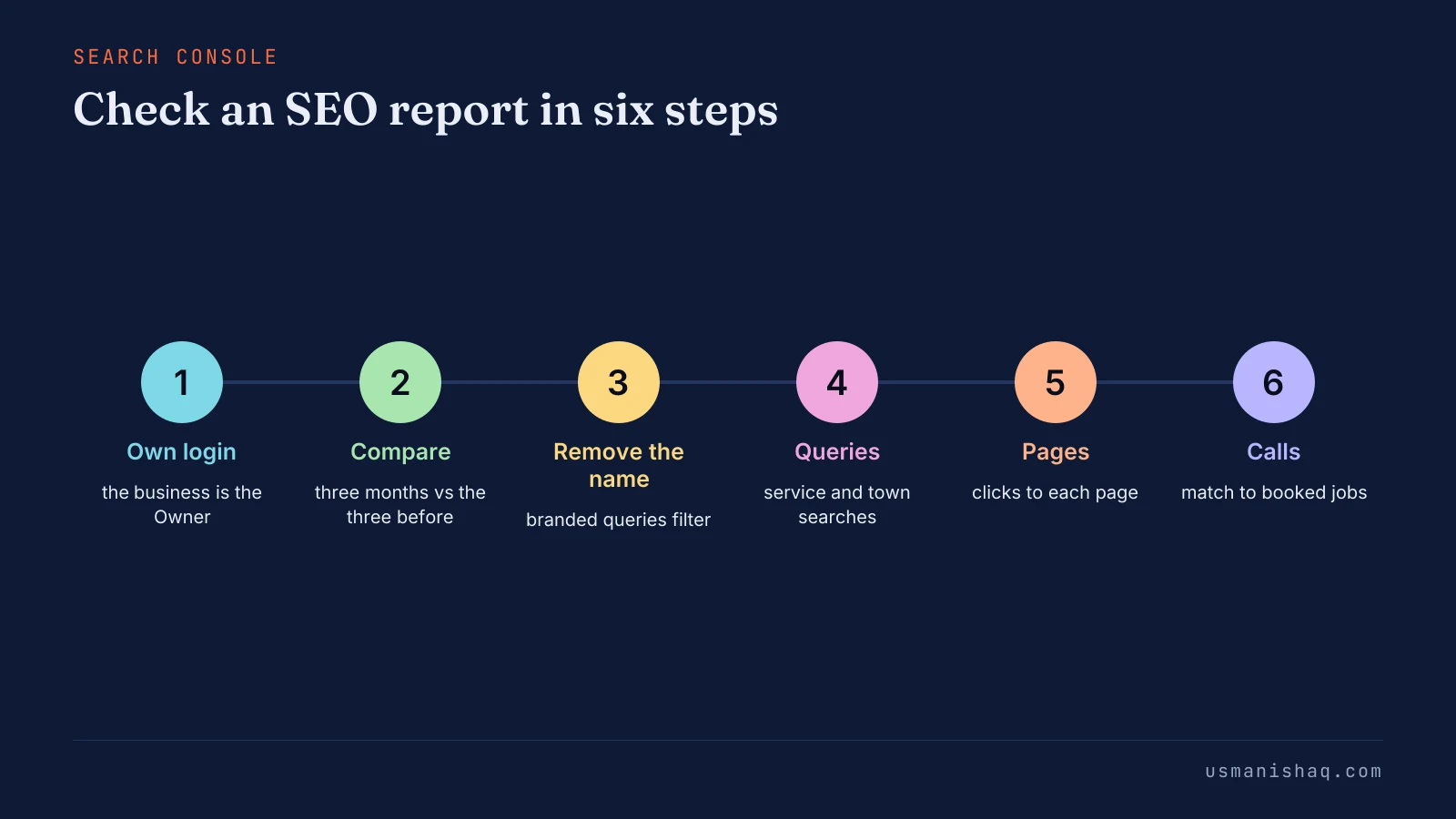
An owner checks an SEO report in Google Search Console by comparing three months with the three before, without searches for the business name. Google Search Console is Google's free report on how a website appears in Google Search.
The steps to check an SEO report in Search Console are listed below:
- Open Search Console with the business's own login: the business should be the Owner, and the provider a user.
- Open the Performance report and compare the last three months with the previous three months.
- Remove searches for the business name with the branded queries filter, or with "Queries not containing" and the name.
- Read the Queries tab for searches that name a service and a town.
- Read the Pages tab for the service and town pages, with the clicks of each.
- Match the pages with clicks to the calls and booked jobs in the records for the same months.
The Performance report opens on "the past three months" by default, according to Search Console Help. The table shows a "Difference" column when two periods are compared. Seasonal trades should also compare the same months of the year before.
Google notes that the branded filter "isn't available for sites with a low number of impressions." Google adds: "Some queries might be incorrectly identified as branded or non-branded."
The Owner role "Has full control over properties in Search Console", so the numbers stay checkable without the provider. The check reads the whole report against the months before, while a page filter follows one new page over time.
A semantic content audit reads the same Performance report against the site's semantic SEO plan, not against last month. A Semantic Content Audit of the whole site returns a written issue map, ordered by the cost of each fix.
The figure below runs the six steps from the business login to the job book.
One plumbing company's report shows the check at work.
What does the check show for a plumbing company's report?
A Search Console check of an SEO report shows a plumbing company which searches and pages brought Franklin calls, and which rankings brought none.
The plumbing company in the site's worked example is based in Springfield and has a town page, "Repiping in Franklin", at /franklin/repiping/. Semantic SEO gave the Franklin page one search to own, so the check reads that one search first. The example is an illustration with no numbers.
The report as received lists rankings, including searches for the company's own name. Step 3 of the check removes the name searches. The Queries tab then shows impressions and clicks for "repiping franklin".
The Pages tab shows /franklin/repiping/ taking those clicks. The call records show calls that name Franklin, and the job book shows the repiping jobs booked in Franklin. The name rankings at the top of the report explain none of those jobs.
Why can an SEO report show higher rankings and no more calls?
An SEO report shows higher rankings and no calls when buyers do not type the ranked searches or do not phone from the page. Owners put the problem plainly: "Great rankings but no calls".
The first cause is a ranking for searches buyers never type. Examples are the business name, a how-to question and a town the business does not serve. Semantic SEO plans pages for searches buyers type, such as a service with a town, before any ranking is reported.
The second cause is a ranked page that gives no answer or no phone number at the top. A town page with impressions and no calls needs a better answer on the page, not more pages.
Progress without a result points at the page or the search, not at the wait. One ranking deserves its own question: the ranking for the business name.
Does searching your own business name show how the SEO is doing?
No, searching the business name shows little about SEO, because people who already know the name find the business anyway. Search Console Help states: "Search results are specific to the time, place, device, and recent history of the person searching."
Search Console counts the searches strangers typed, with the name removed in step 3 of the check. Semantic SEO measures new customers, so searches for the business name are left out of the reading. Searches by strangers are the searches an SEO report reads and an SEO invoice pays to reach.
What does an SEO invoice pay for?
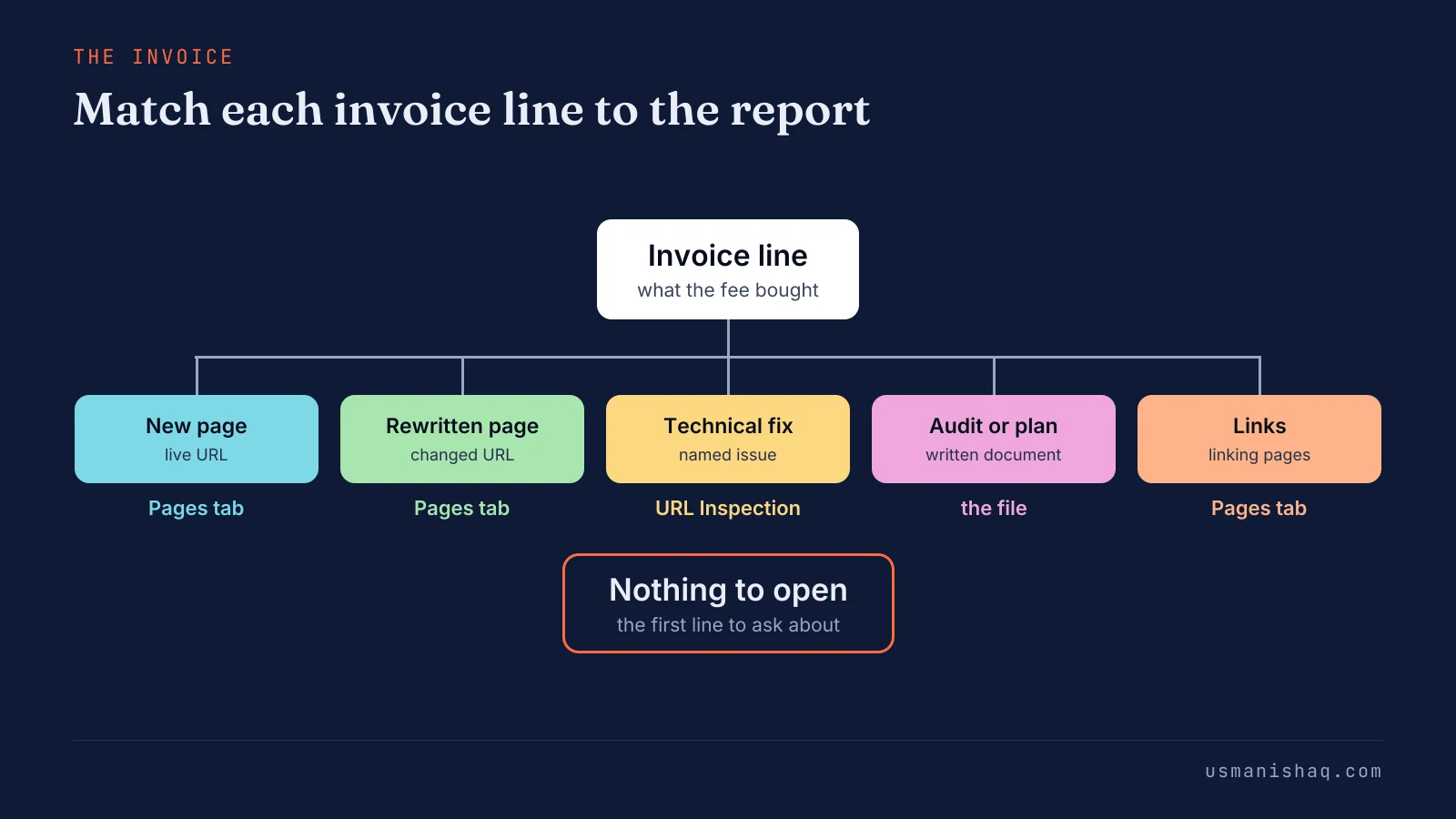
An SEO invoice pays for its listed lines, and each line should match a page, a fix or a document the owner can open. Owners ask the question as "what am I paying for", or as "what I'm paying for SEO vs what I'm getting".
Each invoice line should carry its countable output, its page and its month. A semantic SEO plan names each page before the month starts, so every invoice line has a page to match.
The table below sets each common SEO invoice line beside what the owner can open and where the line shows in Search Console.
| Invoice line | What the owner can open | Where the line shows in Search Console |
|---|---|---|
| New page | The live URL | The page's row in the Pages tab from the month the page went live |
| Rewritten page | The URL and a note of what changed | The page's clicks against the three months before |
| Technical fix | The named issue and the URLs the fix touched | "URL is on Google" in URL Inspection for those URLs |
| Audit or page plan | The written document | The pages the document names, in later months |
| Links | The pages that link to the site | The linked page's row in the Pages tab |
A line with nothing to open is the first line to ask about. The figure below ties each kind of invoice line to the place an owner opens the line.
Google's guide "Do you need an SEO?" sets a plain standard for changes to the site. An SEO with FTP access to the server "should be willing to explain all the changes they are making to your site."
An hour count is not the test, because the line's output is what the owner can open. Owners sometimes read a longer report as more work for the same invoice.
Does a longer SEO report mean more work was done?
No, a longer SEO report does not mean more work was done, because report length counts charts, not changes to the site.
The test is each invoice line matched to a change and a number, or to a reason the number stayed flat. Semantic SEO changes sit on named pages, so each change can be opened and checked whatever the report's length. We state in each report which towns moved and which towns did not.
A report that names what did not move is easier to check than one that shows only gains. The answers start with the questions an owner should ask each month.
What should an owner ask about each monthly SEO report?
An owner should ask five questions about each monthly SEO report, each tied to a call, a page or an invoice line. Google's "Do you need an SEO?" lists "How do you measure your success?" among the questions for any SEO.
The five questions to ask about a monthly SEO report are listed below:
- "Which calls and booked jobs came from Google Search last month, and from which pages?" The answer names each page and the count from the call records and the job book.
- "How did clicks from searches without the business name move against the three months before?" The answer gives the Search Console comparison with the name removed.
- "Which pages went live or changed, and where can I open them?" The answer lists each live URL.
- "Which numbers did not move, and what changes next month?" The answer names the page and the planned change.
- "Which invoice line produced each change?" The answer matches every line to a page, a fix or a document.
Every question deserves a written answer or a date for one. Each question has a short answer when the work follows a semantic SEO plan, because the plan names the pages first. One answer needs its own next step: a report that shows no calls.
What should an owner do when the SEO report shows no calls?
An owner finds where the chain stops, at demand, progress or result, and asks for the fix at that point before the next invoice. The chain runs from impressions to clicks to calls and booked jobs.
The table below sets each point where the chain can stop beside what the report shows and the fix to ask for.
| Where the chain stops | What the report shows | Fix to ask for |
|---|---|---|
| Demand | Few impressions for searches that name a service and a town | Pages for the missing services and towns, where the town has its own searches |
| Progress | Impressions with few clicks, or a low average position | A rewritten title and opening answer for those searches |
| Result | Clicks to service and town pages, and no calls | The phone number and the answer at the top of the page |
| Not counted | No count of calls or booked jobs | Call records and the job book, matched to pages each month |
Each fix sits on a named page, not in a longer report. Each fix in the table is semantic SEO page work, done on the page where the chain stops.
A chain broken for months under a monthly fee moves the decision to whether a monthly SEO retainer pays, judged against booked jobs. A missing page at the demand point raises a timing question for each new page.
How long should a new page take to show up in an SEO report?
A new town or service page on an established site usually shows impressions first and brings first calls in 3 to 6 months. Local SEO agencies that publish timelines report the first traceable calls or enquiries in months 3 to 6.
A new page passes four stages: indexed, first impressions, first clicks and first calls. A semantic SEO report shows each new page with its stage, from indexed to first calls.
Owners waiting on one page often ask how long a new town page takes to bring calls. The full guide on how long a new town page takes to bring calls sets out each stage and what slows each stage. A page stuck at one stage is a reason to seek a second opinion.
How does an owner get a second opinion on an SEO report?
An owner gets a second opinion on an SEO report by giving another consultant read access to Search Console and one small paid task. Read access means the Restricted user role, which in Google's words "Has simple view rights on most data."
One small paid task, such as a flat-fee audit, shows how a consultant reads the owner's own numbers. A second opinion follows the same logic an owner uses to test an SEO consultant before hiring.
The guide on how to test an SEO consultant before hiring sets out the paid task and the access to give. Semantic SEO case studies show other sites' Search Console reports, and a paid test shows the owner's own site. A second opinion also raises the question of the fee.
Is the SEO fee too high for what the report shows?
No, a report alone does not show whether an SEO fee is too high, because the fee prices a scope of work. Owners put the worry as "Am I over paying for SEO work?"
The report shows what the fee bought in the month, and the price question needs the scope. A semantic SEO price follows the scope, the number of services and towns, and the starting state of the site.
A semantic SEO consultant's cost is set after a diagnosis of the site. Most consultants publish no rate and quote a fixed price for a written scope.
Owners who need a price can read what semantic SEO consultants cost, scope by scope. The comparison of what semantic SEO consultants cost explains how the scope sets the price. Five shorter questions owners ask about SEO reports follow.
Questions owners ask about SEO reports
Owners reading an SEO report ask five further questions: report frequency, missing reports, AI assistants, SEO scores and totals.
How often should an owner get an SEO report?
An owner should get an SEO report once a month, matching the monthly invoice the report explains. Practitioner guides for business owners treat a monthly report as the usual rhythm, with a longer review each quarter.
What should an owner do when the SEO company sends no report?
An owner should ask the SEO company for a monthly report in writing and read Search Console directly until the report arrives. Google's Do you need an SEO? guide advises: "Ask for explanations if something is unclear."
Can Search Console show visits from ChatGPT or other AI assistants?
No, Search Console shows Google Search only, so visits from ChatGPT, Perplexity or Claude need a separate check. Google's help page on impressions and clicks states: "Clicking a link to an external page in AI Mode counts as a click."
Is a high SEO score in a report a good sign?
No, a high SEO score is not a sign of more calls, because the score is a tool's own estimate, not Google data. Search Console reports no site score, and semantic SEO measures a site in calls and booked jobs.
Why do the searches in a report not add up to the total clicks?
The searches can fall short of the total clicks, because Search Console omits anonymized queries and counts the chart and the table differently. Google's help page on the Performance report states: "The chart totals can sometimes differ from the table totals."
What should an owner read first in the next SEO report?
An owner should read calls and booked jobs first in the next SEO report, then the pages and searches behind them, then the invoice.
Search Console is where an owner can understand which searches and pages moved. An owner builds the next month's work on the page where the chain stops, with semantic SEO naming one page for each search.