

A topical map for a landscaping company website lists pages, each tied to one search, one season and one crew.
A landscaper sells work that changes with the calendar. Leaf cleanup is the search in October and mulch is the search in April. A map that ignores the calendar gives you a site that is busy when the crews are not.
Pages sort by season first, then by what your crews can staff in that season. A seasonal page stays live after its window closes.
Start from the calendar, not the keyword list
A landscaping map starts from the jobs your crews sell and the month each job sells in.
You do not begin with a list of keywords. Mowing, cleanup, mulching, planting, patios and snow are jobs, and each one has a different buyer and a different month.
Someone with a patch of dead lawn does not search like a property manager with ten lots. The map keeps those two buyers on separate pages.
Each row holds a page, the search it owns, the season it sells in and the crew that does the work. That last column is the one most maps leave out.
Landscaping pages that follow the seasons
Each job your crews sell in a set window gets its own page, tuned to that window.
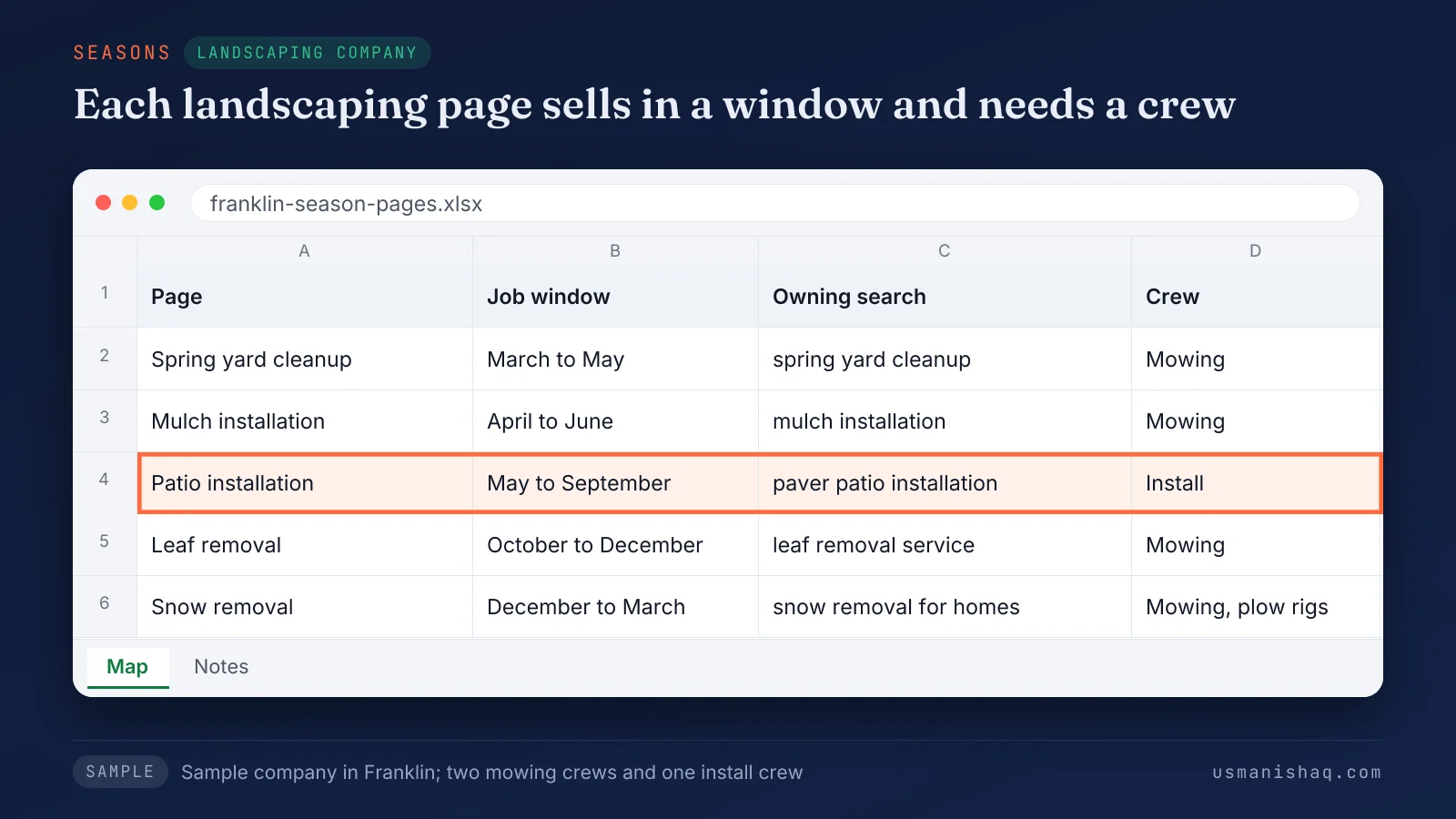
Some jobs run all year, such as a mowing contract. Others live in a few weeks, such as aeration or leaf removal. The sample below is a Franklin landscaping company with two mowing crews and one install crew.
| Page | Job window | Owning search | Crew |
|---|---|---|---|
| Spring yard cleanup | March to May | spring yard cleanup | Mowing |
| Mulch installation | April to June | mulch installation | Mowing |
| Patio installation | May to September | paver patio installation | Install |
| Lawn aeration and overseeding | September to October | lawn aeration and overseeding | Mowing |
| Leaf removal | October to December | leaf removal service | Mowing |
| Snow removal | December to March | snow removal for homes | Mowing, plow rigs |
| Lawn mowing plans | Signups March to May | weekly lawn mowing | Mowing |
I invented the Franklin company to show the shape, so read the rows as a sample. Look each search up in suggestions before you give it crew time.
Notice that patio work may sell in winter even though crews lay pavers in summer. Some homeowners plan a patio while it is cold and book before the ground is workable. That page goes live in the planning months.
Crews decide which pages go live
A landscaping page goes live only when your crews have open weeks in the window where the page sells.
Fill a calendar you cannot staff and you get angry callers and a bad review. Leave a page empty in a month your crews are idle and you waste the same effort the other way. Both cost you.
I plan this with a simple count I call the crew-week test, which is not a Google concept. It is arithmetic. One sheet holds it.
The crew-week test
The crew-week test compares the weeks a crew has free in a window with the weeks one job of that page takes.
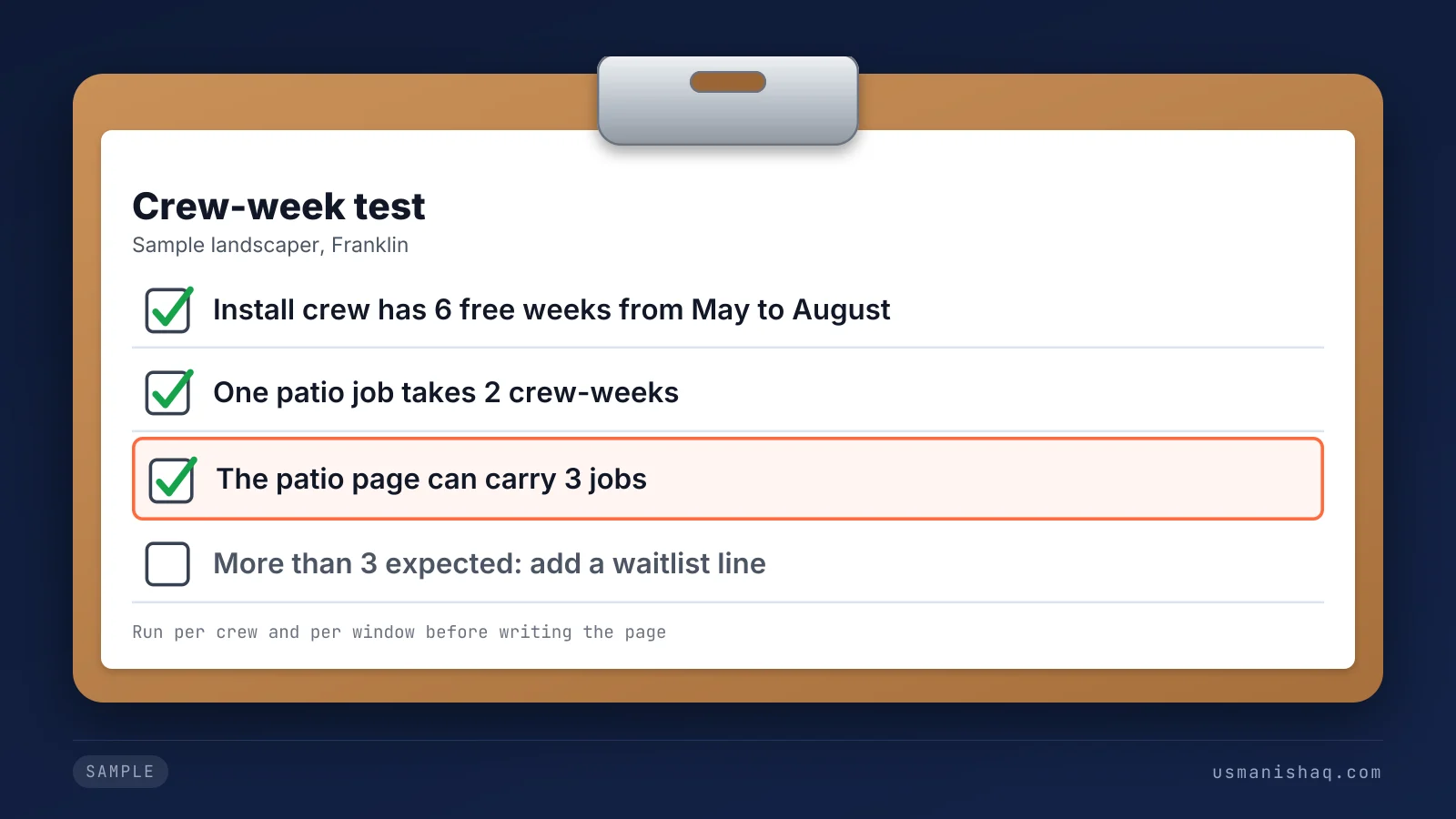
Take the Franklin install crew. In the sample it has six free weeks between May and August. One patio job takes two crew-weeks. The patio page can therefore carry three jobs.
Expect more than three? You have two moves. Add a waitlist line to the page. Or keep a thinner page and lean on the pages that fill idle weeks.
The same count tells you where pages are missing. The Franklin mowing crews have empty weeks in January. A page for snow removal fills some of them. A page for tree and shrub pruning fills more, if the company sells it.
Run it per crew and per window. Nothing more.
Write the answer in a column next to the page. No free crew-weeks? The row stays in the map and the page waits.
Do maintenance, design and install pages follow different rules?
Yes, maintenance pages follow a signup cycle, while design and install pages follow a planning cycle that starts months earlier.
A mowing contract repeats. The customer signs up once and the crew returns every week. That page owns searches like "weekly lawn mowing" and answers frequency and service area.
Design and install pages sell a project. The customer wants proof, a process and a sense of the timeline. Those pages carry a gallery of finished work with the town and the job named for each entry.
A mowing page and a patio page share a trade but not a buyer. Put both on one Services page and neither owns a search.
Commercial lots add a third buyer. A property manager wants a site walk, a contract and a reply time. That work gets a section of its own.
Seasonal pages after the season ends
A seasonal landscaping page stays live and gets refreshed, because the same search returns every year.
Deleting leaf removal in January and rebuilding it in September throws away the page's history. You keep the address and update the facts instead.
Keep a short refresh list for each seasonal page. Check the dates, the crew count and the service area. Swap last year's photos for finished jobs from this one.
Some owners want to hide the page off season. You can leave it up with a plain line that says when the next booking window opens. A customer who finds it in March learns that leaf cleanup books in September, and that is a useful answer.
Pair each refresh with a calendar reminder. The owner of the site usually forgets. I plan the reminders into the map, because pages that quietly go stale are the usual fault.
Four faults that break a landscaping map
A landscaping topical map breaks on four faults, which are one services page, copied towns, unsold work and ignored seasons.
One Services page holds every job and owns none of them. Split it by job and by window.
Copied towns are the second fault. Ten town pages with the same paragraph and a different place name answer nothing new. Each one needs what exists only there, such as the streets you mow and the finished jobs on them.
Unsold work is the third. You do not install retaining walls? Then a page for them brings calls you decline. The fourth is a season page that ignores the weeks you can staff.
The Semantic SEO Architecture work for seasonal trades draws this sheet for your own crews and months before any page is written.
What landscaping owners ask once the map is drawn
Three questions come up after the map is drawn, and they are about lawn services, snow and galleries.
Do I need a separate page for each lawn service?
You need a separate page for a lawn service when its search, price or next step differs from the others.
Mowing, aeration and fertilizing often differ on all three, so they split. Edging and trimming usually stay as sections of the mowing page. The method for deciding is the page test in which search earns a page.
Should snow removal share a page with lawn care?
No, snow removal should have its own page, because the buyer, the season and the equipment differ.
Someone with a driveway to clear searches in December. A lawn customer searches in April. Both on one page muddles the answer for each.
Is a project gallery enough for installs?
No, a gallery supports an install page but does not replace one, because the gallery owns no search.
Label each entry with its town, its material and its job. Then the matching service page can link to it, using the approach in linking service pages to their proof.
Takeaway for landscaping owners
A landscaping map gives each job one page and checks that page against the season and the crew.
Build rows for the jobs your crews sell and add the window each one sells in. Run the crew-week test before you write. Keep seasonal pages live and refresh them, so the same address answers the same search each year. Your Google Business Profile lists the same jobs, so what has to match between profile and website deserves a read.